


![What Is AI-Powered Memorization? How It Works, Its Effectiveness & Best Tools [2026 Guide]](/_next/image?url=%2Fblog%2Fen%2Fai-anki-shien.png%3Fv%3D4&w=1920&q=75&dpl=dpl_9SRSZDZ5yMfoV7dxZ4vp67Tnt8qN)
AI-powered memorization support helps with two jobs: creating practice questions and deciding when to review them. You provide material such as notes or a PDF, check the generated cards, and practise answering without looking. A review scheduler then uses your answers to suggest when each card should appear again.
The software can reduce preparation and scheduling work. It does not learn on your behalf, verify every generated answer, or guarantee an exam result. This guide explains what it handles, what still needs your judgment, and how to try it with one topic.
What Is AI-Powered Memorization Support?
A flashcard has a question on the front and an answer on the back. A collection of cards is called a deck. Two different technologies can help you use that deck:
- AI card generation drafts questions and answers from your source material. You check their accuracy and edit unclear wording.
- Spaced repetition schedules reviews across several days or weeks. You try to recall each answer before revealing it, then record how well you remembered.
An app may offer either feature or both. The label "AI" alone does not tell you how its review schedule works. For a practical comparison, see our AI flashcard app guide.
How Review Timing and Card Generation Work Together
1. Revisit Material Across Several Sessions
The forgetting curve describes how recall can decline over time without further practice. It is not a fixed countdown for every learner or every subject. A familiar word, a new formula, and a difficult explanation will not necessarily need the same review dates.
Spaced repetition means returning to material after a gap instead of doing all repetitions in one sitting. In practice, review decisions should respond to what you can actually remember:
| What happened? | What to do next |
|---|---|
| You answered correctly without a hint | Record the result and review again after a gap |
| You needed the answer to recognize the idea | Check the explanation and record the difficulty honestly |
| You repeatedly miss the same card | Check whether the question is unclear or the concept needs more study |
| You can answer the card but not an exam problem | Add practice applying the idea, not just more repetitions of the card |
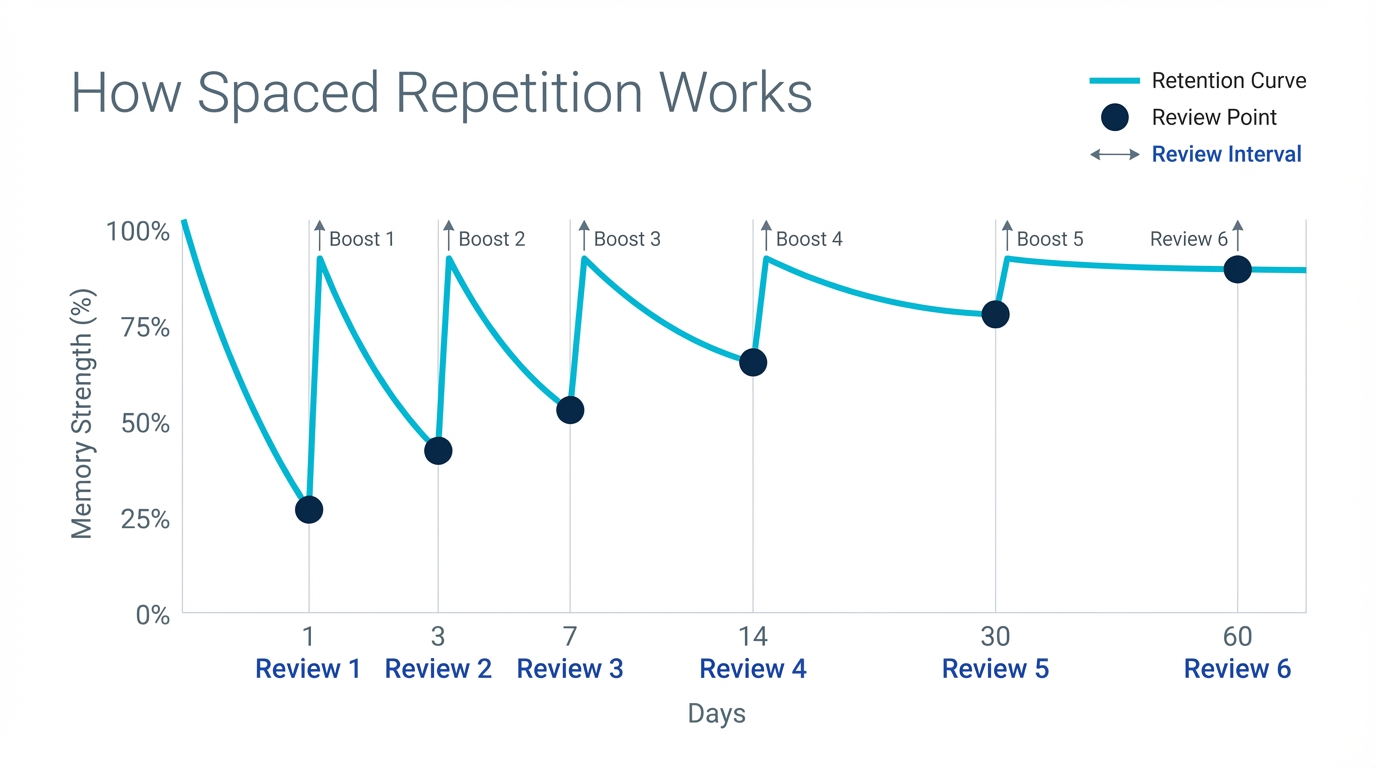
The expanding intervals in the illustration are an example, not a timetable that guarantees permanent memory. For more on adjusting the gaps, see when to review what you learned.
Memly uses FSRS, the Free Spaced Repetition Scheduler. It estimates a card's future recall from your review history and uses that estimate to suggest the next date. It cannot observe the exact moment you forget something. Our FSRS 6.0 explanation covers the memory model in more detail.
2. Draft Questions from Your Own Material
Instead of typing every card from scratch, you can use AI to produce a first draft. Different source formats need different checks:
- PDF or text: check that the cards cover the assigned section and preserve qualifications such as "usually" or "except when."
- Photos or handwritten notes: check names, numbers, symbols, and any handwriting the AI may have misread.
- Video or audio: compare important terms and explanations with the original recording or trusted notes.
Card creation can itself help you think through a topic. AI is useful when drafting takes too much time, but reviewing the draft remains part of learning. Keep each question clear enough to judge your answer; our guide to writing good flashcards includes before-and-after examples.
3. Adjust the Schedule as You Review
Adaptive scheduling means the next review can change when you report a different result. Cards you find difficult may need attention sooner; cards you recall reliably can often wait longer. Answer honestly rather than marking a card correct because its answer looked familiar.
The schedule reduces bookkeeping. You still choose relevant material, correct mistakes, and decide when a topic needs a textbook explanation or a worked problem instead of another flashcard.
Does AI-Powered Memorization Support Work?
Separate the learning method from the software. Research on retrieval practice and spacing supports testing yourself across multiple sessions. That does not establish the accuracy of every AI-generated card or promise the same improvement to every app user.
A useful way to evaluate a tool is to check what changes in your own study routine:
| Goal | What the tool can help with | What you should check |
|---|---|---|
| Less preparation work | Draft cards from source material | Time spent correcting cards as well as generating them |
| More reliable recall | Bring material back for later practice | Whether you can answer without hints after a gap |
| A manageable routine | Keep the next review easy to find | Whether the daily workload fits your available time |
For the research background, read five evidence-based study methods. Our separate article on Memly's reported retention results discusses product-specific figures. Those figures should not be treated as a prediction of your individual result.
Use Cases: What Belongs on a Flashcard?
Language Exams: TOEFL, IELTS, and GRE
Vocabulary, phrases, and grammar distinctions can make useful cards. Include a short example sentence so that you practise the meaning in context. If two words are easy to confuse, ask what distinguishes them. Continue listening, reading, writing, and speaking practice alongside the cards.
Professional Exams: Bar Exam, CPA, and MCAT
Use cards for definitions, conditions, exceptions, and relationships you need to recall. Use practice questions for applying them. A correct definition is not enough to show that you can analyse a case or solve a calculation. See our exam-preparation guide for ways to combine both forms of practice.
School and University Courses
Start with a single lesson or assigned section. Save the key facts and the points you could not explain after class. For each subject, keep enough time for the actual assessed task, such as an essay, problem set, or oral explanation.
How to Compare Flashcard Apps
Do not assume that an app without built-in AI lacks spaced repetition. Compare card generation and review scheduling separately, then check the platforms and materials you use.
- Card creation: manual, imported, AI-generated, or a combination?
- Review scheduling: how are later review dates chosen?
- Editing: can you easily correct answers and split overloaded cards?
- Access: does it work on the devices where you actually study?
- Cost: does the plan include the features you need?
Our Memly, Anki, and Quizlet comparison looks at these trade-offs side by side.
How to Get Started with One Topic
- Choose a small source: one page or one lesson, not an entire course.
- Generate a draft: upload the material or paste the text.
- Check each card: verify the answer and make the question unambiguous.
- Try a review: answer before revealing the back and record the result.
- Return after a gap: use the suggested review date and check what you retained.
Memly is available on Web, iOS, and Android. It is free to try with no credit card required. Start with material you are permitted to upload, and avoid including confidential or personal information.
Frequently Asked Questions
Can It Be Used for Any Subject?
It can help with many subjects that involve recalling facts or explanations. It is a supplement, not a replacement for practical training, extended writing, problem-solving, or feedback from a teacher.
Will AI Do the Thinking for Me?
It can draft an answer, but you should verify it and explain the idea in your own words. During review, try answering before looking. That keeps the act of recalling with you rather than with the software.
Can I Study on Just My Phone?
Yes. Memly supports Web, iOS, and Android. A phone can suit short reviews; a larger screen may be more comfortable for checking long documents and editing cards.
How Can I Tell Whether It Is Helping?
Test a small topic before and after several review sessions. Look at answer quality and total preparation time, not just the number of cards generated. Keep using the parts that help, and revise cards that remain confusing.
Start with One Useful Question
Choose something you need to remember this week. Turn it into one clear question, check the answer, and try recalling it tomorrow. That small test will show you how card creation, active recall, and spaced review fit together before you build a larger deck.
