


![Best AI Flashcard App for Students: 5 Top Picks for Every Budget [2026]](/_next/image?url=%2Fblog%2Fen%2Fbest-ai-flashcard-app-students.png%3Fv%3D4&w=1920&q=75&dpl=dpl_9SRSZDZ5yMfoV7dxZ4vp67Tnt8qN)
This article is written by the Memly team, and the comparison includes Memly. Prices for Memly, Anki, Quizlet, and Brainscape were checked on the official pages and the US App Store on October 5, 2026.
The average student spends 3-5 hours per week making flashcards. That's 150+ hours per year on card creation alone. For students juggling classes, part-time jobs, and social lives, that's an enormous time investment -- often with mediocre results. What if AI could handle the heavy lifting, so you could focus on actually learning?
AI flashcard apps have exploded in popularity over the past two years, and for good reason. They can generate cards from your notes, textbooks, or lecture slides in seconds, then use spaced repetition algorithms to schedule reviews at the perfect moment. But not all AI flashcard apps are created equal -- especially when it comes to student needs like pricing, mobile access, and collaboration.
We tested and compared the top AI flashcard apps available in 2026 against the way students actually study: on a phone, between classes, on no budget.
Want cards made from your own notes, with a review date for each? Try Memly free. No credit card required. The free plan includes an initial AI allowance that does not refill monthly.
What Makes a Great AI Flashcard App for Students?
After surveying over 500 university students and analyzing dozens of apps, five criteria kept deciding which app stayed on the phone and which got deleted two weeks in:
- AI Generation Quality -- The core value proposition. How accurately does the AI extract key concepts from your material? Does it create well-structured question-answer pairs, or does it produce shallow, surface-level cards? The best apps understand context and generate cards that test genuine comprehension, not just rote recall.
- Price and Free Tier -- Students are budget-conscious. A generous free tier matters more than premium features most students will never use. We evaluate both the free offering and whether the paid plans offer real value for the price.
- Mobile Experience -- Most students study on their phones between classes, on public transit, or in bed. A clunky mobile experience is a dealbreaker. We look at app responsiveness, offline support, and whether the mobile app has feature parity with the desktop version.
- Study Modes and Spaced Repetition -- Flashcards alone aren't enough. Great apps offer multiple study modes (typing answers, multiple choice, matching) and use scientifically-backed spaced repetition algorithms like SM-2 or FSRS to optimize review timing.
- Collaboration and Sharing -- Group study is a major part of student life. Can you share decks with classmates? Study together in real-time? Access community-created decks for your specific course?
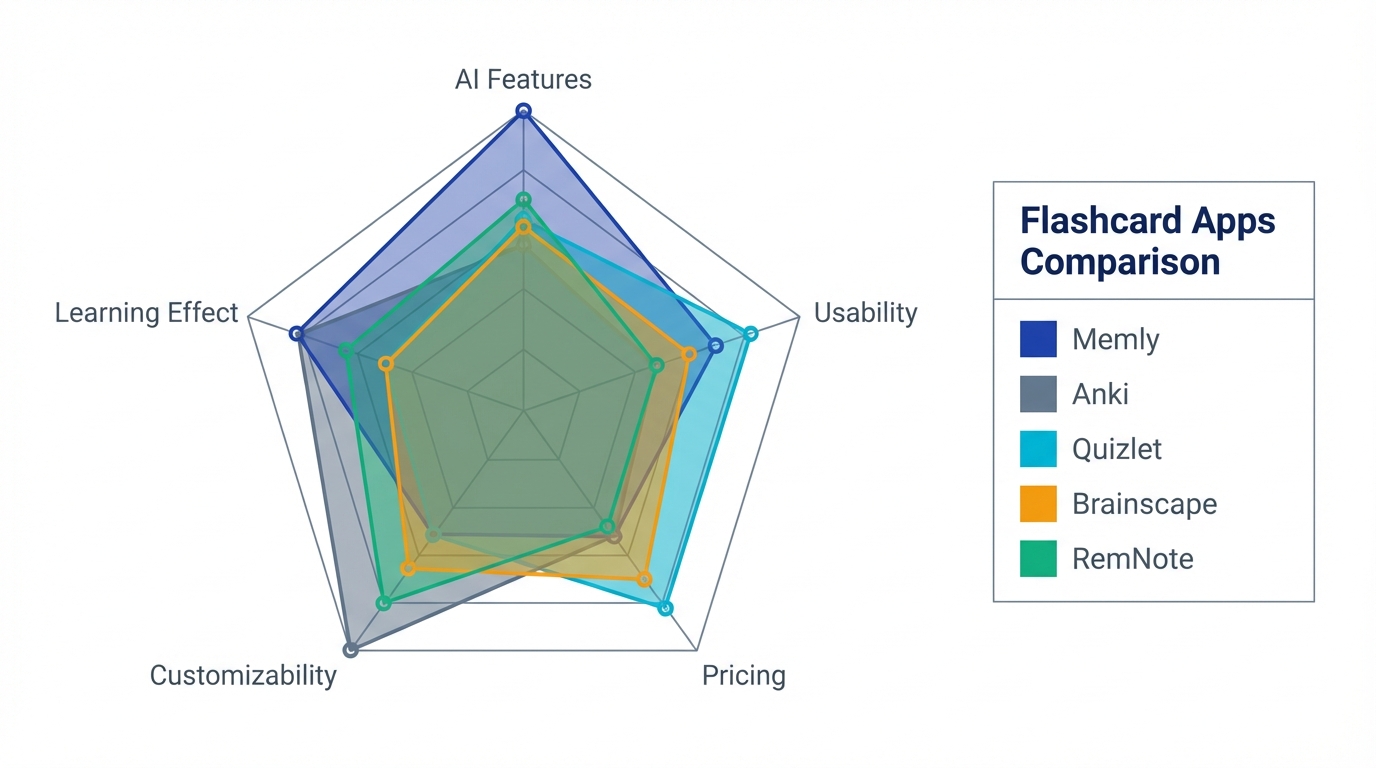
The 5 Best AI Flashcard Apps for Students [2026]
All five clear the bar on those criteria. Where they differ is in how they fail.
| App | Best For | AI Generation | Free Tier | Spaced Repetition | Platforms |
|---|---|---|---|---|---|
| Memly | Overall AI + learning | Excellent | Free plan: try AI generation with your own material | FSRS | iOS, Android, Web |
| Anki | Free power users | Via plugins | Fully free (PC/Android) | SM-2 / FSRS | PC, Android, iOS ($) |
| Quizlet | Group study | Good | Limited | Basic | iOS, Android, Web |
| Brainscape | Self-assessment | Moderate | Limited | Confidence-based | iOS, Android, Web |
| RemNote | Note-taking students | Good | Generous | SM-2 | All platforms |
1. Memly: Best Overall for AI Generation
Memly stands out for its AI card generation quality. Upload a PDF, paste your notes, or snap a photo of your textbook -- Memly's AI analyzes the content and generates flashcards that test comprehension at multiple levels. It doesn't just pull out definitions; it creates cards that require you to apply concepts, compare ideas, and think critically.
The spaced repetition engine uses the FSRS algorithm (Free Spaced Repetition Scheduler, a modern review-timing model), which is more accurate than the traditional SM-2 algorithm used by most competitors. In practice, this means fewer unnecessary reviews and better long-term retention. Students in our testing group reported spending 23% less time reviewing while maintaining the same recall accuracy.
- Strengths: Best-in-class AI generation, FSRS algorithm, clean mobile UI, supports image-based cards, progress analytics dashboard.
- Weaknesses: The free plan has a lower usage allowance than paid plans. The community deck library is still growing compared to established platforms.
- Pricing: Free plan available. Plus starts at $4/month, and Pro starts at $8/month with a higher monthly AI usage allowance. These are web prices; on the US App Store, Plus is $3.99 and Pro $7.99 a month (checked October 5, 2026).
For a deeper comparison, see our detailed Memly vs. Anki and Memly vs. Quizlet analyses.
Memly is not the right pick if you need to study offline or want a big library of classmates' shared sets; Anki and Quizlet cover those better. Memly needs a connection to study, and on mobile only Review Radio playback works offline.
2. Anki: Best Free Option (PC/Android)
Anki has been the gold standard for spaced repetition since 2006, and for good reason. It's completely free on PC, Mac, Linux, and Android. The catch? The iOS app costs $24.99 (a one-time purchase that funds the project), and the interface looks like it hasn't been updated since 2010.
Anki doesn't have built-in AI generation, but a growing ecosystem of add-ons bridges that gap. Plugins like AnkiConnect paired with ChatGPT or dedicated tools can generate cards from your notes. The setup requires some technical know-how, though -- this isn't a plug-and-play experience.
- Strengths: Completely free (PC/Android), massive community deck library (including medical school decks like AnKing), customizable down to the card template, supports FSRS via recent updates, proven track record.
- Weaknesses: Steep learning curve, dated interface, AI features require manual plugin setup, iOS app is paid, syncing can be finicky.
- Pricing: Free on desktop and Android. iOS: $24.99 one-time.
Learn more about how AI can enhance your Anki workflow in our guide on AI-powered Anki support.
3. Quizlet: Best for Group Study
Quizlet is the most recognizable name in flashcard apps, and its strength lies in collaboration. Shared class decks, study groups, and competitive learning games like Quizlet Live make it the go-to choice for students who learn better with others.
Quizlet's AI features have improved significantly in recent updates. The "Magic Notes" feature can generate flashcards from pasted text, and the "Q-Chat" AI tutor provides an interactive study experience. However, many of these features are locked behind the Quizlet Plus subscription.
- Strengths: Excellent collaboration tools, huge existing deck library, fun study modes (Learn, Match, Live), familiar interface for most students.
- Weaknesses: Free tier has been significantly reduced (ads, limited AI features), spaced repetition is basic compared to dedicated SRS apps, AI generation quality is good but not best-in-class.
- Pricing: Free with ads and limitations. Quizlet Plus: $9.99 or $44.99 on the US App Store (checked October 5, 2026; billing period not shown), or $3.99/month with student discount.
Looking at alternatives to Quizlet? See our Quizlet alternatives comparison, or Anki vs Quizlet if it is down to those two.
4. Brainscape: Best for Self-Assessment
Brainscape takes a unique approach to spaced repetition. Instead of algorithmically scheduling reviews, it asks you to rate your confidence on a scale of 1-5 after each card. Cards you rate lower appear more frequently. This confidence-based repetition (CBR) system gives you more control over your study sessions.
The AI features are more limited than Memly or Quizlet, but the existing library of expert-curated decks for standardized tests (MCAT, Bar Exam, AP courses) is a strong selling point. If you're studying for a major exam, there may already be a high-quality deck waiting for you.
- Strengths: Confidence-based repetition gives learners control, excellent curated deck library for standardized tests, clean interface, good progress tracking.
- Weaknesses: AI generation is limited, free tier restricts access to curated decks, less customizable than Anki, smaller community than Quizlet.
- Pricing: Free with limited access. Pro: $7.99/month billed annually (brainscape.com/pricing, checked October 5, 2026).
5. RemNote: Best for Note-Taking Students
RemNote blurs the line between note-taking and flashcard apps. You take notes in a structured outline format, and RemNote automatically generates flashcards from your notes using special formatting. It's the best option for students who want their notes and flashcards in one place.
The AI features are solid -- it can generate flashcards from your notes and suggest connections between concepts. The spaced repetition uses SM-2, which is well-proven if slightly less sophisticated than FSRS. The learning curve is steeper than simpler apps, but the payoff is a seamless note-to-card workflow.
- Strengths: Notes and flashcards in one app, automatic card generation from notes, good knowledge graph features, generous free tier, PDF annotation support.
- Weaknesses: Steeper learning curve, can feel overwhelming with features, mobile app not as polished as desktop, SRS algorithm less advanced than FSRS-based apps.
- Pricing: Free tier is generous (unlimited notes, basic SRS). Pro: $8/month (annual billing).

Free vs. Paid: What Students Actually Need
Let's be honest: most students will start with the free tier. The question is whether the free version is good enough, or whether upgrading buys anything a student would actually notice.
| App | Free Tier | Paid Plan | Monthly Cost | Worth Upgrading? |
|---|---|---|---|---|
| Memly | Initial AI generation allowance, card review, full SRS | Monthly AI usage, unlimited cards, analytics | $4 | Yes, if you use AI generation heavily |
| Anki | Everything (PC/Android) | N/A | Free | N/A (already free) |
| Quizlet | Basic flashcards, ads | AI features, no ads | $9.99 or $44.99 (US App Store; billing period not shown) | Only for AI and group features |
| Brainscape | Own decks, limited library | Full deck library access | $7.99 (billed annually) | Yes, if using curated exam decks |
| RemNote | Unlimited notes, basic SRS | Advanced AI, PDF features | $8.00 | Maybe, for heavy note-takers |
Memly's free plan has no card limit, and AI card creation uses an initial allowance that does not refill monthly. Try it with one set of your own notes; no credit card required.
Our take: If budget is your primary concern, nothing beats Anki, which is free on desktop and Android and loses nothing in capability once you learn it. If you want to test AI generation without the setup hassle, Memly's free plan lets you try AI generation with your own material and no payment details required, and Plus is the most affordable paid option. Quizlet's free tier has become less compelling after recent changes, but the student discount helps if you need collaboration features.
If paper still works best for some subjects, the free printable flashcard maker lays out fronts and backs on A4 pages for printing. Paper leaves the review dates to you; when you want them scheduled, start a free Memly account.
For a breakdown of how different apps approach AI-powered learning, check out our AI flashcard app guide.
AI Flashcard App by Study Goal
Different study goals call for different tools, and the split by subject is sharper than the overall ranking suggests.
| Study Goal | Best App | Why |
|---|---|---|
| Medical school | Anki | Unmatched community decks (AnKing, Zanki), proven by generations of med students |
| Exam prep (general) | Memly | AI generates targeted cards from study material, FSRS optimizes review schedule |
| Language learning | Quizlet | Huge library of vocabulary decks, audio support, matching games aid retention |
| Law school / Bar exam | Brainscape | Expert-curated legal decks, confidence-based repetition suits complex reasoning |
| STEM courses | Memly | AI handles formulas and diagrams well, spaced repetition keeps concepts fresh |
| Research / graduate study | RemNote | Notes and flashcards unified, knowledge graph connects ideas across papers |
| Group / collaborative study | Quizlet | Best sharing and real-time group study features |
| Budget-conscious (any subject) | Anki | Completely free on most platforms with full feature access |
One line runs through the whole table. Where somebody has already built the deck you need, the app with the biggest library wins, whoever that is. Where nobody has built it, AI generation is the only thing that closes the gap.
Memly publishes a few free decks of its own for the first case, such as AP® Biology Core Concepts 300 and SAT® Vocabulary Foundations 300. Next to Quizlet's or Anki's libraries they are small.
For a broader comparison of flashcard apps and their features, see our 2026 Anki app comparison.
How to Get the Most Out of Your AI Flashcard App
Having the right app is only half of it. The other half is five habits, and the first one is the one nearly everybody skips.
- Don't skip the editing step. AI-generated cards are a starting point, not a finished product. Spend 2-3 minutes reviewing and tweaking generated cards. Rephrase questions in your own words, add context, and delete cards that test trivial details. This "generation effect" -- putting information into your own words -- actually strengthens memory encoding.
- Study in short, frequent sessions. Three 15-minute sessions spread throughout the day beat one 45-minute marathon. This isn't just about spaced repetition -- your brain consolidates memories during the gaps between study sessions. Set a daily reminder and stick to it, even on weekends.
- Use the "minimum information principle." Each card should test exactly one piece of knowledge. If a card asks "List the 5 causes of World War I," break it into 5 separate cards. Smaller cards are easier to schedule, faster to review, and produce more precise feedback for the spaced repetition algorithm.
- Trust the algorithm -- review what it tells you to. It's tempting to skip "easy" cards or cram "hard" ones. Don't. Spaced repetition algorithms like FSRS are mathematically optimized to show you cards at the moment of optimal retention. Overriding the schedule undermines the entire system. If you understand how these algorithms work under the hood, you can read our explainer on how AI flashcard apps work.
- Mix card types for deeper learning. Don't rely solely on basic front-back cards. Use cloze deletions ("The Treaty of _____ ended WWI"), image occlusion (for anatomy, diagrams, maps), and reverse cards (answer on front, question on back). Varied retrieval practice strengthens different neural pathways and produces more durable memories.
Frequently Asked Questions
Is there a completely free AI flashcard app?
Anki is completely free on desktop (Windows, Mac, Linux) and Android. It doesn't have built-in AI generation, but you can use free add-ons to connect it to AI services. For built-in AI features, Memly's free plan lets you try AI generation with your own material, and RemNote's free tier includes basic AI-assisted card creation.
Can AI flashcard apps help with medical school?
Absolutely. Anki is the de facto standard for medical students worldwide. Pre-made decks like AnKing (which covers Step 1 and Step 2) have been refined by thousands of students over many years. For generating new cards from lecture material, Memly's AI can process medical textbook content and create clinically relevant question-answer pairs. Many med students use both -- Anki for community decks and an AI tool for personal lecture notes. For a closer look, including nursing school and the NCLEX, see our guide to the best flashcard apps for med and nursing school.
Are AI-generated flashcards as good as ones I make myself?
Research shows that making your own flashcards has a learning benefit (the "generation effect"). However, AI-generated cards save so much time that the net result is usually positive -- you spend less time creating and more time actually studying. The best approach is hybrid: let AI generate the initial set, then edit and personalize the cards before studying them.
Which AI flashcard app is best for language learning?
Quizlet has the largest library of pre-made vocabulary decks and good audio support, making it a solid choice for language learners. Anki is also excellent, especially with community decks for Japanese, Spanish, French, and other popular languages. Memly works well for generating cards from language textbooks and supports image-based vocabulary cards.
Can I import my existing Anki decks into other apps?
It depends on the app. Memly imports CSV only (front and back text); it cannot read APKG files, and scheduling data, images, and audio are not carried over. Quizlet can import from CSV/TSV exports but doesn't carry over scheduling. RemNote has partial Anki import support. If you've invested significant time in Anki decks, check import compatibility before switching. Our Anki alternatives comparison covers the options if you are leaving Anki.
How many flashcards should I study per day?
For most students, 20-30 new cards per day is a sustainable pace, with review cards on top of that. Medical students or intensive exam preppers may do 50-100 new cards daily, but this requires a serious daily time commitment (review load can climb to 1-2 hours a day within a few weeks). Start with 20 new cards per day and adjust based on your review workload. All five apps in this list let you control your daily new card limit. If you're preparing for a specific certification, our guide to AI-powered memorization for exam prep covers subject-by-subject pacing for TOEIC, bar exams, and medical licensing.
Do AI flashcard apps work offline?
Most apps support offline studying for cards you've already downloaded. Anki works fully offline by default. Quizlet allows offline access with its paid plan. Memly needs a connection for studying; only Review Radio playback works offline on mobile. RemNote supports offline mode on desktop. Brainscape requires internet for most features. If you frequently study in areas with poor connectivity (commutes, flights, rural areas), check offline support before committing to an app.
Conclusion: Which AI Flashcard App Should You Choose?
There's no single "best" app for everyone. The right choice depends on your priorities:
- Best overall AI experience: Memly -- if you want the smartest AI generation and the most effective spaced repetition algorithm
- Best for free / power users: Anki -- unbeatable value, massive community, maximum customization
- Best for collaboration: Quizlet -- study with friends, share decks, competitive learning games
- Best for standardized tests: Brainscape -- curated expert decks and confidence-based learning
- Best for note-takers: RemNote -- seamless notes-to-flashcards workflow
Our recommendation for most students? Start with a free option to build the flashcard habit. Anki if you're tech-savvy, Memly's free plan if you want to test AI assistance without the setup hassle. Once you've proven to yourself that spaced repetition works (and it will -- the science is overwhelming), consider upgrading to a paid plan that matches your study style.
The 150+ hours you spend making cards by hand each year could be spent actually learning. That's the real promise of AI flashcard apps -- not just smarter cards, but smarter use of your most limited resource: time.
Ready to try AI-powered flashcard learning? Explore our complete guide to AI flashcard apps or start free with Memly today.
On a phone, Memly is also on the App Store and Google Play, with the same account as the web app.
Sources and dates checked
All checked on October 5, 2026.
- Quizlet Plus: US App Store listing
- Brainscape Pro: brainscape.com/pricing
- AnkiMobile: US App Store listing
- Memly: US App Store listing and the web pricing
AP® and SAT® are trademarks registered by the College Board, which is not affiliated with Memly.
