

How Memly MCP works
See how cards made in Claude or ChatGPT move into Memly and onto an FSRS review schedule.
Connect Memly to ChatGPT or Claude and create, find, and edit cards without breaking the flow of the conversation. The connection uses MCP, a shared standard that lets an AI client work with outside services. Ask as soon as something worth remembering comes up, instead of reopening the app later. Free users can search and read; Plus and Pro users can create and edit.
Add the URL to your AI client
Approve it in Memly
Manage cards from chat
https://app.memly.ai/mcpURL to enter
In the ChatGPT or Claude settings, enter https://app.memly.ai/mcp in the field for the server address. Claude labels that field Remote MCP server URL; ChatGPT labels it Server URL.
Free reads, paid writes
Free users can search and view Memly content. Creating, editing, deleting, or restoring decks and cards requires Memly Plus or Pro.
Only your account
The connector can only access the Memly account you authorize. It cannot read or change another user's decks or cards.
01Setup
Choose the client you use and only its steps stay on screen. You do not need to set up both Claude and ChatGPT. Each step names what to click and what you should see afterwards.
To connect, you sign in to your own Memly account and approve the request on Memly's screen; that is what OAuth means here. You never generate or paste an API key. The preparation is the same whether you use Claude or ChatGPT.
What you needclaude.ai on the web. You only fill in a name and a URL. Free plans can add one custom connector. On Team and Enterprise, an admin adds it in the organization settings and each member connects to it afterwards.
Open Customize in the left sidebar, or open Settings from your account menu and pick Connectors inside Customize. Opening the old connector settings page directly only shows a notice that connectors moved to Customize, and you cannot add one from that screen.
You should seeThe list of connectors you have already added, with an Add button at the top right.
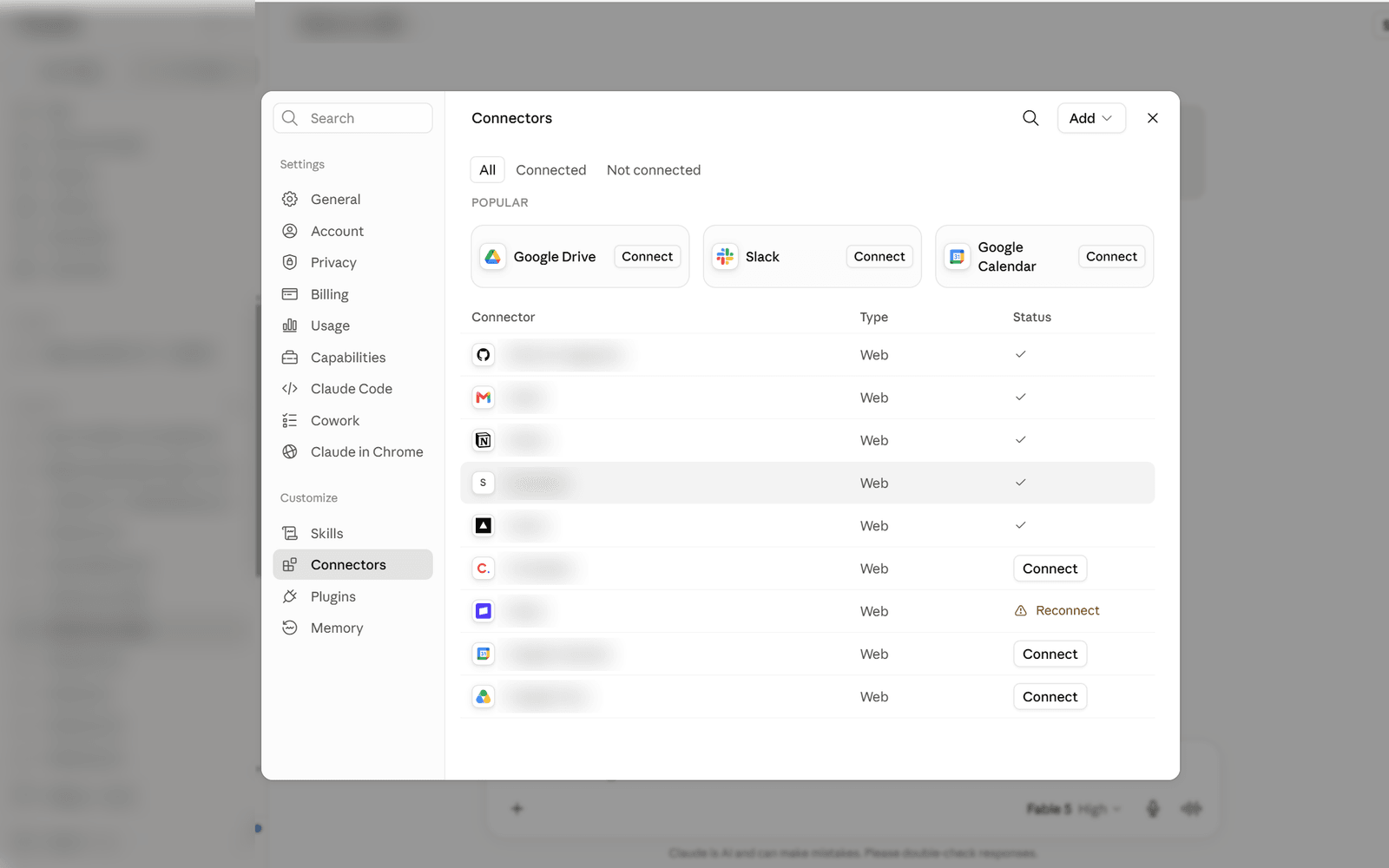
The button is at the top right of the list, not at the bottom of the page. Add custom connector is the second item in the menu that opens.
You should seeA dialog with two fields: Name and Remote MCP server URL.
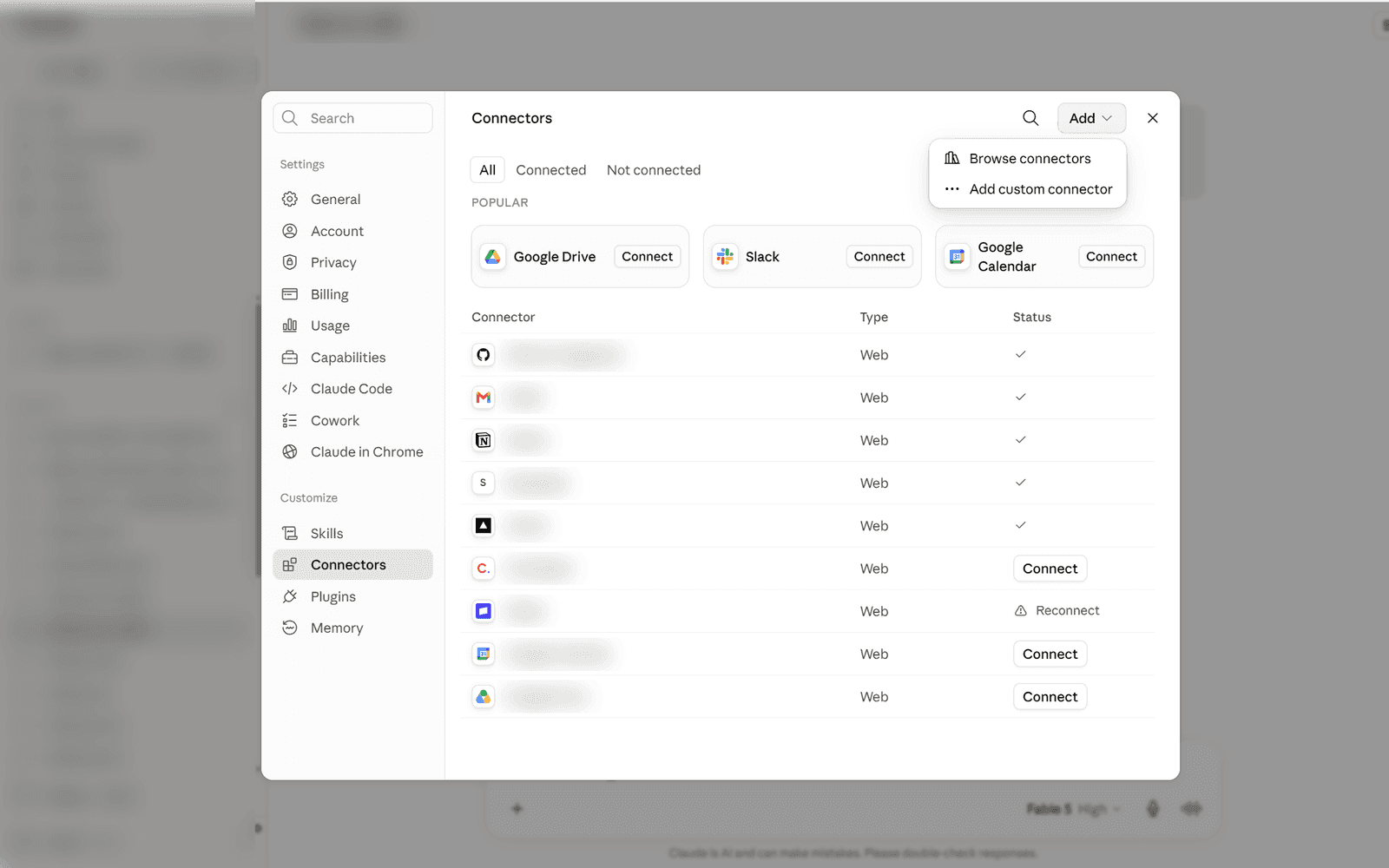
You only fill in the top two fields, Name and Remote MCP server URL. The OAuth Client ID and Client Secret under Advanced settings are optional, so leave them empty.
You should seeBoth fields sitting empty, ready for input.
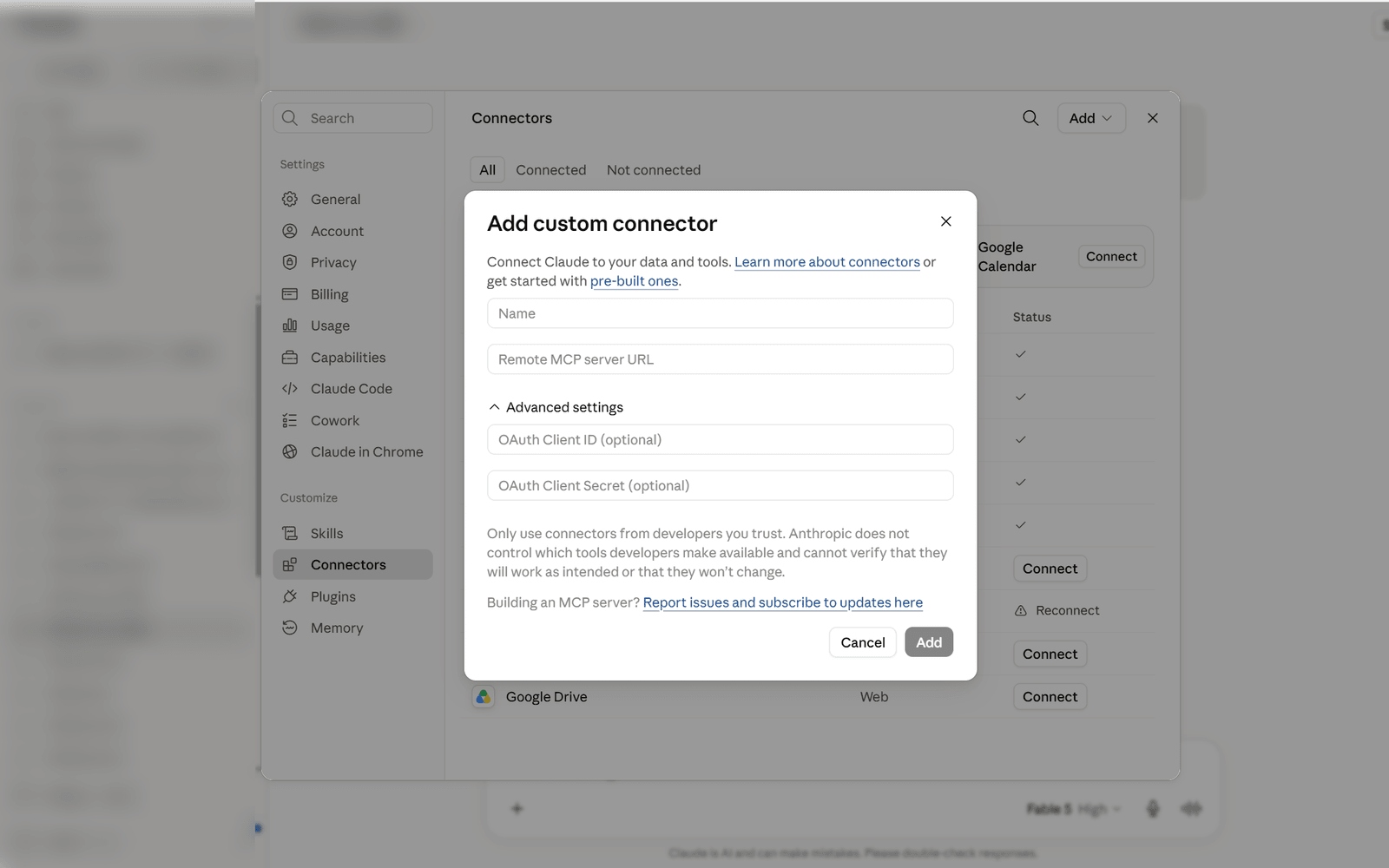
Name it something recognizable, such as Memly. Paste the value below into the URL field and click Add.
https://app.memly.ai/mcpYou should seeMemly appears in the list. It is not connected yet, so click Connect on its row to start the authorization.
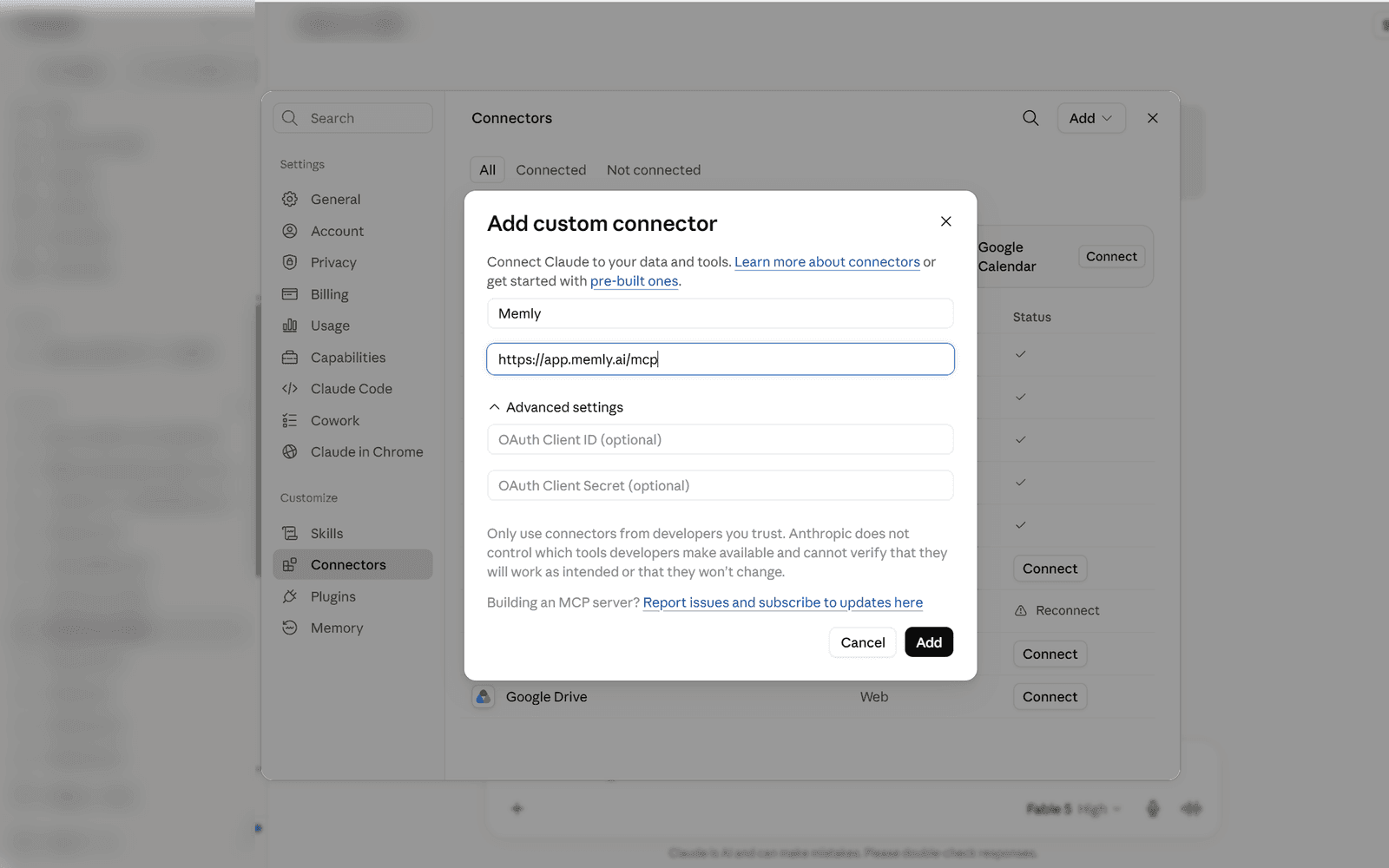
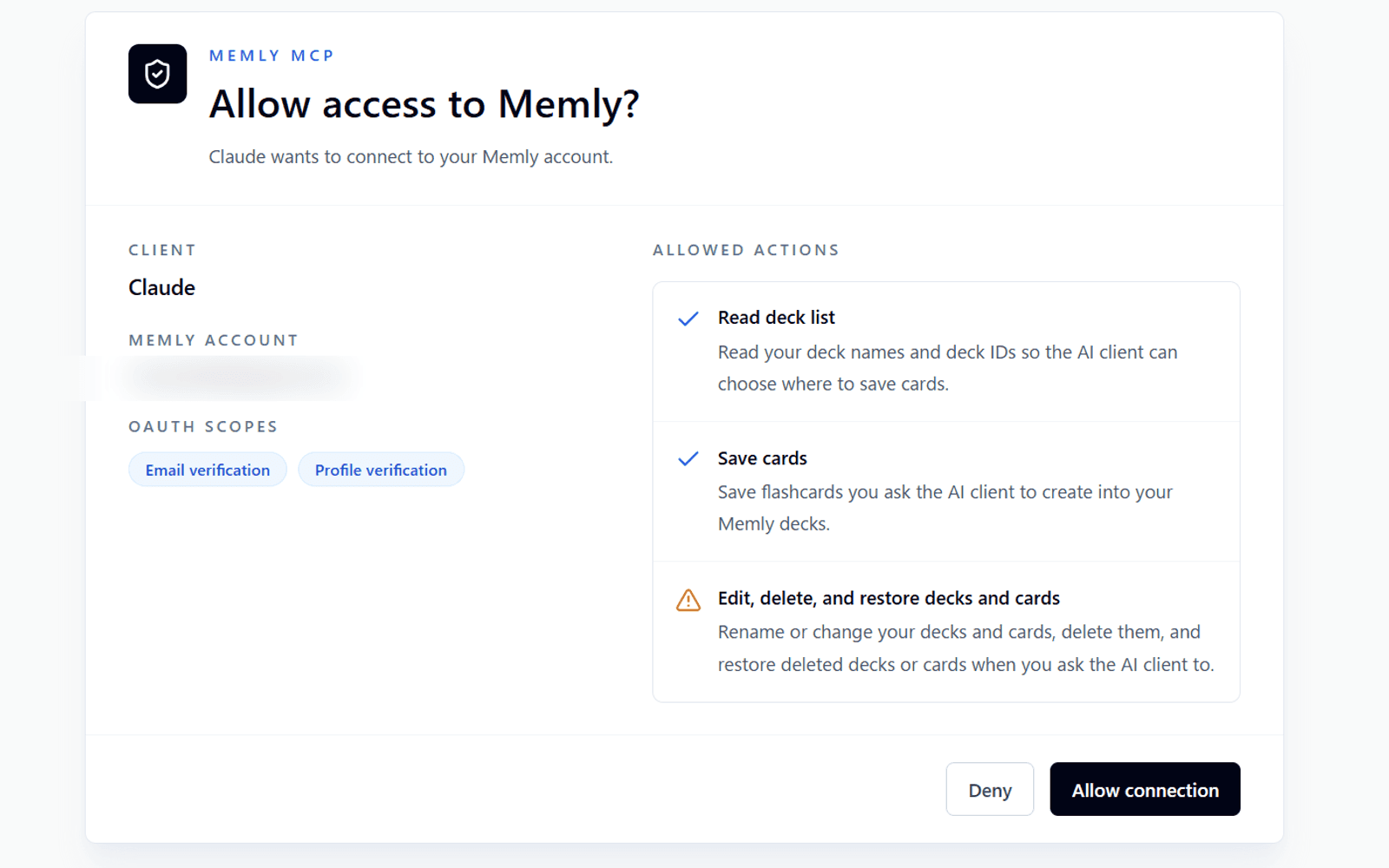
Connect opens Memly's authorization screen. Check three things before you approve: the app asking for access is Claude, the Memly account shown is yours, and the only permissions requested are to check your email address and your profile.
You should seeBack in Claude, with Memly listed as connected.
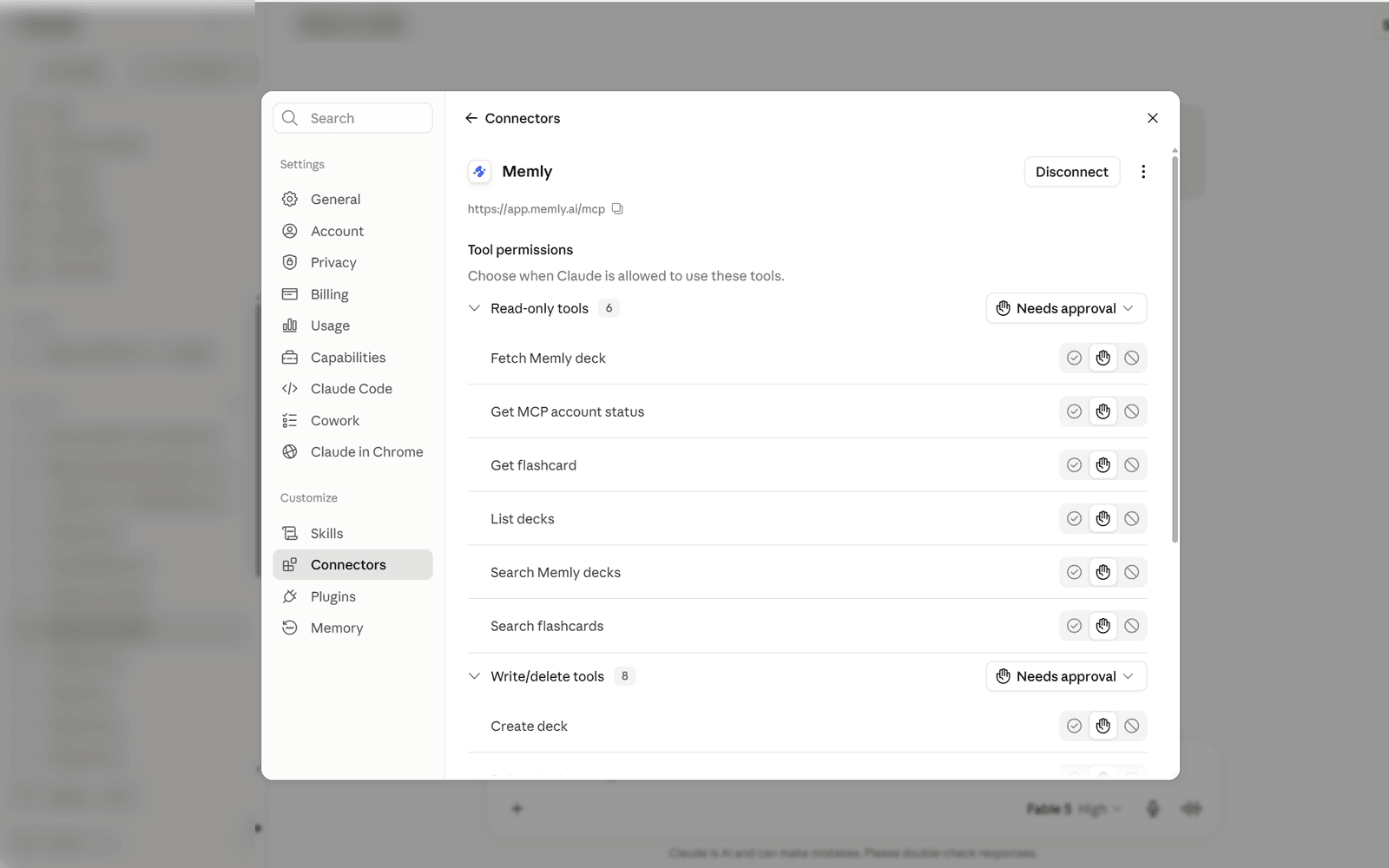
Open Memly in the connector list to see the tools Claude can call. Once the connection works, the read-only tools are listed separately from the write and delete tools. To use it in a chat, open Connectors from the + button next to the message box and switch Memly on.
You should seeTools for browsing decks and for adding, editing, deleting, and restoring cards.
These are the real settings screens in Claude and ChatGPT. Anything personal has been masked.
Almost every failure is one of these. Work down the list in order.
A connector you added earlier can still be holding old sign-in details. Delete the Memly connector and add it again with the same URL.
A red banner saying the connector name already exists can appear and disappear before you notice it. Only the name is checked for duplicates, so a different name goes through.
Uninstalling from the list does not release the name. To remove it for good, open the plugin's … menu, choose Manage, then use the … at the top right of the details and pick Delete.
Check that you entered https://app.memly.ai/mcp and that no stray whitespace was pasted with it. A trailing slash still works, so that is not the cause.
The free plan is read-only. Writing needs Plus or Pro, so confirm you authorized with an account that has an active subscription.
Check that Memly is switched on in ChatGPT or Claude and that tool use is allowed in that conversation. Naming Memly outright, such as "list my Memly decks," usually settles it.
The error screen shows an identifier starting with ofid. Send it to support along with the time of the failed attempt, and we can match it against the server logs.
02Plans
Looking things up works on the free plan. Only the actions that change your Memly data need Plus or Pro.
| What you can do | Tools involved | Free | Plus / Pro |
|---|---|---|---|
| List your decks and their IDs | list_decks | Included | Included |
| Search across your cards | search_flashcardssearch | Included | Included |
| Read a card's front, back, and tags | get_flashcardfetch | Included | Included |
| Check whether your plan allows writing | get_account_status | Included | Included |
| Create or rename a deck | create_deckupdate_deck | Not included | Included |
| Add cards written by the AI | import_flashcards | Not included | Included |
| Rewrite an existing card | update_flashcard | Not included | Included |
| Delete cards or decks | delete_flashcardsdelete_deck | Not included | Included |
| Restore something you deleted | restore_flashcardsrestore_deck | Not included | Included |
03Tools
Once connected, your AI client sees the tools below. You never have to name them yourself, but this is the map if you want to know what just happened.
Available on the free plan. Nothing in Memly changes.
list_decksReturns your decks and their IDs, usually as the step before saving into an existing deck.
search_flashcardsSearches across your cards by text, optionally narrowed to one deck.
get_flashcardReturns the front, back, and tags of a single card.
searchThe fixed tool name that ChatGPT deep research looks for. Clients that expect it can search your cards through this.
fetchThe counterpart to search, which returns the content behind a search hit.
get_account_statusReports whether the authorized account is allowed to write.
Requires Plus or Pro. Most AI clients show the action and ask you to confirm before it runs.
create_deckCreates a new deck.
update_deckUpdates a deck, such as renaming it.
import_flashcardsAdds a batch of AI-written cards, up to 100 per call.
update_flashcardRewrites an existing card's front, back, tags, or deck.
Requires Plus or Pro. Deleting does not erase the data straight away, so anything with a known ID can be restored.
delete_deckSoft-deletes a deck together with the active cards inside it.
delete_flashcardsSoft-deletes the cards you name.
restore_deckRestores a deleted deck by ID.
restore_flashcardsRestores deleted cards by ID.
04Flow
Use it like a normal conversation. Memly still checks authentication, plan access, ownership, and content safety before changing anything.
Add Memly's Remote MCP URL in ChatGPT, Claude, or another MCP-compatible AI client.
Confirm the Memly account shown on the consent screen and approve the connection.
Say things like, 'turn this into five flashcards' or 'add this to my Edo period deck.'
The AI client calls the Memly tool, and Memly saves, updates, deletes, or restores content after server-side checks.
05How to ask
You can ask in normal language. Behind the scenes, the AI client calls a Memly tool and reports the result back.
Turn this explanation into five flashcards and add them to my Edo period deck.
Tool call: import_flashcards
Saved 5 cards to the Edo period deck.
Find the Tokugawa Ienari card in my Edo period deck and make the answer shorter.
Tool call: update_flashcard
Updated the back of the card with a shorter answer.
Delete the Test deck and the cards inside it too.
Tool call: delete_deck
Deleted the Test deck. It can be restored later if needed.
06Safety
Even when an AI client sends the request, Memly treats it as untrusted input and checks who is acting, what they can change, and whether the content is safe.
Memly checks the OAuth 2.1 bearer token, Plus/Pro subscription, and deck ownership.
Memly checks required fields, text length, card count, tag count, and basic card shape before saving.
Rich HTML keeps only the 12 allowed tags and strips every attribute, including href and class. Links and images are not preserved.
Creating cards is a write operation, so the guide tells AI clients to show the action and ask for user confirmation before invoking the tool.
07For developers
Most users do not need this section. It exists so MCP clients and developers can inspect the exact shape used when new cards are added to Memly.
Adding cards
New cards are added through import_flashcards.
Destination
The AI client can target an existing deck or create/reuse a deck by title.
Result
Memly returns the destination deck, imported count, skipped count, and non-fatal warnings.
Safety
Memly checks authentication, Plus/Pro access, ownership, and HTML sanitization server-side every time.
{
  "name": "import_flashcards",
  "title": "Import flashcards",
  "description": "Import flashcards generated by an MCP-capable AI client into a Memly deck. Use this write tool only after the user asks to save cards to Memly. The client must provide either deckId or deckTitle and 1-100 front/back cards. If the user refers to an existing deck by name and does not know the ID, call list_decks first and pass the matching deckId. Memly requires Plus or Pro for write actions, validates the payload, sanitizes rich HTML, and saves the cards.",
  "inputSchema": {
    "type": "object",
    "additionalProperties": false,
    "properties": {
      "deckId": {
        "type": "integer",
        "minimum": 1,
        "description": "Existing Memly deck ID owned by the authenticated user. Provide exactly one of deckId or deckTitle (not both, not neither)."
      },
      "deckTitle": {
        "type": "string",
        "minLength": 1,
        "maxLength": 120,
        "description": "Deck title to create or reuse when deckId is not provided. Provide exactly one of deckId or deckTitle. If the user names an existing deck but does not know the ID, prefer calling list_decks first and pass the exact deckId when found."
      },
      "sourceTitle": {
        "type": "string",
        "maxLength": 160,
        "description": "Optional source title, document name, URL title, or conversation topic."
      },
      "language": {
        "type": "string",
        "enum": ["ja", "en", "ko"],
        "description": "Main language used for the card explanations."
      },
      "cards": {
        "type": "array",
        "minItems": 1,
        "maxItems": 100,
        "items": {
          "type": "object",
          "additionalProperties": false,
          "required": ["front", "back"],
          "properties": {
            "front": {
              "type": "string",
              "minLength": 1,
              "maxLength": 1000,
              "description": "Question or prompt side of the flashcard. Ask one clear recall target; do not send FSRS, user_id, due, stability, or difficulty fields."
            },
            "back": {
              "type": "string",
              "minLength": 1,
              "maxLength": 4000,
              "description": "Answer or explanation side of the flashcard. Keep it compact but self-contained."
            },
            "frontRich": {
              "type": "string",
              "maxLength": 4000,
              "description": "Optional sanitized HTML. Allowed tags: p, strong, em, mark, ul, ol, li, blockquote, h4, h5, br, code."
            },
            "backRich": {
              "type": "string",
              "maxLength": 8000,
              "description": "Optional sanitized HTML using the same allowed tag set."
            },
            "tags": {
              "type": "array",
              "description": "Short organization labels created by the AI client. Do not include private account identifiers.",
              "maxItems": 12,
              "items": {
                "type": "string",
                "minLength": 1,
                "maxLength": 40
              }
            }
          }
        }
      }
    },
    "required": ["cards"]
  },
  "outputSchema": {
    "type": "object",
    "additionalProperties": false,
    "properties": {
      "deckId": {
        "type": "integer",
        "description": "Memly deck ID used for the import."
      },
      "deckTitle": {
        "type": "string",
        "description": "Memly deck title used for the import."
      },
      "importedCount": {
        "type": "integer",
        "minimum": 0,
        "description": "Number of cards created."
      },
      "skippedCount": {
        "type": "integer",
        "minimum": 0,
        "description": "Number of cards skipped as duplicates or invalid after validation."
      },
      "warnings": {
        "type": "array",
        "description": "Non-fatal import notes, such as sanitized HTML or duplicate tags.",
        "items": {
          "type": "string"
        }
      }
    },
    "required": ["deckId", "deckTitle", "importedCount"]
  },
  "annotations": {
    "readOnlyHint": false,
    "destructiveHint": false,
    "idempotentHint": false,
    "openWorldHint": false
  },
  "securitySchemes": [
    { "type": "oauth2", "scopes": ["email", "profile"] }
  ],
  "_meta": {
    "securitySchemes": [
      { "type": "oauth2", "scopes": ["email", "profile"] }
    ]
  }
}deckIddeckId or deckTitledeckTitledeckId or deckTitlesourceTitleOptionallanguageOptionalcards[].frontRequiredcards[].backRequiredcards[].frontRich / backRichOptionalcards[].tagsOptionalstructuredContent.deckId / deckTitleOn successstructuredContent.importedCount / skippedCountOn successstructuredContent.warningsOptionalHTTP 401 UnauthorizedAuthentication required
HTTP 400 Bad RequestMalformed request
HTTP 403 ForbiddenRejected Origin
HTTP 429 / 413Rate limit / payload size
JSON-RPC error -32601 / -32602 / -32603Protocol error
Tool result isError: true (HTTP 200)Tool execution error
Implementers should also check these primary references because MCP and client support can evolve.
08FAQ
Common questions about using Memly MCP.
Partly. Free users can connect and read: searching and viewing decks and cards both work without a subscription. Write operations such as creating, editing, deleting, and restoring require Plus or Pro.
Any client that supports Remote MCP can connect. We have verified the connection with ChatGPT (Developer mode) and Claude (custom connectors).
No. Memly only receives the tool inputs the AI client sends, such as card text or search terms. The full conversation is never transmitted.
Deleting does not erase the data straight away, so it can be undone. But no tool can list deleted content, which means restoring needs an ID. Within the same conversation the ID is still there, so "restore the deck I just deleted" works. In a new conversation the ID is gone, so restore it from the Memly app instead.
No. The connector only operates on the account you authorized via OAuth, and Memly verifies ownership on the server for every request.
Work through the "If something goes wrong" list: remove the connector and add it again with the same URL. If it still fails, contact support with the ofid identifier shown on the error screen and the time of the attempt.
Connect Memly to your AI client. Free users can look things up, and Plus/Pro users can organize decks and cards directly from chat.