



You study two hours every day, yet forget 80% of it by the following week. This fact, illustrated by the Ebbinghaus forgetting curve, is a reality most learners would rather ignore. Out of 730 hours of annual study time, roughly 584 hours' worth of knowledge vanishes without sticking.
However, the right flashcard app can dramatically reduce this loss. The reason is spaced repetition: instead of cramming, the app schedules each review just before you are about to forget, so the knowledge sticks. The question is: which app should you choose? As of 2026, the three major flashcard apps are Memly, Anki, and Quizlet. Each has clear strengths and weaknesses, and picking the wrong one could waste months of learning progress.
Five dimensions separate them: AI features, scheduling algorithm, pricing, supported file formats, and ideal user. Two of those five do most of the deciding, and price is not one of them. If you want a broader overview of AI-powered memorization, start with What Is AI-Powered Memorization? A Complete Guide to How It Works, Its Effects, and the Best Tools.
Three Flashcard Apps Compared Across Five Dimensions
All three apps do the same core thing. They show a card, ask for recall, and decide when to show it again. Everything that distinguishes them sits around that loop.
| Dimension | Memly | Anki | Quizlet |
|---|---|---|---|
| AI Features | AI auto-generation (PDF/image/YouTube/audio) | Manual creation + partial AI via add-ons | Partial AI support (text-based) |
| Algorithm | FSRS 6.0 (4th generation) | SM-2 (1st generation) *FSRS switchable | Proprietary algorithm |
| Pricing (monthly) | Free / $4 / $8 | PC free / iOS $24.99 (one-time) | Free / Plus $9.99 or $44.99 (US App Store, checked October 5, 2026; billing period not shown) |
| Platforms | iOS / Android / Web | PC / iOS / Android (unofficial) | iOS / Android / Web |
| Ease of Use | Intuitive, even for beginners | Steep learning curve (maximum customizability) | Simple and familiar |
At this level of summary every app looks like an even set of trade-offs. One row is not what it appears, though. The asterisk in Anki's algorithm column means its 1987 default can be switched to FSRS, the same family of scheduler Memly runs on, which quietly removes the usual reason for leaving Anki.
Want cards made from your own notes, with a review date for each? Try Memly free. No credit card required. The free plan includes an initial AI allowance that does not refill monthly.
AI Features Compared
Card creation is where flashcard apps get abandoned. Forty cards in, typing out a definition you read ten seconds ago stops feeling like studying, the deck never gets finished, and the reviewing it was built for never starts. Closing that gap is what the AI is for, and the three apps close it by wildly different amounts.
Memly: Multimodal AI Auto-Generation
Memly's standout AI feature is its ability to automatically generate flashcards from PDFs, images, YouTube videos, and audio files. Simply upload a textbook PDF and it extracts key points into cards. It also supports YouTube lecture videos and audio materials, turning virtually any study resource into flashcards.
Beyond that, FSRS schedules each card's next review from your answers, and when generating you can choose the level of detail (Easy, Medium, or Detailed), reducing the risk of wasting time on questions that are too easy or getting discouraged by ones that are too hard. For more details on how AI flashcards work, see our explainer on how AI flashcard apps work.
Anki: Manual Creation + Community Add-ons
Anki is fundamentally a manual card-creation app. However, thanks to the strength of its open-source ecosystem, there are numerous add-ons (plugins) available, including integrations with ChatGPT and Claude that enable AI-assisted generation.
Anki's true strength lies in its unparalleled customizability. You can freely design card templates using HTML and CSS, and create cards with LaTeX formulas, text-to-speech, and virtually any format imaginable. The massive library of shared decks, particularly popular among medical students and language learners, is another major draw.
Quizlet: Text-Based AI Support
Quizlet supports AI card generation from text. Paste your notes and the AI produces question-answer pairs. However, it does not support direct generation from PDFs, images, videos, or audio.
Quizlet's strength lies in its game-based study modes. With matching, test, and live competition modes, it offers engaging ways to study that help maintain motivation. It's especially well-suited for team-based learning and classroom use.
| AI Feature | Memly | Anki | Quizlet |
|---|---|---|---|
| AI generation from text | Supported | Via add-ons | Supported |
| AI generation from PDF | Supported | Not supported | Not supported |
| AI generation from images | Supported | Not supported | Not supported |
| AI generation from video | Supported (YouTube links) | Not supported | Not supported |
| AI generation from audio | Supported | Not supported | Not supported |
| Auto difficulty adjustment | Not supported (you choose the level of detail when generating; FSRS sets review dates from your answers) | Not supported | Partial |
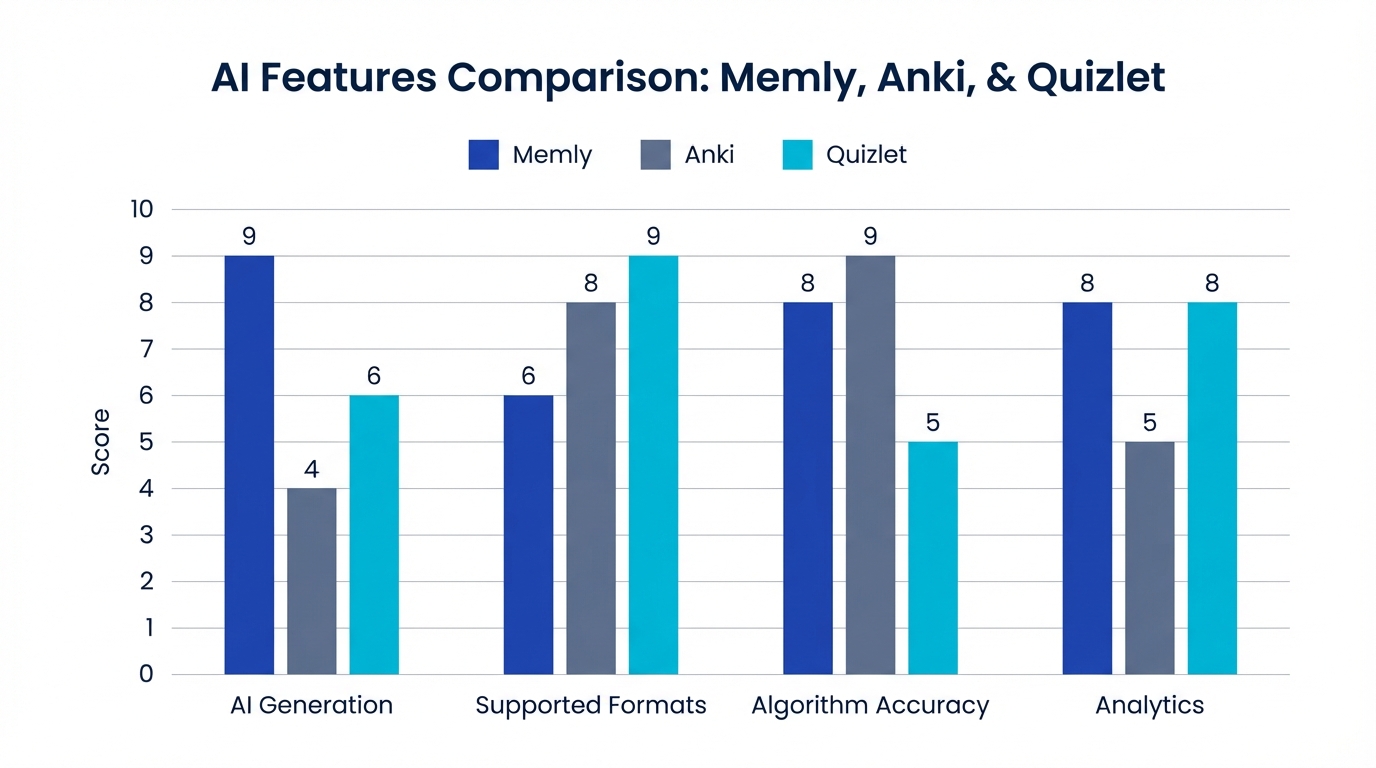
Differences in Memory Retention Algorithms
AI can write the cards. It cannot tell you when to look at them again. That job belongs to the scheduling algorithm, and for the same hour of study it decides how much of that hour is still with you next week.
FSRS 6.0 (Used by Memly)
FSRS (Free Spaced Repetition Scheduler) 6.0 is a 4th-generation spaced repetition algorithm released in 2025. It uses 21 parameters (Memly applies the same values for every user) and a power-function forgetting curve model (a mathematical estimate of how quickly you forget over time) to predict memory decay with high precision.
According to the Open Memory Benchmark, FSRS 6.0 shows a significant improvement in memory prediction accuracy over SM-2. In Memly's own internal study (n=648), learners using this FSRS-based scheduling achieved 74% better retention. For technical details on FSRS 6.0, see our FSRS 6.0 explainer article.
SM-2 (Anki Default)
SM-2 is the algorithm developed by Piotr Wozniak in 1987 and is considered the foundation of spaced repetition. Its simple, robust design has been trusted by users for over 30 years. While Anki uses SM-2 as its default, FSRS has been built in as a switchable option since version 23.10 (October 2023).
The limitation of SM-2 is its limited adaptation to individual memory patterns. It applies the same interval formula to all users, so it cannot fully account for individual differences in memory. However, its simplicity means it runs smoothly even on low-spec devices.
Proprietary Algorithm (Quizlet)
Quizlet uses a proprietary scheduling algorithm. While details are not publicly disclosed, it reportedly incorporates some machine learning as an adaptive algorithm. The lack of academic validation data makes it difficult to compare openly with FSRS 6.0 or SM-2.
| Attribute | FSRS 6.0 (Memly) | SM-2 (Anki Default) | Proprietary (Quizlet) |
|---|---|---|---|
| Year Developed | 2025 | 1987 | Undisclosed |
| Personalization | High precision with 21 parameters (Memly uses the same values for every user) | Limited | Partial |
| Forgetting Curve Model | Power function (personalizable) | Fixed exponential function | Undisclosed |
| Academic Validation | Verified via open benchmark | 30+ years of track record | Limited |
| Open Source | Algorithm is public | Public | Closed source |
Pricing Comparison
Price alone is a poor way to pick a study tool, but the plan still has to fit your budget.
| Plan | Memly | Anki | Quizlet |
|---|---|---|---|
| Free Plan | Initial AI allowance (no monthly refill); no card limit | PC version fully free (all features) | Ads shown, limited features |
| Paid Plan 1 | $4/month (monthly AI quota, unlimited cards) | iOS: $24.99 (one-time purchase) | Quizlet Plus: $9.99 (US App Store; billing period not shown) |
| Paid Plan 2 | $8/month (higher monthly AI quota, advanced features) | -- | -- |
| Annual Cost (cheapest paid) | $36 | $24.99 (iOS one-time) | $44.99 (US App Store; billing period not shown) |
Where these prices come from (checked October 5, 2026): Memly's are the web prices on its pricing page; in the iPhone app, Plus is $3.99 or $35.99 and Pro is $7.99 or $69.99 on the US App Store. Anki's iOS price is the AnkiMobile listing on the US App Store. Quizlet Plus is the in-app purchase list on the US App Store, which shows $9.99 and $44.99 without the billing period.
How to Think About Cost-Effectiveness
The three figures in the last row land within about twenty dollars of each other, and Memly's and Anki's within about eleven dollars of each other, so cost is unlikely to be what decides this. A more useful measure is retention gained per hour of study. If you study 40 hours a month, Memly's $4/month plan works out to about $0.10 per hour. Factor in the efficiency gains from FSRS 6.0, which reduces the study time needed to retain the same knowledge, and the effective cost drops even further.
Anki is the lowest-cost option if you use it on PC. All features are available for free, making it attractive for those who want to minimize their budget. However, the iOS app costs $24.99 as a one-time purchase, which is worth considering if smartphone-based study is a priority. For what that price buys and the free ways to study on an iPhone, see Is Anki free on iPhone? Anki costs in 2026.
Supported File Format Comparison
Most study material already exists before the flashcards do. Lecture slides, scanned pages, the recording of a seminar you only half-followed. Whether an app reads those directly or makes you retype them is the difference between an evening of setup and a minute of it.
| File Format | Memly | Anki | Quizlet |
|---|---|---|---|
| AI auto-analysis and card generation | Manual copy-paste | Not supported | |
| Images (JPG/PNG) | OCR + AI analysis for card generation | Can attach to cards (manual) | Can attach to cards (manual) |
| Video (YouTube links) | YouTube videos with captions only (video files such as MP4 are not accepted) | Not supported | Not supported |
| Audio (MP3, etc.) | AI transcription + card generation (MP3, M4A, WAV, AAC, FLAC, OGG, WEBM) | Can attach to cards (manual) | Not supported |
| Word (DOCX) | AI analysis for card generation | Not supported | Not supported |
| CSV/TSV | Import supported | Import supported | Import supported |
Memly's multimodal support (the ability to read text, images, YouTube videos, and audio alike) particularly addresses the need to "leverage existing study materials as-is." Whether it's textbook PDFs, lecture recordings, or photos of whiteboard notes, you can convert your existing resources directly into flashcards, dramatically reducing the time spent on card creation.
Who Each App Is Best For
So which one, in the end? Less depends on the app than on two things you already know: what you plan to feed it, and whether you study alone.
Beginners and Efficiency Seekers: Memly
- First-time flashcard app users
- Those who don't want to spend time creating cards
- Learners who use diverse materials like PDFs, YouTube videos, and audio
- Those who want maximum efficiency through cutting-edge AI
- Anyone preparing for exams or language study who needs results fast
"Thanks to Memly's AI auto-generation, I uploaded my textbook PDF and had over 300 cards ready in minutes. Creating them manually would have taken days." -- Memly user (3rd-year medical student)
Customization Enthusiasts: Anki
- Those who want fine-grained control over card layout and design
- Users with HTML and CSS knowledge
- Learners who want to leverage community shared decks
- PC-based learners (all features available for free)
- Anyone who needs LaTeX formulas or specialized formatting
Anki's greatest appeal is its massive community, backed by over 20 years of history. Shared decks covering medicine, languages, programming, and more are available for free, and its add-on library is unmatched.
Team Learners and Gamers: Quizlet
- Those who want to study with classmates or groups
- Learners who enjoy game-style memorization
- Teachers who want to distribute study materials to students
- Anyone who stays motivated through matching games and live competitions
- Those who want a simple UI to get started quickly
Quizlet's live competition mode effectively boosts motivation across entire classrooms. It's particularly popular for high school English study and corporate team-building exercises.
For detailed head-to-head comparisons, see our Memly vs. Anki comparison and Memly vs. Quizlet comparison, which also compares six Quizlet alternatives. For a broader look at AI flashcard apps, check out our Best AI Flashcard Apps ranking. If your sets are already in Quizlet, the free Quizlet converter turns pasted terms and definitions into a CSV that Memly or Anki can import.
Frequently Asked Questions
Q. Do flashcard apps actually work?
Yes. The effectiveness of spaced repetition has been repeatedly validated by cognitive science research. Reviewing at optimal intervals has been shown to improve retention rates by 2-3x compared to the same amount of unstructured study time. Modern algorithms like FSRS 6.0 further enhance this by optimizing review intervals to individual memory patterns.
Q. Can I switch from Anki to Memly?
Yes, for the card text. Memly imports CSV (front and back), so you can export your Anki notes as text, arrange them into Memly's CSV template, and import them. Memly cannot read .apkg files, and review history, images, audio, and cloze formatting are not carried over.
Q. Is the free plan sufficient?
All three apps allow basic flashcard study on their free plans. Ongoing AI generation, however, requires a paid plan on both Memly and Quizlet. Anki is unique in offering all features for free on PC, making it the most cost-effective option for desktop-based learners. Memly starts at $4/month, and Quizlet Plus is listed at $9.99 on the US App Store (checked October 5, 2026; the listing does not show the billing period).
Q. Can I study only on my smartphone?
Memly and Quizlet both support iOS and Android and offer a comfortable smartphone-only experience. Anki has an official iOS version ($24.99 one-time) and an Android version (AnkiDroid, free), but advanced card editing and add-on management may require the PC version.
Q. Which app is best for exam preparation?
The best app depends on the type of exam. To turn textbook PDFs into cards quickly, choose Memly. To reuse existing shared decks for medical or language exams, choose Anki. To study for an exam as a team, choose Quizlet.
Q. Which is best for children?
For elementary and middle school students, Quizlet is the most approachable thanks to its game elements. For high school students and above preparing for serious exams, Memly streamlines card creation with AI. Anki's complexity makes it better suited for tech-savvy high school students and college learners.
Q. Is it okay to use multiple apps at once?
It's possible, but not recommended. A scheduling algorithm can only place a review correctly if it sees your full history for that card, so splitting cards across apps leaves each one working from partial data. Commit to a single app and use it for at least two weeks before judging it.
Conclusion: Which Flashcard App Is Right for You?
By now one of the three has probably started to feel like yours. That instinct is usually right.
- For maximum learning efficiency with AI and the latest algorithm: Memly
- For customizability and leveraging community shared resources: Anki
- For team learning and game-based study: Quizlet
One thing outweighs the choice itself: starting matters more than choosing correctly. As the Zeigarnik effect in psychology demonstrates, we remember incomplete tasks more vividly than completed ones, which is why an unresolved decision keeps nagging at you and why right now is the moment you are most primed to act.
Channel that "I need to decide" energy into getting started instead. The smallest useful action is to download one app and create five cards, which takes about five minutes. With Memly you can upload a single PDF and have the cards generated for you.
Those 584 hours are not lost to a lack of effort. They are lost to reviews that never got scheduled. Memly serves over 5,000 users on the FSRS 6.0 algorithm, and the free plan is enough to find out what is still in your head two weeks from now.
Try Memly free on the web, iPhone, or Android. No credit card required; the free plan includes an initial AI allowance that does not refill monthly.
