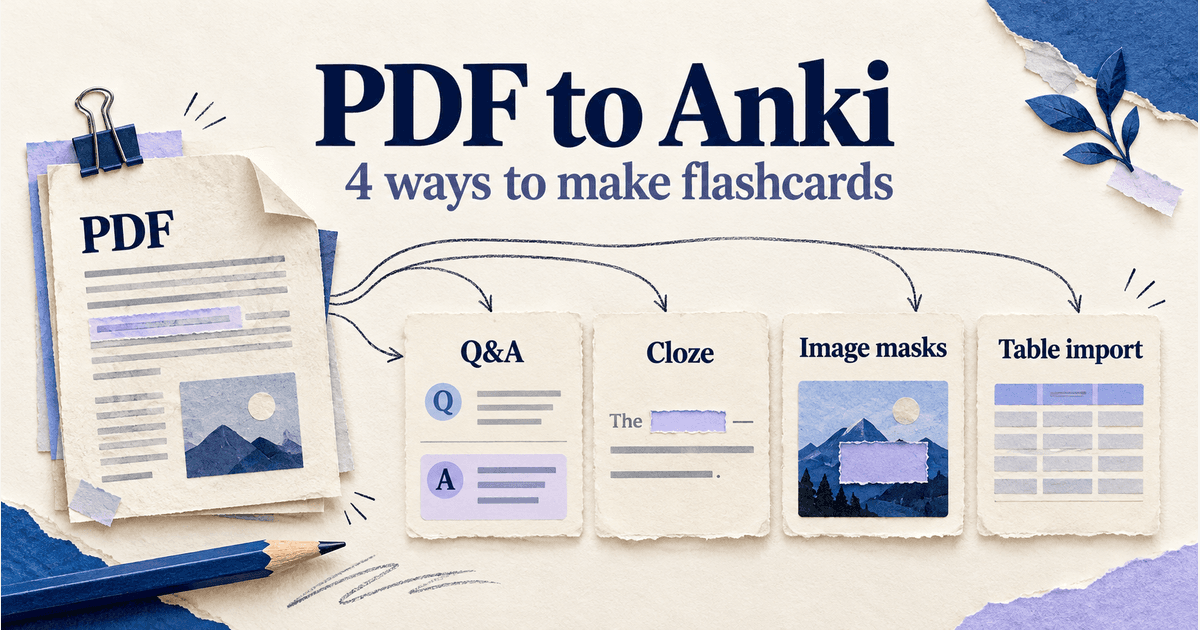
A highlighted PDF can still leave you unable to answer a question with the document closed. To turn a PDF into Anki flashcards, choose the parts you need to recall, turn them into questions or masks, and keep a source reference with each answer.
Four useful routes are Basic question-and-answer cards, Cloze deletions, Image Occlusion, and a CSV or TSV table import. Anki's text importer expects structured text, so a PDF needs a preparation step. The method depends on whether you need to recall an explanation, a missing term, a diagram label, or a batch of separate facts.
Choose a PDF-to-Anki method
| Method | Use for |
|---|---|
| Basic Q&A | Ideas to explain |
| Cloze | A missing term |
| Image masks | Diagram labels |
| Table import | Several similar facts |
Use more than one method if the PDF mixes prose and diagrams. You do not need to convert every sentence. Start with a section that matters for your course, attempt to explain it without looking, and make cards for the details you could not retrieve.
Try the methods with one original PDF
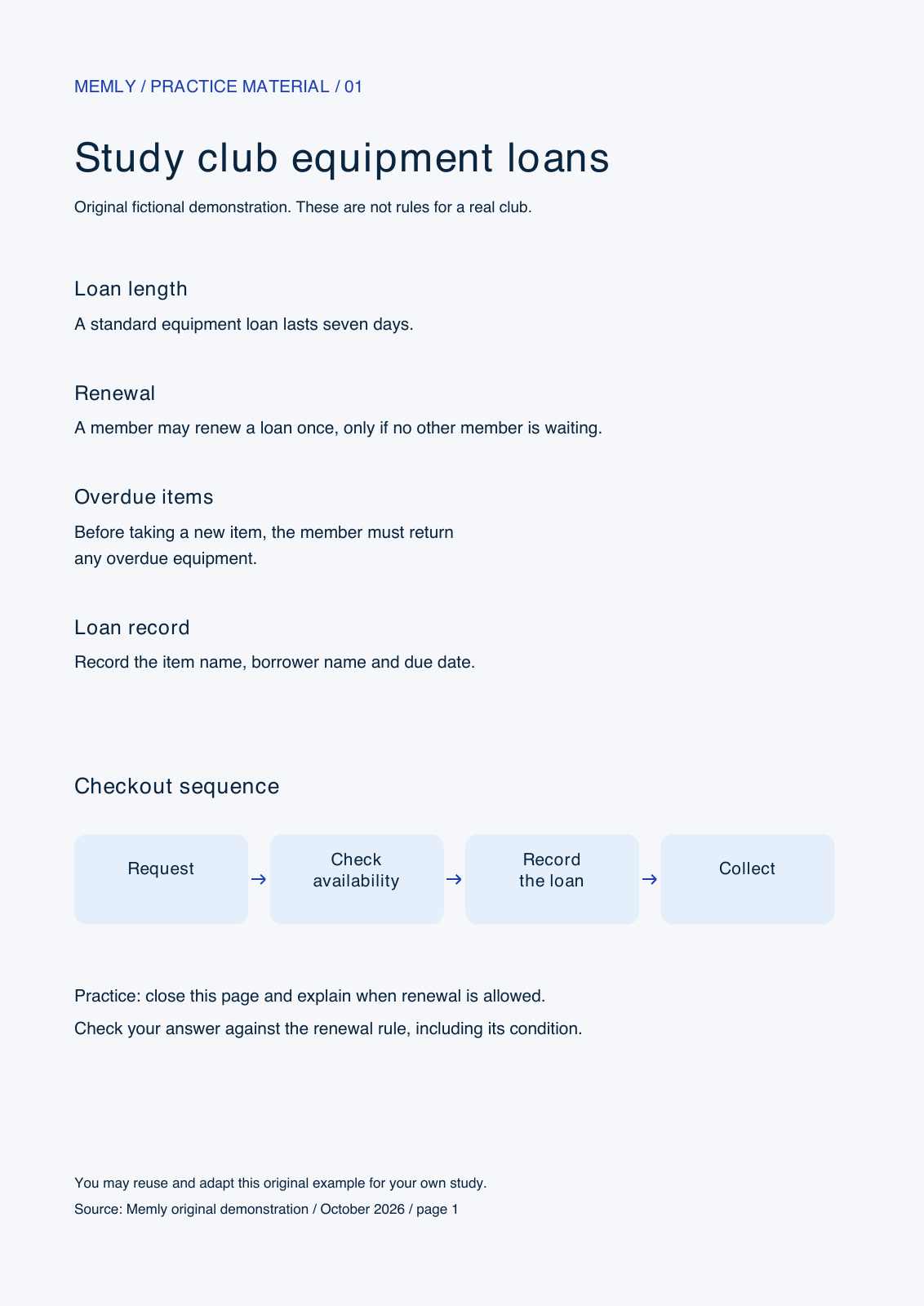
Our example is a one-page, fictional study-club handout. It describes equipment loans, including a seven-day loan period, a renewal condition, and a four-step checkout sequence. These are invented practice facts, not a real club's rules or evidence about learning outcomes.
- Download the original PDF.
- Download the same page as an image for the diagram exercise.
- Download the three-card TSV or the plain CSV for the import exercise.
The example keeps the source small enough to check every answer. For your own PDF, retain the document title and page number. If text copied from a scan is garbled, compare it with the visible page before making a card; a clean-looking transcription can still change a number or omit a condition.
1. Make Basic cards for questions you need to answer
Basic cards are a good starting point when you need to explain a rule in your own words. Read a short section, close or cover it, and write the question you want your future self to answer. Then reopen the PDF to check the back of the card.
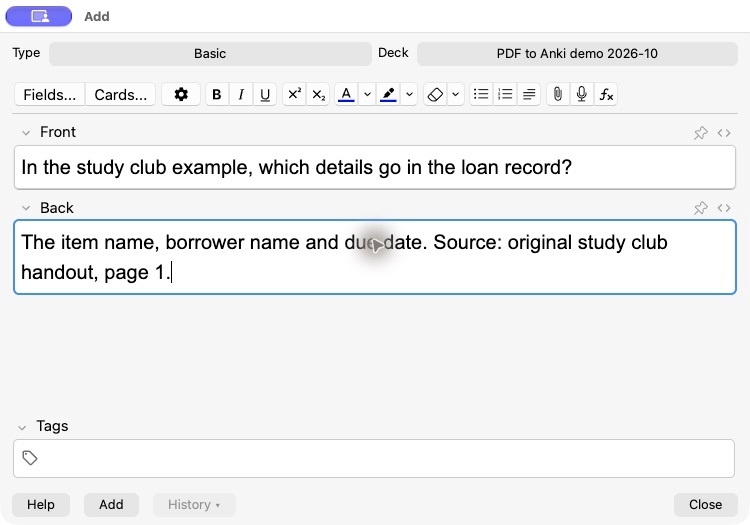
- In Anki desktop, choose a separate practice deck and open Add.
- Select the Basic note type.
- Put the question in Front and the checked answer in Back.
- Include the source on the back, then add the note.
For the handout, the card can read:
Front: In the study club example, which details go in the loan record?
Back: The item name, borrower name and due date. Source: original study club handout, page 1.
A question such as "What are the rules?" leaves you guessing how much to say. Name the context and the target. If one card asks about loan length, renewal, overdue items and checkout steps, split it: those answers can be forgotten independently. The record-details example is one bounded list; split that too if you repeatedly recall only part of it.
For more examples of manageable prompts, see how to write good flashcards.
2. Use Cloze for a specific missing detail
A cloze card keeps a short sentence visible while hiding a chosen answer. Use it when that surrounding context is helpful, such as the name of a process or a value attached to a clearly named rule. It is less suitable when you need to generate an entire explanation from scratch.
- Open Add and choose the Cloze note type.
- Enter a short, checked sentence in Text.
- Mark the missing answer with cloze syntax, and put the source in Back Extra.
- Add the note and check its question and answer before relying on it.
In the study club example, a standard equipment loan lasts {{c1::seven days}}.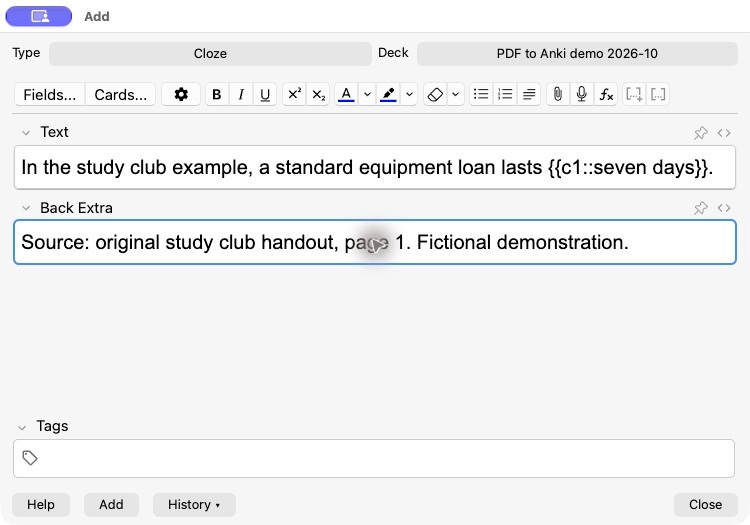
Do not leave the answer elsewhere on the front. A sentence that repeats "seven-day loan" immediately before the blank would reveal it. Also distinguish recalling a term from understanding a rule. You can remember "seven days" yet miss the separate condition that renewal is allowed only when nobody else is waiting. That condition deserves its own question.
3. Use Image Occlusion for labels in a PDF diagram
When the relationship is visual, keep the diagram and hide a label. Anki's built-in Image Occlusion is available in version 23.10 and later. The official editing manual describes the image selector, mask tools and the two hiding modes.
- Capture or export a readable image of the relevant diagram, including enough context to identify it.
- In Anki's Add window, select Image Occlusion and choose the image.
- Draw a mask over the label you want to recall. Choose whether other masked labels stay hidden or remain visible.
- Add the note, then check both sides of the resulting cards for readable labels and accidental clues.
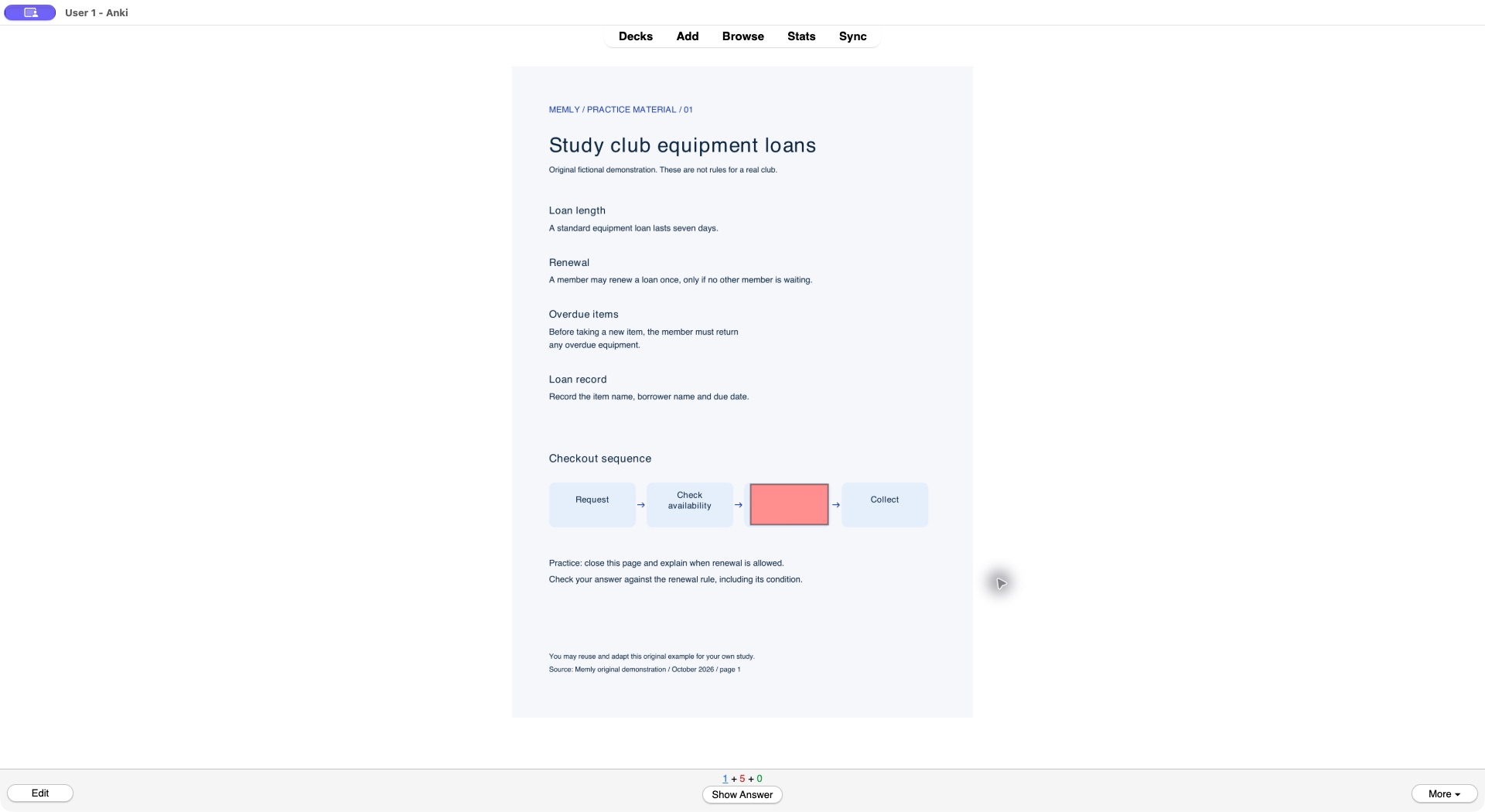
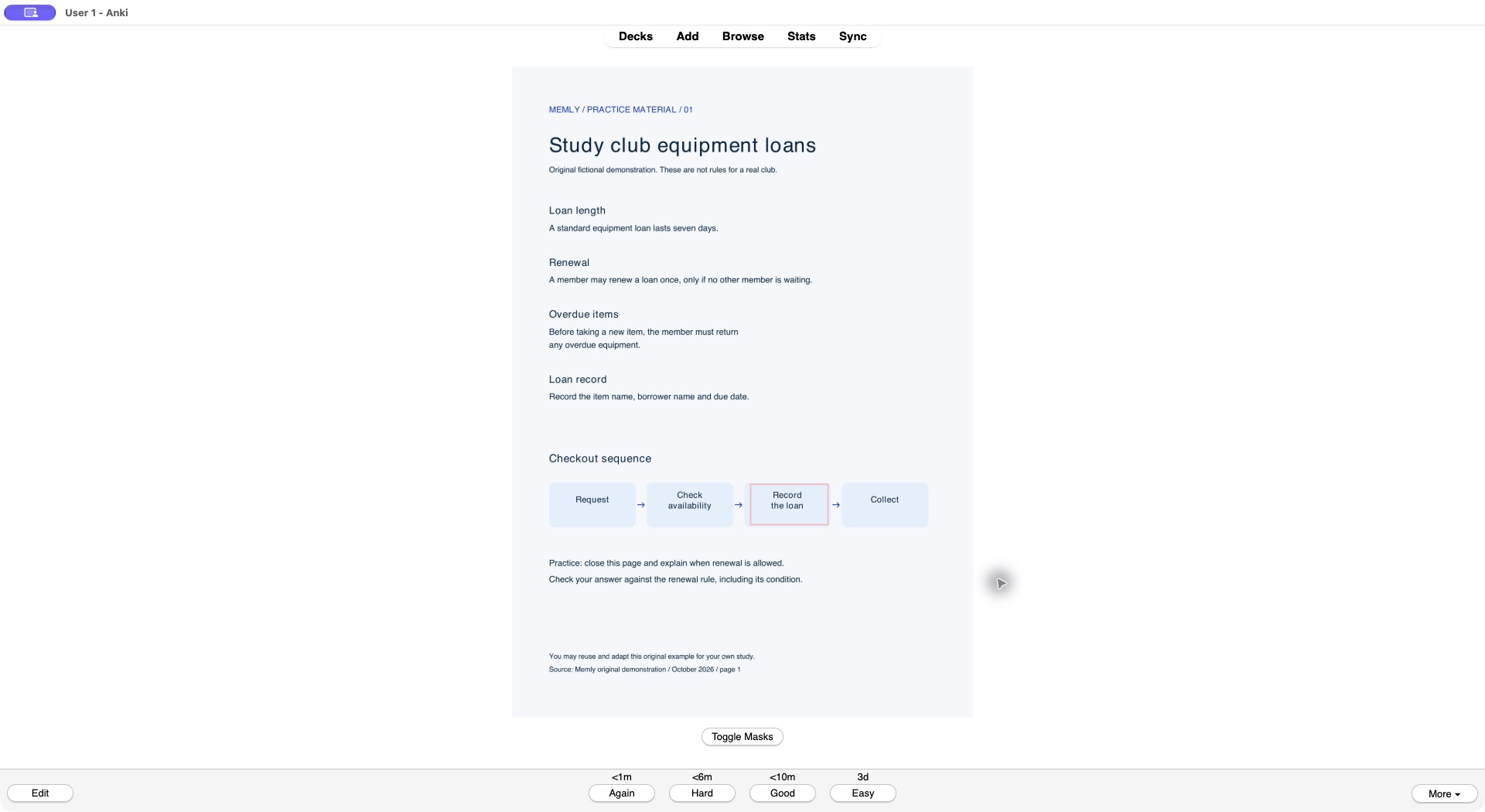
In our handout, the checkout sequence is Request → Check availability → Record the loan → Collect. In our saved demonstration, the mask covers "Record the loan" while the preceding and following steps remain visible. The question is which step comes after checking availability and before collecting the item.
Crop away unrelated text if it repeats the hidden answer. Keep arrows and neighboring labels readable: a tiny full-page image makes the task partly an eyesight test. If you need to explain why a step comes before another, add a separate Basic question; identifying a missing label does not test that explanation.
On November 4, 2026, we saved this Image Occlusion note in the same practice deck, closed the Add window, and opened it through Study Now. The front hid the selected step; Show Answer revealed "Record the loan". We also checked the saved Basic and Cloze cards on both sides. These checks establish that this small example was saved and displayed, not that it improved anyone's memory. We used a desktop window; no phone or iPad display test is claimed.
4. Turn checked questions into a CSV or TSV import
A table import is useful when you already have several questions with the same structure. Each row in our example contains one question and one answer. This moves prepared text into Anki; it does not decide which facts are worth learning or whether the answers match the PDF.
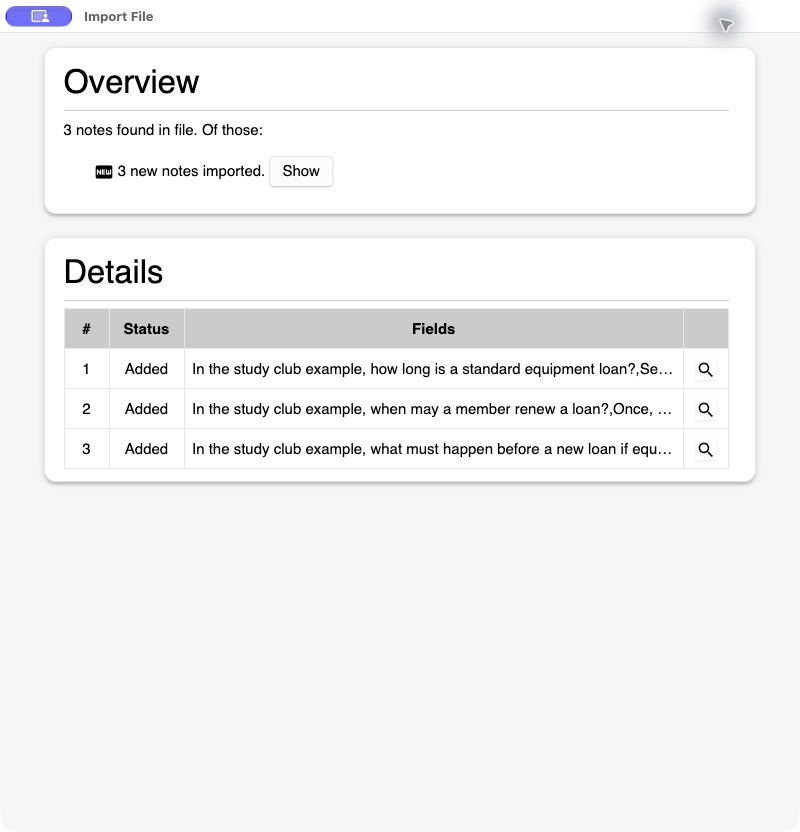
On October 25, 2026, we imported the downloadable TSV into a separate Anki demo deck. The import result reported three new notes. We also added one Basic note and one Cloze note manually. These are counts from this small demonstration, not a speed or accuracy benchmark.
- Download the TSV above. It includes Anki header lines naming the tab separator, Basic note type and a dedicated demo deck.
- Choose Import File in Anki desktop and select the file.
- Check that the preview has two columns, with questions first and answers second. Use Basic and confirm the target deck.
- Check how existing notes will be handled. We selected Preserve for this test.
- Import, read the result, and inspect the cards before importing a larger file.
The plain CSV has the same three question-and-answer rows but no Anki configuration headers. Choose the deck and Basic note type yourself, and confirm comma separation. The answers contain commas, so their CSV fields are quoted. For your own file, use UTF-8 and check the preview rather than trusting the filename extension. Anki's text-file import manual documents separators, quoting and field mapping.
Where AI can help with the table
If you use an AI tool to draft rows, give it a short source passage and a precise output format. Do this only with material you are allowed to send to that service. An example instruction is:
Using only the passage below, draft three question-and-answer pairs. Each question must name its context and ask about one rule. Keep every condition in the source. Return two tab-separated columns, with one pair per line, no header, no Markdown and no tabs or line breaks inside a field. Add the supplied source title and page to each answer. If the passage does not support an answer, omit that pair.
Check every row yourself. For our renewal rule, "Members can renew once" is incomplete: it drops "only if no other member is waiting." A fluent answer is not enough. Keep the qualifier, then check that the question actually asks for the condition. The downloadable table was prepared from the original handout; it is not presented as an unedited output from a particular AI product.
Check the deck before adding more pages
- Source: Every answer matches the visible PDF page, including exceptions and units.
- Scope: The prompt tells you what to recall without requiring the open document.
- Clues: The front does not reveal the answer through another sentence, label or caption.
- Import: Questions and answers are on the correct sides, with no stray header row.
- Display: Open image cards on the device you will study on; zooming during authoring can hide a readability problem.
- Workload: Try the small set before creating the next batch.
Keep worked problems, arguments and longer explanations in your study routine too. A deck can support those tasks by rehearsing their building blocks, but recognizing a formula or diagram label does not demonstrate that you can solve a new problem.
Common PDF-to-Anki questions
Can I import a PDF directly as flashcards?
The text-import route in this guide uses a CSV or TSV, not the PDF itself. First turn selected material into questions and answers, or use an image for Image Occlusion. Keep the original PDF available to check your cards.
What if the PDF is scanned?
Try selecting a sentence. If there is no usable text layer, you can type the facts yourself, use a readable image for a visual question, or use OCR and compare the result with the scan. Pay special attention to missing minus signs, decimal points, subscripts and small words such as "not."
Should every highlighted line become a card?
No. A highlight identifies something you noticed. A card should identify something you need to retrieve. Pick one section, explain it with the PDF closed, and use the gaps to decide what to add. Start with the sample PDF if you want to practice the file workflow before using course material.
For the broader workflow, read turning lecture notes into flashcards and our guide to AI-assisted flashcard learning. Choose one small section today and make a few checked cards you can actually answer with the source closed.