



In a survey of flashcard learners, 62% of those who had used Anki for three or more years reported spending over half their study time creating cards. Much of the time you think you're "studying" may actually be going into the task of making cards.
Anki has nearly 20 years behind it. Memly uses AI to take the card-making step off your hands. Which one is right turns on a question only you can answer: over the last month, did more of your study time go into making cards or into answering them?
Memly vs. Anki in 30 Seconds
Three differences decide it for most people.
- Card Creation: Anki requires users to manually create cards using text or HTML. Memly uses AI to auto-generate cards from PDFs, images, YouTube videos, and audio.
- Review Algorithm: Anki uses SM-2 by default (a fixed-parameter system developed in 1987) and has had FSRS built in since version 23.10. Memly uses FSRS 6.0 by default, scheduling each card from its answer history.
- Customizability: Anki offers limitless customization through add-ons. Memly provides a modern UI that requires no setup to get started immediately.
| Category | Anki | Memly |
|---|---|---|
| Card Creation | Manual (text/HTML) | AI auto-generation |
| Algorithm | SM-2 (default) / FSRS | FSRS 6.0 |
| Pricing (PC) | Free | Free / Plus from $4/mo |
| Time to Start Learning | Requires setup and deck building | Just upload your materials |
Detailed Comparison: Features, Pricing, and Usability
Ten categories, though only three or four of them will decide anything for any one learner.
| Category | Anki | Memly |
|---|---|---|
| AI Auto Card Generation | Not supported (manual only) | Auto-generation from PDF, image, YouTube, audio |
| Review Algorithm | SM-2 (1987) *FSRS built in since v23.10 | FSRS 6.0 (2025) built-in |
| Pricing | PC/Android free, iOS $24.99 (one-time) | Free / Plus $4/mo / Pro $8/mo |
| Platforms | Windows / Mac / Linux / iOS / Android | iOS / Android / Web (cross-platform) |
| UI/UX | Function-focused classic UI | Modern and intuitive design |
| Material Support | Text, image, audio (manual attachment) | PDF, image, YouTube, audio (AI-analyzed) |
| Offline Learning | Fully supported | Not supported (Review Radio playback only) |
| Community | r/Anki, shared decks, thousands of add-ons | Growing community |
| Learning Analytics | Statistics view (extendable with add-ons) | Stats dashboard (review forecast, memory status, weak cards, streak) |
| Support | Community-based (forums) | In-app support |
| Customizability | Infinitely extendable via add-ons | Essential features built in as standard |
Anki's greatest strength is the add-on ecosystem and community scale built up over nearly two decades. With thousands of add-ons, you can customize card templates, extend statistics, integrate with other services, and more. Memly ships many of those same capabilities out of the box, so there is no setup step before the first review.
How Flashcard Creation Differs
The card creation workflow is the biggest difference between the two apps, and the gap is measured in what your hands have to do.
Creating Cards in Anki
- Read your study material and identify the key points to memorize
- Open Anki and select the target deck
- Open the card editor via the "Add" button
- Type the front (question) and back (answer) as text
- Manually attach images or audio as needed
- Adjust the card template HTML/CSS (optional)
- Add tags for organization
Each card takes 1-3 minutes. Creating 100 cards requires 2-5 hours of work. That work is not wasted, though: deciding what goes on the front of a card forces you to separate the essential from the incidental, which is itself a pass through the material.
Creating Cards in Memly
- Upload your material (PDF, image, or audio) or paste a captioned YouTube link
- AI analyzes the content and automatically extracts key points
- Flashcards are generated automatically
- Review the generated cards and edit as needed
- Start studying immediately
100 cards are ready in minutes, and the hours saved go into reviewing instead of authoring. Generating cards from YouTube videos and audio also means a lecture recording becomes study material directly, with no transcription step in between.
Memory Retention Algorithms: FSRS 6.0 vs. SM-2
Two apps can hold the same 500 cards and still put a different workload in front of you tomorrow morning. What differs is the algorithm deciding which cards come due, and across months that difference lands squarely on long-term retention.
SM-2 (Anki's Default Algorithm)
SM-2 is the spaced repetition algorithm developed by Piotr Wozniak in 1987. It uses a fixed-parameter approach that applies the same settings to all users, calculating the next review interval based on review ratings (Easy/Good/Hard/Again).
- Interval calculation based on a fixed Ease Factor
- Identical parameters applied to all users
- Simple and predictable behavior
- Over 30 years of proven reliability
Note: FSRS has been built into Anki since version 23.10 (October 2023) and can be enabled in the deck options with no add-on needed (the FSRS4Anki Helper add-on is the legacy method). SM-2 remains the default.
FSRS 6.0 (Memly's Default Algorithm)
FSRS (Free Spaced Repetition Scheduler) 6.0 is a spaced repetition algorithm released in 2025. It uses a machine-learning model of the forgetting curve (the rate at which people tend to forget what they have learned) to predict optimal review timing for each card from its answer history.
- 21 parameters (Memly uses the same values for every user)
- Power-function forgetting model that is more accurate than traditional exponential models
- Prediction accuracy improves the more you study
- Independently tracks memory Stability (how long a memory lasts) and Difficulty (how hard a card is to recall)
| Attribute | SM-2 | FSRS 6.0 (optimized per user, e.g. with Anki's optimizer) |
|---|---|---|
| Year Developed | 1987 | 2025 |
| Personalization | None (same parameters for everyone) | Yes (adapts to individual learning data) |
| Forgetting Model | Fixed Ease Factor | Personalizable power function |
| Number of Parameters | A few (fixed) | 21 (individually optimized) |
| Memory Prediction Accuracy | Basic | High precision |
| Review Efficiency | Tends toward over-reviewing | Maximum retention with minimal reviews |
The personalization rows describe FSRS 6.0 when its parameters are fitted to one person's review history, which Anki's built-in optimizer can do. Memly runs FSRS 6.0 with the same 21 parameter values for every user and schedules each card from that card's answer history.
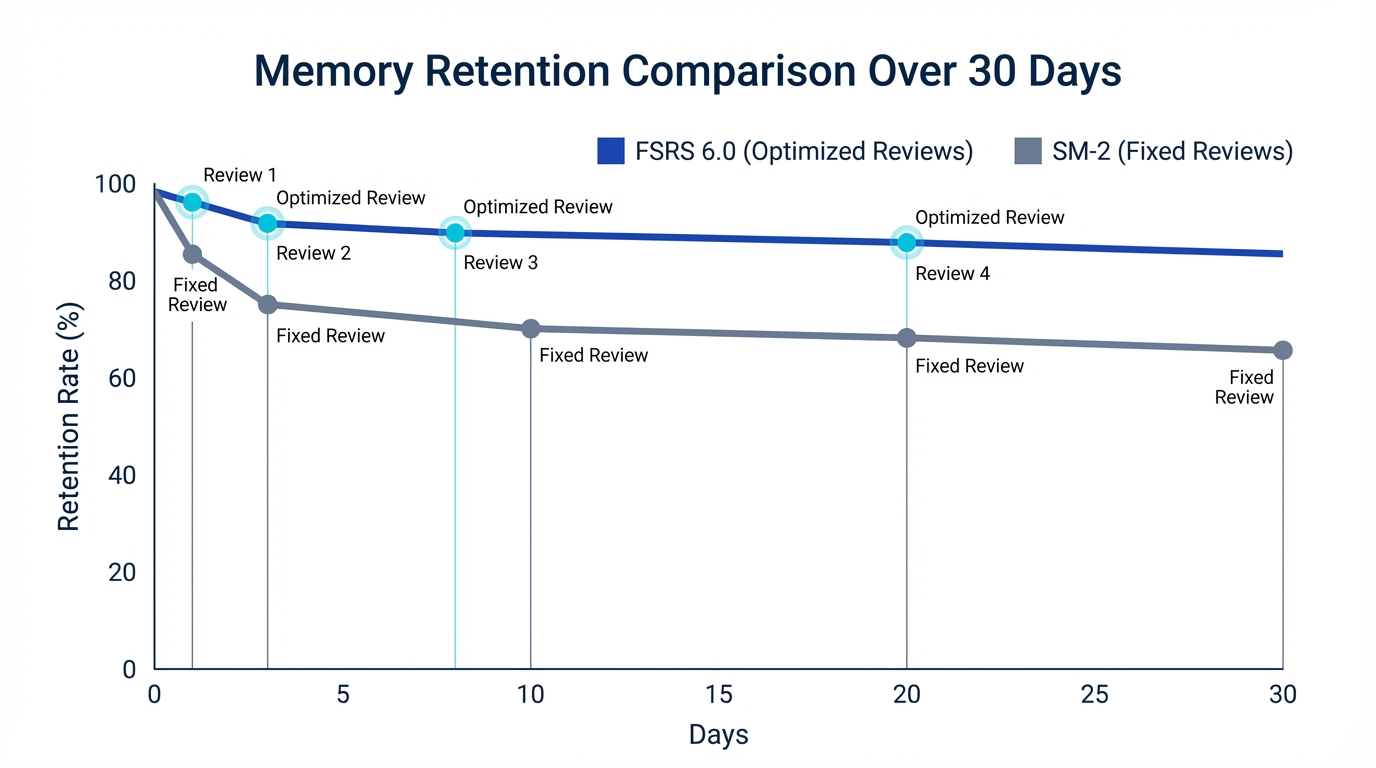
SM-2 has a track record spanning over 30 years, and plenty of learners have gotten results with it. FSRS 6.0 models each card's memory from its answer history, and the efficiency gap shows up most in long-term, high-volume study, where better-timed reviews compound across thousands of cards. For more details, see our article on how FSRS 6.0 works.
Pricing Comparison
The two do not charge in the same shape. Anki asks for at most one payment, ever. Memly bills every month, which changes how the comparison looks depending on how far ahead you count.
Anki Pricing
- Windows / Mac / Linux: Completely free (open source)
- Android (AnkiDroid): Completely free (open source)
- iOS (AnkiMobile): $24.99 (one-time purchase, lifetime access)
- AnkiWeb: Free (for syncing and basic web-based study)
For PC and Android users, Anki is the only fully free, full-featured spaced repetition app. This is one of Anki's biggest appeals and a major advantage for students and budget-conscious learners. The $24.99 iOS price tag, compared to monthly subscriptions, also offers excellent long-term value.
Memly Pricing
- Free plan: Try AI generation with your own material and no payment details required; no card limit; initial AI allowance (no monthly refill)
- Plus ($4/month): Monthly AI generation allowance, unlimited cards, FSRS 6.0, learning analytics, and more
- Pro ($8/month): Higher monthly AI usage and priority support
| Duration | Anki (PC + iOS) | Memly Plus | Memly Pro |
|---|---|---|---|
| 1 month | $0-$24.99 | $4 | $8 |
| 6 months | $0-$24.99 | $24 | $48 |
| 1 year | $0-$24.99 | $48 | $96 |
| 3 years | $0-$24.99 | $144 | $288 |
On pure pricing alone, Anki becomes more advantageous the longer you use it. The three-year row is where that gap gets uncomfortable. What the row leaves out is the other cost: at 1-3 minutes per card, a 100-card deck built by hand is 2-5 hours you also paid.
Who Anki Is For vs. Who Memly Is For
The split is less about features than about what you would rather spend an evening doing.
Anki Is For You If...
- You want to customize card templates and designs to your exact preferences
- You enjoy fine-tuning your study environment with add-ons
- You mainly use PC or Android and want to keep costs at zero
- You already have a large Anki deck collection and want to leverage community shared decks
- You have HTML and CSS knowledge and want to create advanced card templates
- You're a long-time Anki user satisfied with your existing workflow
- You want to exchange tips with communities like r/Anki
Memly Is For You If...
- You want to spend your time learning, not creating cards
- You want to turn PDFs, images, YouTube videos, and audio directly into study materials
- You want efficient memory retention with the FSRS 6.0 algorithm
- You don't want to spend time on setup and configuration
- You prefer a modern, user-friendly interface
- You want a consistent learning experience across smartphone and PC
- You want to start with powerful features right away, even without technical expertise
The useful test is last month rather than an ideal month. Someone with 2,000 cards and a tuned add-on setup will not be happier starting over; someone who spent three evenings typing cards and none reviewing them already knows which line applies.
If you'd like to compare with even more apps, see our 2026 Flashcard App Comparison and How to Choose an AI Flashcard App.
Frequently Asked Questions
Can I transfer my Anki decks to Memly?
Partly. Memly imports CSV, so you can export your Anki notes as text, arrange the front and back into Memly's CSV template, and import them. Memly cannot read .apkg files, and review history, images, audio, and cloze formatting are not carried over. Many people keep using their existing Anki decks while creating new study materials in Memly, which works well enough as a hybrid.
Which one is better for long-term retention?
FSRS 6.0 predicts forgetting more accurately than SM-2 (Anki's default; Anki can also run FSRS), so in theory it schedules reviews more efficiently. SM-2 still works well when used consistently, and an approximate schedule you follow every day beats an optimal one you skip. Review daily with whichever app you choose.
Which is better for free long-term use?
If free usage is your top priority, Anki wins hands down. The PC and Android versions are completely free with no feature restrictions. Memly's free plan is limited to basic features, so for long-term free use, Anki is the rational choice.
Does Memly have add-ons (plugins) like Anki?
Memly does not have an add-on system like Anki's. However, many features that Anki users achieve through add-ons (detailed learning statistics, AI integration, etc.) come built in as standard features in Memly. Conversely, some of Anki's more specialized add-ons (specific card layouts, external tool integrations, etc.) may not have equivalents in Memly. If your priority is generating cards directly from Claude or ChatGPT, our Memly vs Anki MCP comparison contrasts the zero-setup connector with Anki's AnkiConnect-and-ngrok approach.
Which is better for medical school or competitive exam prep?
Anki has a long track record in medical education, with established shared decks like AnKing. On the other hand, if you want to efficiently create cards from your own lecture notes or textbooks, Memly's AI auto-generation saves significant time. For fields where trusted shared decks already exist, Anki has the edge; for learning from your own materials, Memly is the better choice.
Can I use both apps at the same time?
Yes. Keep your existing Anki decks and use Memly for new study materials; many learners run both this way and let each app do what it does best.
Which is better if I only study on my smartphone?
For smartphone-only study, Memly is the smoother option. Anki's mobile app is designed as a supplement to the PC version, with card creation assumed to happen on the desktop. Memly handles material upload, card generation, and reviewing entirely from the phone.
Conclusion: Start Today with the App That Fits You
Both Anki and Memly are excellent flashcard apps based on spaced repetition. Anki offers nearly 20 years of proven reliability, free usage, and unmatched customizability. Memly delivers cutting-edge AI technology and the FSRS 6.0 algorithm, letting you focus on learning itself.
Which one you pick matters less than starting today with the one you picked. Time spent hunting for the perfect tool is time not spent reviewing.
If Memly interests you, try it on the free plan. Upload your study materials and the AI generates flashcards automatically. If it doesn't suit you, your Anki decks are still exactly where you left them.
For a broader look at memorization and learning, see What Is AI-Powered Memorization? A Complete Guide to How It Works, Its Effects, and the Best Tools. For a comparison with another AI-powered alternative, see Anki vs Gizmo. And if you're still weighing manual decks against automated ones, our breakdown of flashcards vs AI-powered memorization shows where traditional methods fall short.
