


![How to Choose an AI Flashcard App: 5 Key Comparison Points [2026 Edition]](/_next/image?url=%2Fblog%2Fen%2Fai-anki-app-erabikata.png%3Fv%3D4&w=1920&q=75&dpl=dpl_9SRSZDZ5yMfoV7dxZ4vp67Tnt8qN)
There are over 10 AI flashcard apps on the market, but choosing the wrong one wastes both time and money. Too many people pick an app because "it's popular" or "it's free," only to realize three months later that it won't get them to their goal, and then start over with a different app.
Five things decide the fit: the scheduling algorithm, the input formats it can read, the pricing model, platform coverage, and the analytics it gives back. Most people check the third one first. That is how the three months get spent.
3 Common Mistakes When Choosing an AI Flashcard App
Mistake 1: Not Checking the Algorithm Generation
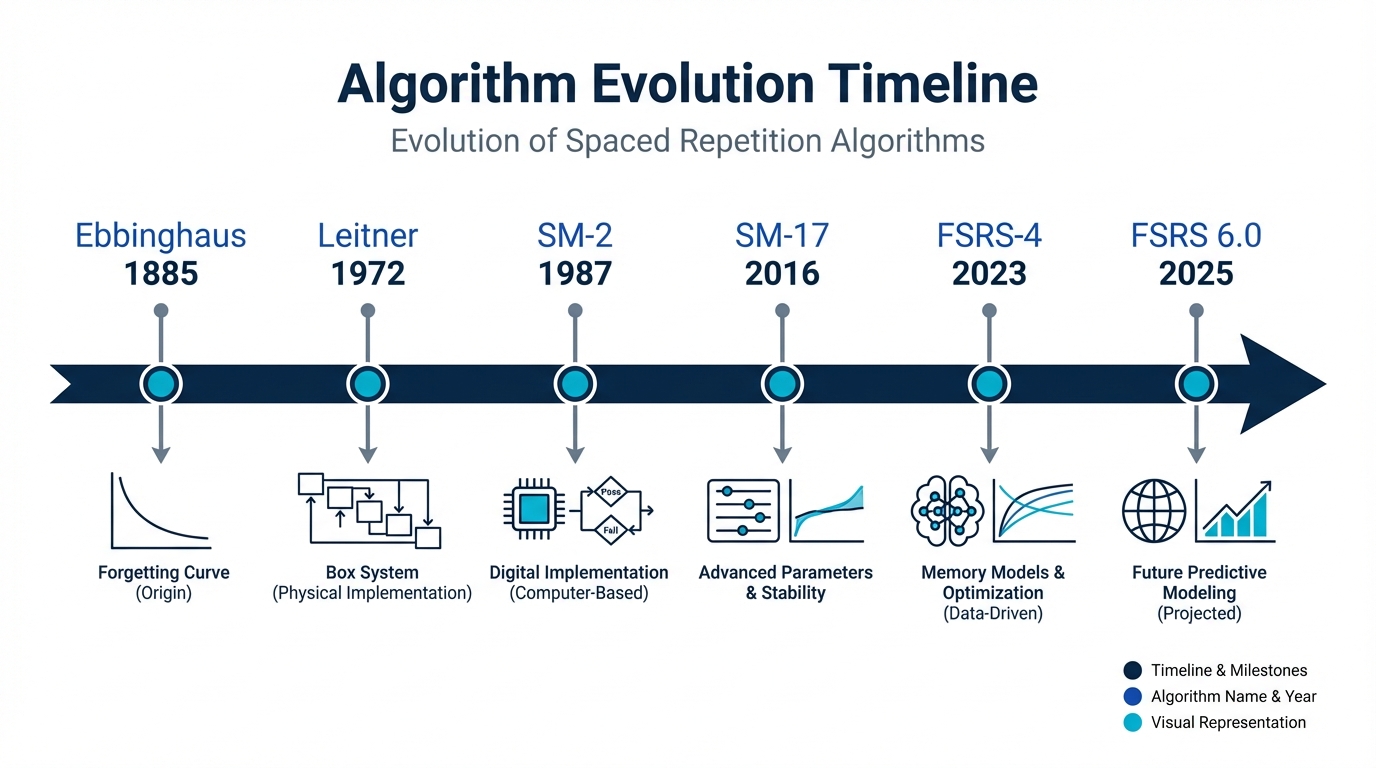
Many apps claim to be "AI-powered," but some still use outdated algorithms from the 2000s under the hood. SM-2 (a scheduling formula developed in 1987) and FSRS 6.0 (a machine-learning scheduling algorithm developed in 2025) can differ by tens of percent in memory prediction accuracy. That accuracy decides whether today's review queue contains the cards you were about to forget. If you judge solely by the label "AI," you may end up with an app whose AI touches card creation and never touches the schedule.
Mistake 2: Prioritizing "Free" Over Functionality
Completely free apps often have strict limits on card generation or use simplified review algorithms. A few dollars a month is a small price against the hours a weak scheduler wastes on cards you already know. Choosing on price alone can cost more in study time than it saves in subscription fees.
Mistake 3: Not Checking Language Support
Some apps are designed primarily for English and may have limited support for other languages. If you're studying in a non-English language, check whether the app handles your language's text analysis, card generation accuracy, and UI localization well.
5 Comparison Points to Avoid a Bad Choice
1. Algorithm Generation
The heart of any flashcard app is its scheduling algorithm. This algorithm determines "when and what you should review." The newer the generation, the more accurately it fits review schedules to your personal memory patterns.
| Generation | Representative Example | Characteristics | Prediction Accuracy |
|---|---|---|---|
| 1st Generation | SM-2 (1987) | Fixed interval calculation, no individual adaptation | Low |
| 2nd Generation | SM-15–17 | Partial personalization | Moderate |
| 3rd Generation | FSRS v4–5 | Machine learning-based, learns individual forgetting curves | High |
| 4th Generation | FSRS 6.0 | Personalizable power-law functions, 21-parameter optimization | State-of-the-art |
How to check: look for the algorithm name on the app's official site or in its settings. If it's not clearly stated, there's a high chance it uses an older-generation algorithm.
2. Supported Input Formats for Auto-Generated Cards
Automatic card generation is where AI saves the most time, but the supported input formats vary widely between apps.
- Text input only: Bare minimum. You need to copy and paste content to create cards
- PDF support: Upload textbooks and reference materials directly. Essential for exam prep
- Image support: Turn handwritten notes and diagrams into cards. Important for medical and STEM studies
- Video support: Extract key points from lecture videos. Great for online learning
The formats that matter are the ones your materials already arrive in. If your semester runs on lecture PDFs and photographed whiteboards, the middle two decide the app and the other two are noise.
3. Pricing Model
AI flashcard apps generally follow one of three pricing models.
- Completely free: Significant feature limitations. Often ad-supported. Not suitable for serious study
- Freemium: Basic features are free; AI generation and premium features are paid. You can try before committing
- Subscription: Monthly/annual fee. Full feature access. Best for continuous learning
The metric worth calculating is cost per hour of study: the monthly fee divided by monthly study hours. If you pay $8/month and study 30 hours, that's about $0.27 per hour. If the app improves your efficiency by 20%, that investment easily pays for itself.
4. Multi-Platform Support
Flashcard study thrives on spare moments: commuting, lunch breaks, the few minutes before bed. Reviews you can do anywhere are reviews that survive a busy week, which is what keeps the schedule from piling up.
- Mobile app: Essential. Both iOS and Android support is ideal
- Web app: Convenient for longer study sessions and card editing on a PC
- Data sync: Does study data sync across devices in real time?
- Offline support: Can you review without an internet connection?
Offline is the one people skip and then need. The tunnel between two stops is exactly where those spare ten minutes live.
5. Learning Analytics
When you feel like "I'm working hard but not seeing results," analytics are what help you identify the cause. A good app provides the following data:
- Retention rates by subject and deck
- Daily and weekly study time and review counts
- Automatic detection of difficult cards with focused review features
- Visualization of upcoming review workload based on forgetting predictions
The first of those is what answers the complaint. When one deck's retention sits well below the rest, you have found where the hours went, and studying harder was never going to reveal it.
Major AI Flashcard Apps Compared on the 5 Criteria
Here's a comparison of the major AI flashcard apps available as of February 2026, evaluated across all 5 criteria.
| Criteria | Memly | Anki | Quizlet | Typical AI Flashcard App |
|---|---|---|---|---|
| Algorithm | FSRS 6.0 (4th generation) | SM-2 / FSRS selectable | Proprietary algorithm | SM-2 based (1st generation) |
| Card Generation | PDF, image, and text supported | Manual creation primarily | Text-only AI support | Text only |
| Pricing | Freemium (free tier available) | PC free / iOS paid | Freemium | $5–$15/month |
| Platforms | Web, iOS, and Android | PC, iOS, and Android | Web, iOS, and Android | Varies by app |
| Language Support | Full multilingual support | UI primarily in English | Partial | Varies by app |
| Analytics | Detailed dashboard | Via plugins | Basic statistics only | Limited |
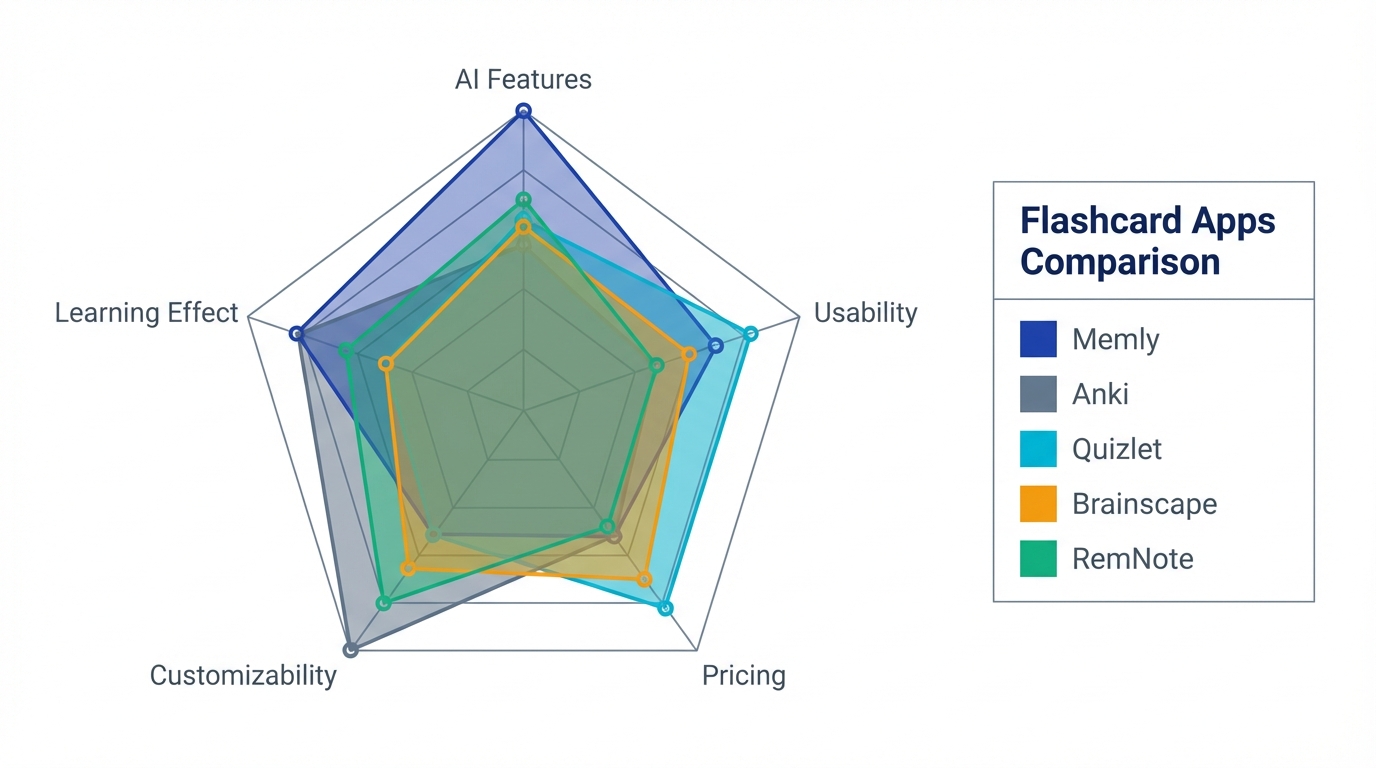
Anki is free and highly customizable, but its initial setup is complex and its UI is primarily English-based, which can be challenging in some language environments. It's ideal for power users who enjoy tinkering, but not for those who want to skip configuration and focus on learning.
Quizlet is the easiest of the four to start with. Its spaced repetition accuracy doesn't match that of apps using FSRS 6.0, which matters less in week one than in month four, once the intervals have grown long enough for the difference to show.
Which AI Flashcard App Is Right for Your Goal?
The five criteria do not carry equal weight for everyone. A vocabulary list and a bar exam stress completely different parts of an app.
- Language learning (TOEFL, IELTS, GRE): Memly suits high-volume vocabulary memorization, with automatic card generation from PDF materials. Fifteen minutes of daily review keeps a growing word list from decaying.
- Professional exams (bar exam, MCAT, CPA): These require subject-specific retention settings and card counts in the thousands, where FSRS 6.0 scheduling saves the most review time.
- Best value: Memly's free plan lets you try AI generation with your own material and no payment details required. Try it, confirm the results, then decide whether to upgrade to Plus or Pro.
- Maximum customization: Anki offers the most flexibility, provided you are willing to invest the setup time.
Conclusion: Once You Choose, Start the Same Day
The 5 criteria above narrow the field quickly: check the algorithm generation first, then the input formats your own materials come in, and let pricing decide only between apps that passed those two.
Comparing apps is easier than reviewing cards, which is why it is where people stall. Another week of research adds nothing to your retention; the forgetting curve keeps running while you read reviews.
If you're still unsure, start with Memly's free plan. Account creation takes 30 seconds and needs no payment method, and one week of reviews will tell you more about the fit than any comparison table can.
To learn more about how AI-powered memorization support works and how well it holds up, read our guide. For technical details on Memly's FSRS 6.0 algorithm, see Memly x FSRS 6.0: The Cutting-Edge Algorithm Powering Next-Generation Learning. You can also explore our 2026 flashcard app comparison and our list of recommended AI flashcard apps.
