


Lecture notes preserve what was taught, but they do not automatically show what you can explain from memory. A short check after class can reveal that gap while the lesson is still fresh. Use it to turn the important points and unanswered questions into cards you can review later.
The cause is not your memory, and it is not your note-taking style. Notes are a record, not a memory. Turning that record into memory costs about ten minutes on the day of each lecture, and those ten minutes are what the all-nighter is paying for later.
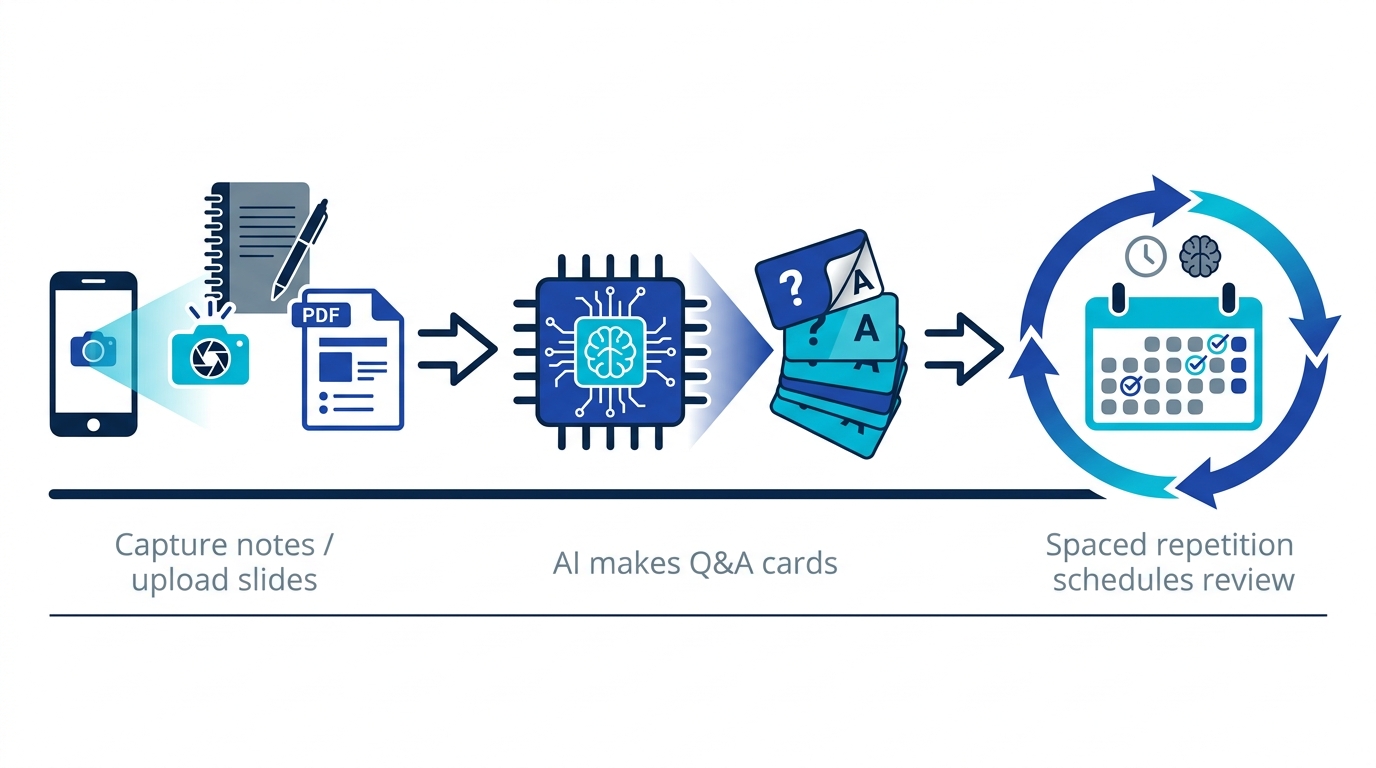
On the day of the lecture, photograph your notes or upload the slide PDF and let AI convert them into flashcards (about ten minutes). Then just answer the cards your app schedules a few times a week. By exam time, you are reviewing weak points instead of deciphering old notes.
Why lecture notes are useless by exam time
Ebbinghaus's forgetting curve applies with full force here: without review, most of what you heard in a lecture fades within days. Stack fifteen lectures on top of each other with no review loop, and what survives until finals is fragments.
Writing notes does not protect you either. Transcribing is hand work, not recall work. And rereading notes before the exam builds only recognition (it looks familiar), not recall (you can produce it on a blank page). Exams test recall. Why You Forget What You Read explains why reading alone never sticks.
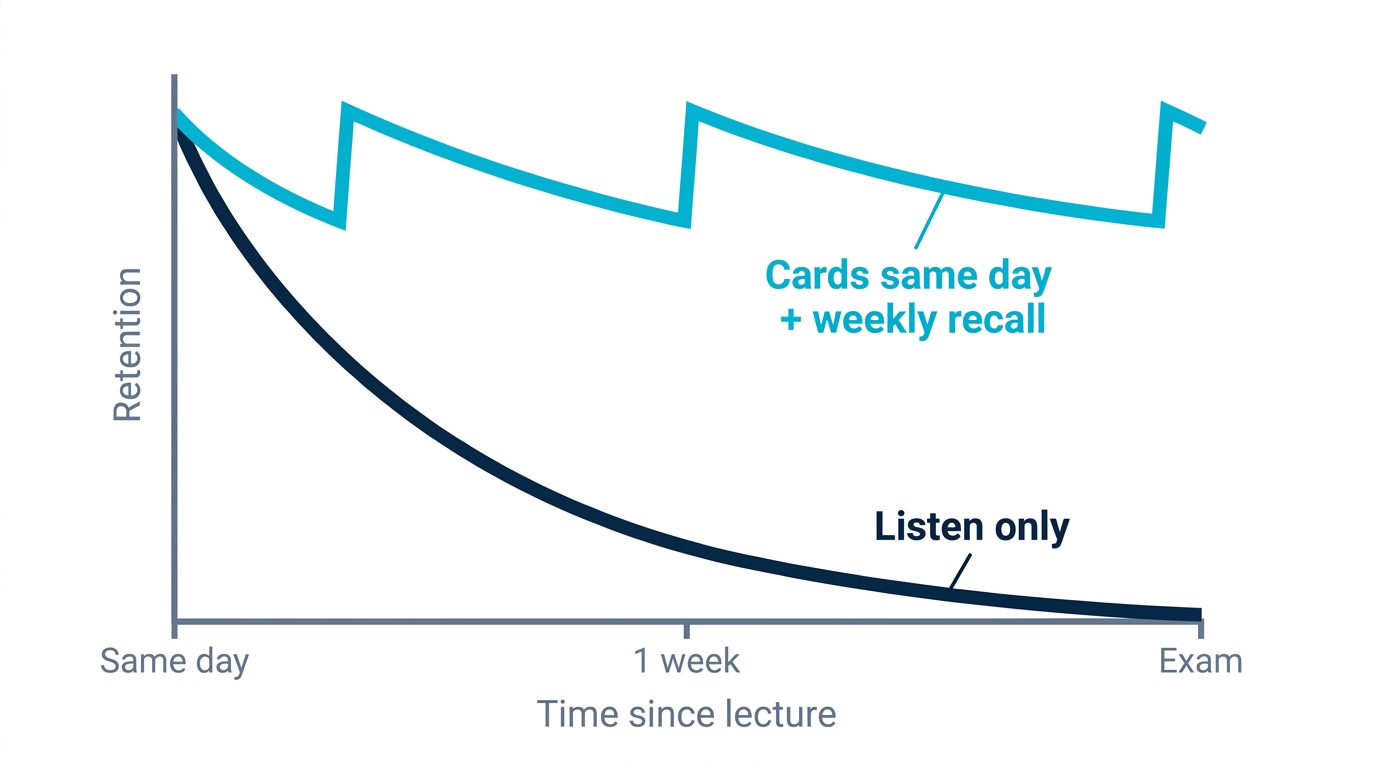
The fix is direction, not effort: convert each lecture into a form you can practice recalling, on the same day, before forgetting wins. The most efficient such form is the flashcard.
Lecture notes to flashcards in three steps
Step 1: capture your notes or slides on lecture day, as they are
Photograph handwritten notes with your phone, or upload the slide deck or handout PDF directly. Do not rewrite anything first. Making a "beautiful summary notebook" costs hours and is a weak learning method, because copying text out is hand work that never asks you to retrieve anything.
Step 2: let AI convert them into question-and-answer cards
AI extracts the testable points and phrases them as questions: for a pharmacology slide, "What is this drug's mechanism of action?"; for anatomy, "Origin, insertion, and innervation of this muscle?" The time difference against doing this by hand is dramatic:
| Method | One lecture (30 cards) | 15 lectures |
|---|---|---|
| Making cards by hand (1-2 min each) | About 45 min | About 11 hours |
| Rewriting a summary notebook | 60+ min | 15+ hours |
| AI generation from photo or PDF | 1-2 min + 5 min check | About 2 hours |
Eleven hours by hand is half a semester of lecture time spent typing instead of remembering. Two hours is a workflow you will still be running in week twelve.
Give the generated cards a one-minute skim and add anything the professor emphasized that the AI missed. That check is your quality control, and it doubles as your first review.
Step 3: just answer what the app schedules
Once the material is cards, review scheduling stops being your problem. A spaced repetition algorithm resurfaces each card right around the time you would forget it, so you never have to decide which course to review when. That is exactly what you need when you are juggling five or six courses at once.
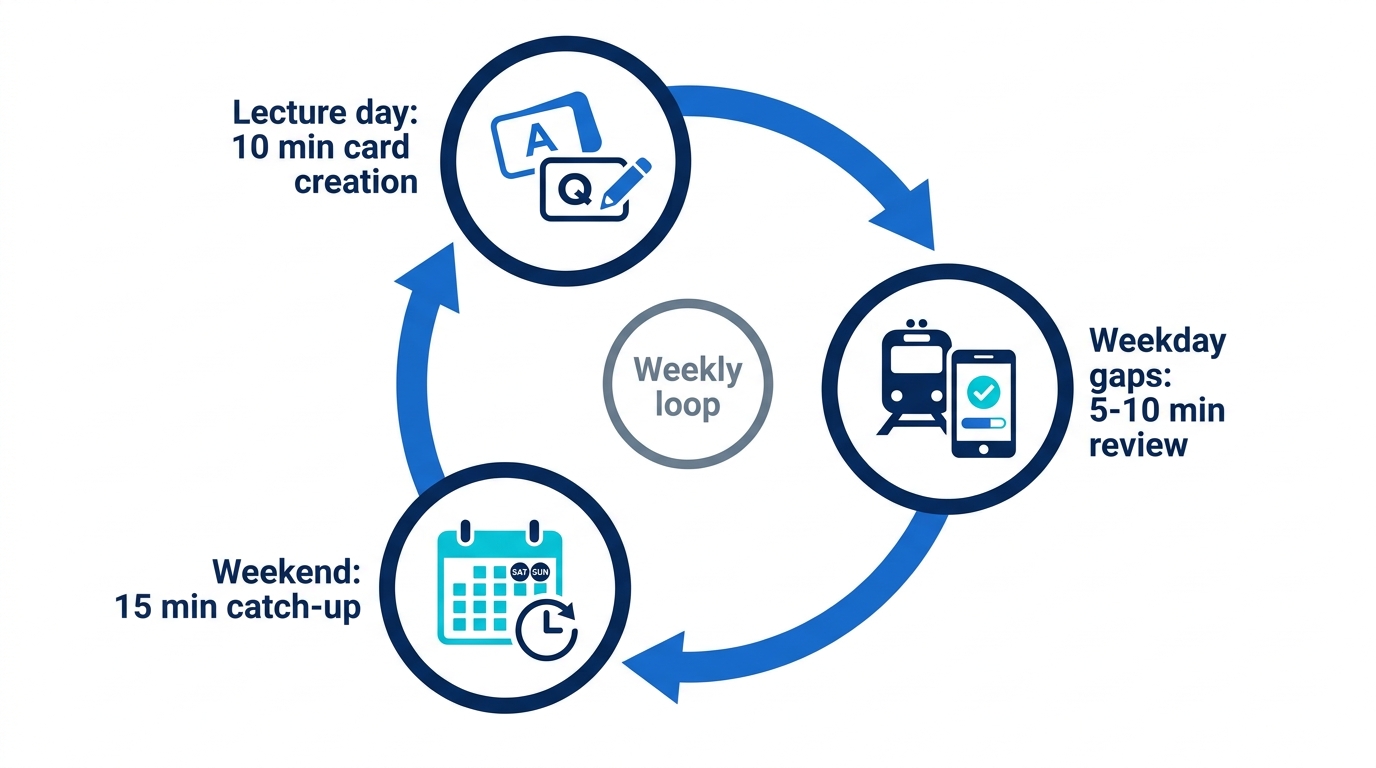
The weekly loop that fits around your timetable
- Lecture day (10 minutes): capture notes or slides, generate cards, skim the results.
- Weekday gaps (5-10 minutes): answer due cards on the bus or between classes.
- Weekend (15 minutes): clear the week's reviews; open the original slides only for cards you failed.
For someone running this loop, two weeks before finals is not the day you start decoding notes. It is the day you start from roughly 80% retention and hunt down the last weak spots. And if the exam is already dangerously close, we wrote a rescue plan: Exam in 3 Days? The Science-Backed Way to Cram.
Card granularity by course type
| Course type | Examples | How to card it |
|---|---|---|
| Memorization-heavy | Anatomy, pharmacology, law, history | One fact per card, plus a "why" card, not just the term |
| Understanding + memorization | Physiology, economics, psychology | Separate cards for the definition and for explaining the mechanism |
| Calculation-heavy | Statistics, accounting, physics | Ask "which formula fits this situation" rather than the formula itself |
The last row is the one people get wrong. Statistics students card the formulas, then freeze in the exam hall, because the paper describes a situation and waits to see which formula you reach for. The common principle: every card should be answerable as "explain this" from memory. That is the ability finals, board exams, and licensing exams all ultimately test.
Memly is built for exactly this workflow
- Photos of notes, slide PDFs, or pasted text: AI generates flashcards from any of them.
- FSRS spaced repetition prioritizes the cards you are about to forget and manages the schedule across all your courses.
- Web, iOS, and Android: capture on your laptop after class, review on your phone on the way home.
In practice that means the photo you take at the end of a 3pm lecture is a due card on your phone during the ride home.
For the full picture of AI-assisted memorization, see the pillar guide AI-Assisted Memorization: How It Works and the Best Tools.
Change ten minutes of your next lecture day
Attach a short review to one lecture already on your timetable. If ten minutes is too much that day, save the main question and one point you did not understand. That gives you a clear place to resume.
One action: after your next lecture, capture that day's notes or slides and turn them into cards. Ten minutes. Those ten minutes are what delete the pre-exam all-nighter later. Memly is free to try, no credit card required.
