


Memly MCP connects MCP-compatible AI clients like ChatGPT and Claude to Memly, so flashcards generated in a chat can be saved straight into your own deck. Setup is one step: enter the remote MCP URL https://app.memly.ai/mcp and authorize with OAuth. Free users can search and view decks and cards; Plus and Pro users can create, edit, delete, and restore them. It combines the speed of AI generation with long-term retention powered by FSRS.
You asked an AI to "turn this into flashcards," and it did. So where did those cards go? Most people leave them sitting in the chat window and lose them the moment the tab closes. Even if you copy them somewhere, roughly 70% of that content is gone within 24 hours unless you review it again. That is what Ebbinghaus's forgetting curve predicts. No matter how fast AI makes cards, "generate and forget" never turns into memory.
Memly MCP solves this at the structural level. Flashcards you generate in ChatGPT or Claude are saved directly into a Memly deck without copy-paste, and the modern spaced-repetition algorithm FSRS resurfaces each card at the moment you are about to forget it. It links AI's generation speed to science-backed retention in a single step.
Connection settings shift as the AI clients change their connector rollouts, so the exact steps live on the Memly MCP setup guide and are kept current there.
What is Memly MCP
MCP (Model Context Protocol) is an open standard for connecting AI assistants to external tools and data safely. As of 2026, more than 300 clients support it, including ChatGPT, Claude, Cursor, and VS Code, turning AI from "just chatting" into "actually doing."
Memly MCP uses this standard to offer Memly as an official remote MCP server. Register https://app.memly.ai/mcp in your AI client and authorize with your own Memly account via OAuth, and the AI can work with your decks and cards directly. There is no shared API key and no fixed account; it touches only the data of the account you authorize.
Once connected, the AI sees 14 Memly tools. The two you will use most are list_decks to read your deck list and import_flashcards to save cards. The flow comes down to four steps.
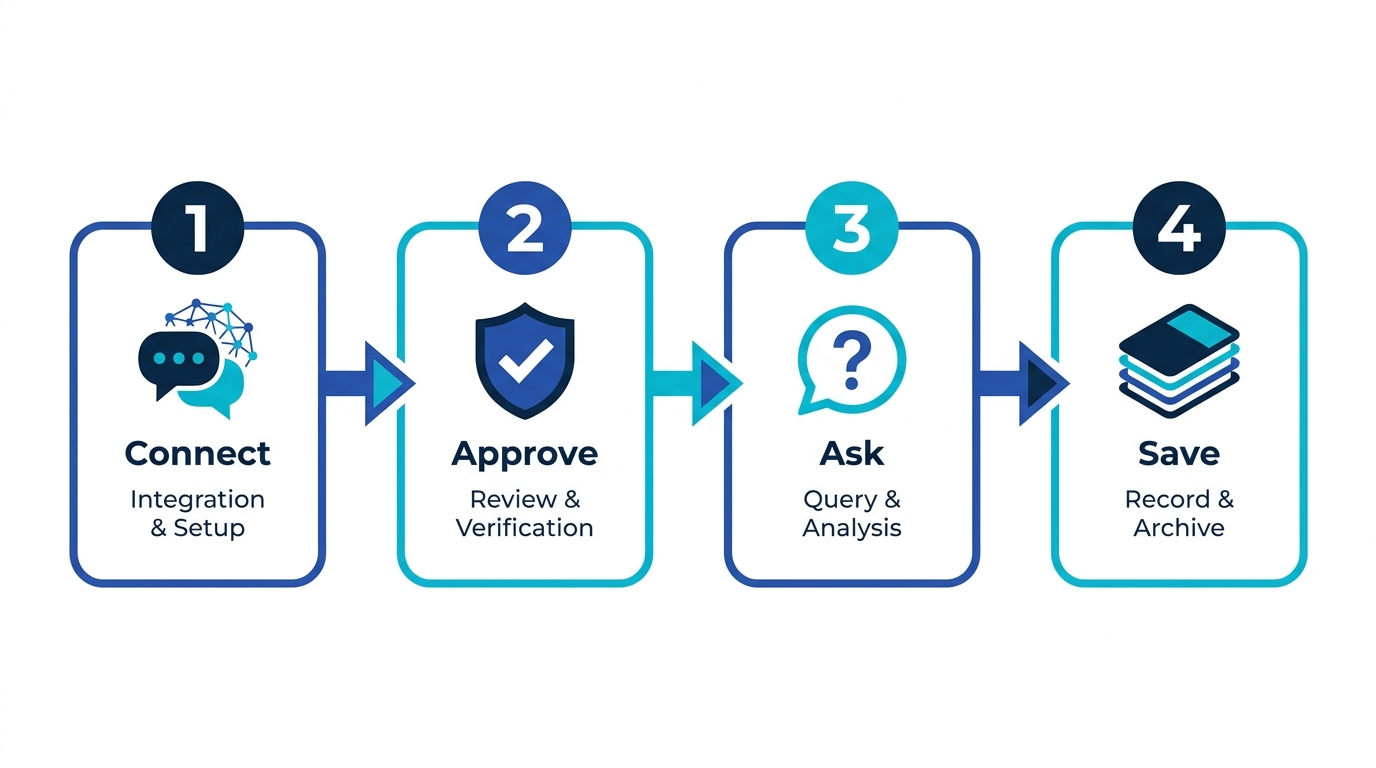
- Connect: add Memly's MCP URL in ChatGPT or Claude
- Approve: confirm your Memly account on the consent screen and authorize via OAuth
- Ask: say "turn this explanation into five cards and add them to my Edo period deck"
- Save: Memly validates the content, saves the cards, and FSRS schedules the reviews automatically
Why "generate and forget" does not stick
Dozens of cards in seconds looks like the problem solved. It solves the half that was never hard. What decides whether the material is still there next week is retrieval, not creation, and cognitive science is unusually consistent on that point.
In Roediger & Karpicke (2006), groups that spent time re-reading retained about 42% after a week, while groups that practiced retrieval (testing themselves) retained about 56%. Cepeda et al. (2008) further showed that spacing reviews at the right intervals beats cramming them together for long-term memory.
| Method | Retention after 1 week | Note |
|---|---|---|
| Re-reading only | ~42% | The fluency illusion makes you feel you "know it" |
| Retrieval (active recall) | ~56% | The effort of recall strengthens the memory trace |
Active recall plus spaced repetition is what turns memorization into knowledge that lasts. Cards left in a chat window get neither. Saving them to Memly is not just storage; it puts each card on a foundation where FSRS estimates its forgetting probability and assigns the optimal review date. For the bigger picture of AI-assisted memorization, see the AI flashcard app guide, and for how FSRS works, see the FSRS 6.0 explainer.
What Memly MCP can do: free vs paid
Memly MCP is more than a card importer. It can search, view, edit, delete, and restore decks and cards. The plan you need depends on whether you are "viewing" or "changing" Memly.
| Operation | Free (incl. Trial) | Plus / Pro |
|---|---|---|
| Search and list decks (list_decks) | Yes | Yes |
| Search and view cards | Yes | Yes |
| Add cards (import_flashcards) | No | Yes |
| Edit card text, tags, destination deck | No | Yes |
| Delete / restore cards and decks | No | Yes |
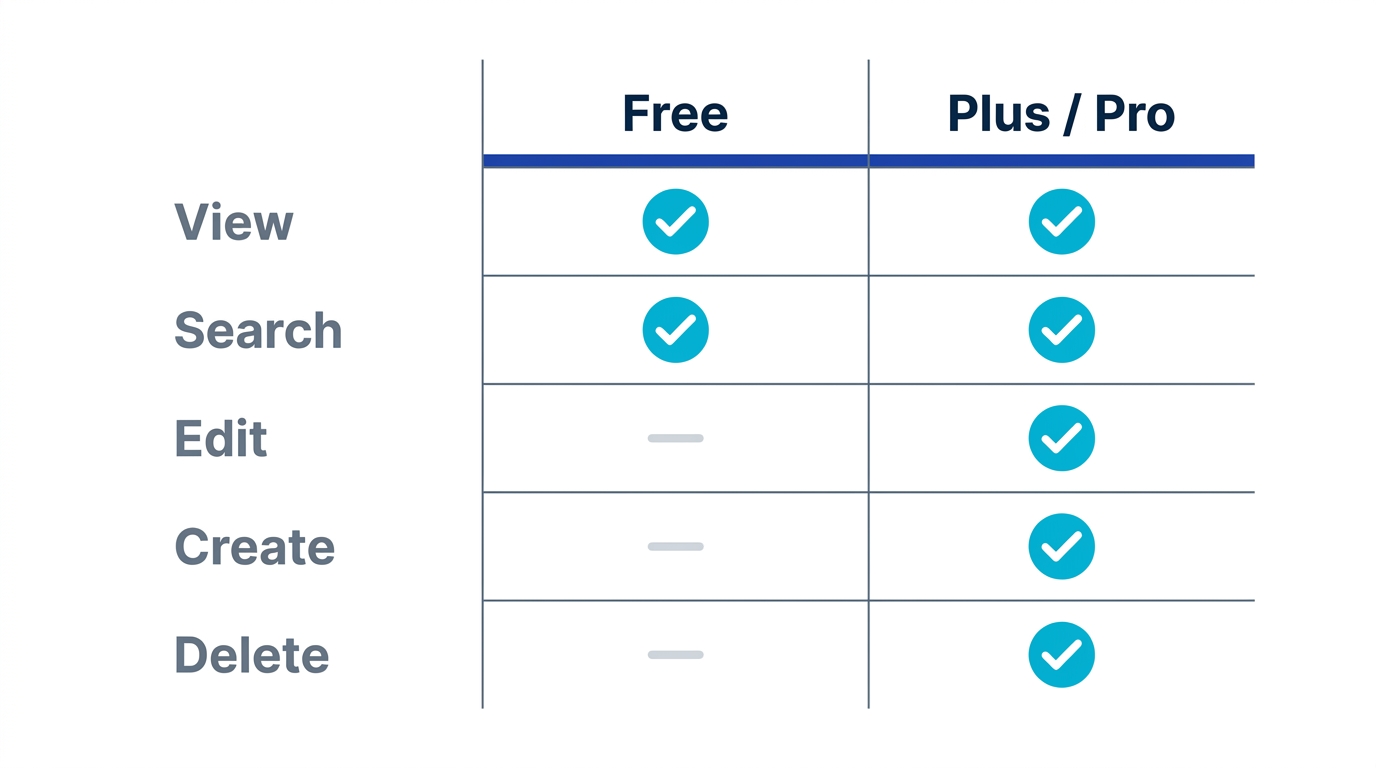
The row that catches people out is the trial. Trial users can authenticate but cannot run the card import. Every write operation is executed only after Memly checks authentication, plan, and deck ownership server-side, so a connection that looks perfectly healthy can still refuse to save.
How to connect Memly to Claude
Before you start
- If you want to save cards, sign in to a Memly account with an active Plus or Pro plan
- To save into an existing deck, confirm the deck name in Memly first
- Keep the URL https://app.memly.ai/mcp ready (no trailing slash)
Add the custom connector in Claude
- Open Claude settings or Customize, then open Connectors
- Choose "Add custom connector" and enter Memly as the name
- Enter https://app.memly.ai/mcp as the remote MCP server URL
- The OAuth Client ID and Client Secret under Advanced settings are optional, so leave that section closed
- On the Memly consent screen, confirm the account shown and approve
Confirm the connection
You are connected when Claude shows list_decks and import_flashcards. If "Authorization with the MCP server failed" persists, delete the connector and add it again with the same URL. The full reconnection steps are on the Memly MCP setup guide.
How to use Memly in ChatGPT, and what to watch for
- Turn on Developer mode in ChatGPT settings (Pro, Plus, Business, Enterprise, or Education on the web)
- Open the connector settings in ChatGPT
- Register https://app.memly.ai/mcp as the Remote MCP server URL
- When the OAuth flow opens, sign in to Memly and approve
- To save into a named deck, call list_decks first, then import_flashcards with the matching deckId
One caveat: ChatGPT developer mode can be enabled on Pro, Plus, Business, Enterprise, and Education accounts on the web, but how write-capable custom connectors behave still depends on your plan, workspace settings, and OpenAI's rollout. Check the official sources for the latest scope. Claude's custom connectors work on every plan including Free, so starting with Claude is the surest path.
How to ask the AI: prompts you can use
No jargon needed. Ask in plain language.
- Create: "Turn this explanation into five flashcards and add them to my Edo period deck."
- Edit: "Find the Tokugawa Ienari card and make the answer shorter."
- Review before saving: "Before saving, show me the fronts and backs in a list."
Saving cards is a write operation, so most AI clients show the action and ask before running it — but whether they prompt is a client-side setting, so name the destination deck in your request. For good cards, ask one idea per card, keep answers understandable without the source, and preserve exact terms and proper nouns.
Use cases: vocabulary and exam prep
Vocabulary and language learning
Hand the AI an article and say, "Pull the key vocabulary from this into 15 cards with example sentences and add them to my English deck." The material you just read becomes study cards, and FSRS optimizes how often each word appears, so the vocabulary that matters to you sticks better than a generic word list.
Exam prep and professional knowledge
While you work through concepts with the AI, say, "Turn the definitions and decision rules I need to memorize into one card each and add them to my exam deck." Understanding and memorization flow together. The larger and more detail-heavy the subject, the better AI generation and spaced repetition work together.
How it differs from Anki MCP
A popular alternative for handling flashcards via MCP is the third-party Anki MCP. The two differ in where the cards end up living and in how much setup each one demands before the first card is created.
| Item | Anki MCP | Memly MCP |
|---|---|---|
| Provider | Third-party / community | Official |
| Setup | Local Anki + AnkiConnect, ngrok for web | Enter one URL |
| Review | Depends on Anki itself | FSRS across web and mobile |
| Pricing | Free / open source | Free (read) + Plus/Pro (write) |
The setup row decides most cases. Anki MCP wants a local Anki running, AnkiConnect installed, and a tunnel such as ngrok to reach it from the web; Memly MCP wants a URL. If you already have years of Anki decks, that overhead can still be worth paying. The Memly vs Anki MCP comparison breaks this down step by step with a decision guide.
Frequently asked questions
Can I use it on the free plan?
Searching and viewing decks and cards works on the free plan. Adding, editing, deleting, and restoring require Plus or Pro.
Does it work in ChatGPT?
Yes, in ChatGPT environments that support Remote MCP. Because full MCP connectors and developer mode have plan and environment limits, starting with Claude's custom connector is the most reliable way to try it.
Is it safe? Is my data protected?
The connection uses per-account OAuth 2.1, and it can only touch the decks and cards of the account you authorize. Other users' data is never visible. Every write checks authentication, plan, and ownership, and rich HTML is sanitized to allowed tags only.
Which AI clients are supported?
Any MCP-compatible client, in principle. The main examples are Claude (custom connector) and ChatGPT (Remote MCP-capable environments).
Conclusion: turn AI chats into knowledge you keep
So where did those cards go? Left in the chat window, they follow the curve, and most of them are gone by tomorrow. Saved through MCP, the same cards come back on the day FSRS estimates you are about to lose them, which is active recall and spaced repetition doing the scheduling you would otherwise have to do yourself.
You have two choices now. One is to keep leaving AI-made cards in the chat window. The other is to connect your AI client to Memly's MCP endpoint (https://app.memly.ai/mcp) today and start keeping the cards you ask for. Open the Memly MCP setup guide, connect Memly to Claude or ChatGPT, and ask the AI to "make cards" once. You can create a Memly account for free, so you can try the connection without entering payment details. For the full picture, see the AI flashcard app guide.
