


You spent 40 minutes coaxing ChatGPT into a solid set of 30 flashcards, then closed the tab. Without a single review, the forgetting curve Hermann Ebbinghaus mapped in 1885 erases roughly half of new material within the first day, and by the end of the week you will have forgotten the majority of it. The cards themselves are buried somewhere in your chat history, never resurfaced. That is the quiet failure of studying with ChatGPT: the generation is instant, but the cards evaporate the moment the conversation scrolls out of view.
The problem has two halves, and the prompt is only the first. Getting ChatGPT to produce cards worth keeping, instead of vague two-sided trivia, comes down to four rules you can fit in one paragraph of instructions. Getting those cards somewhere that resurfaces them right before you would forget them is the half almost everyone skips. Writing the prompt and getting clean, exportable cards takes about 15 minutes; the reviews then run a few minutes a day after that.
Anki, Quizlet, and dedicated AI flashcard generators each handle that second half differently, and the difference does not show up on the day you make the cards. It shows up a month later, in what you can still answer.
Why ChatGPT flashcards usually fail (and it is not the cards)
ChatGPT is genuinely good at drafting flashcards. Give it a paragraph and it returns clean question-and-answer pairs in seconds. The problem is almost never the quality of the first draft. It is everything that happens after.
Two things go wrong. First, the cards live in a chat thread, which is not a study tool. There is no review schedule, no recall prompt, no record of what you got wrong. Second, most people accept whatever ChatGPT produces by default, which tends to be wordy, double-barreled cards that test recognition rather than recall. Both failures push you toward re-reading, which feels productive but is one of the weakest study methods in the research.
| Failure point | What it looks like | The fix in this guide |
|---|---|---|
| Lost cards | Flashcards stay in the chat and are never reviewed | Export to a deck or save them via MCP |
| Bad card design | Long, two-part questions that test recognition | One idea per card, atomic prompts |
| No schedule | You review once, then never again | Spaced repetition with FSRS |
| Invented facts | The model fills gaps with confident, wrong details | A prompt rule plus a quick fact check |
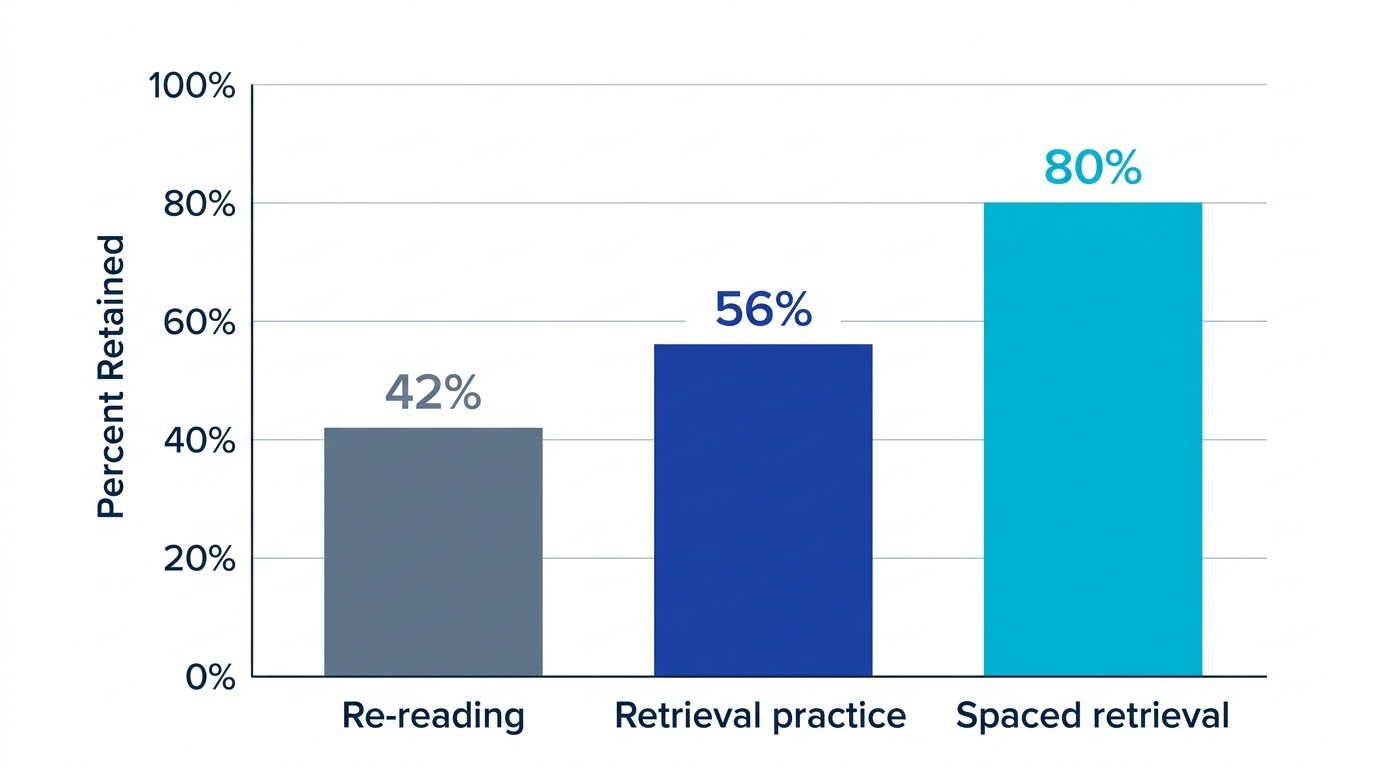
The evidence here is unusually consistent. Roediger and Karpicke (2006), testing recall of prose passages after a one-week delay, found that groups who practiced retrieval retained about 56% of the material, versus about 42% for groups who only re-read. John Dunlosky's 2013 review of learning techniques ranked practice testing and distributed practice as the two highest-utility strategies of the ten he studied, while highlighting and re-reading scored low. ChatGPT can hand you the raw material for the best two strategies in seconds. The trick is not wasting that head start.
The prompt that produces flashcards worth keeping
Default ChatGPT cards are mediocre because the default request is vague. "Make me flashcards about this" gives the model no constraints, so it pads. A good prompt does three things: it sets the card design rules, it fixes the output format, and it names the source. Here is a template you can paste today.
You are a flashcard author who follows cognitive-science best practices. Turn the text below into flashcards. Rules: one single idea per card; the question must require active recall, not recognition; keep answers short enough to recall without the source; preserve exact terms, dates, and proper nouns; do not invent facts, and write "not in source" if the answer is not in the text. Output as a two-column table with columns Front and Back, and nothing else. Source text: [paste your notes].
That single paragraph fixes most of the common problems. Four rules do the heavy lifting, and they map directly to memory research and to the one real risk of letting an AI write your study material.
Rule 1: one idea per card (atomic cards)
A card that asks "What is the capital of France and what river runs through it?" tests two facts and lets you feel correct when you only knew one. Splitting it into two cards is the single biggest quality improvement you can make. Tell ChatGPT explicitly, because by default it bundles related facts together.
Rule 2: force recall, not recognition
"Is FSRS a spaced-repetition algorithm? (yes/no)" is a recognition prompt and nearly useless. "What does FSRS schedule for each card, and on what basis?" forces you to generate the answer from memory. Robert Bjork's work on desirable difficulties shows that the effort of retrieval is exactly what builds durable memory, so easy cards are a trap.
Rule 3: lock the output format and the card type
If you want to move the cards into a study app later, prose is your enemy. Asking for a strict two-column table, or a CSV, means you can copy the whole block in one motion. The cleaner the format, the lower the friction, and friction is what kills follow-through. While you are at it, name the card type you want: basic question-and-answer, reversed (so the back also becomes a prompt), or cloze deletion (a sentence with one word blanked out, ideal for definitions and dates). Asking for "cloze cards for every key term" can be more effective than plain Q&A for vocabulary-heavy material.
Rule 4: do not let it invent facts
This is the rule most people skip and the one that matters most when a language model writes your study material. ChatGPT will confidently fill gaps with plausible-sounding dates, names, and figures that are simply wrong, and a hallucinated answer studied on a spaced schedule is worse than no card at all, because you will memorize it. The prompt rule above ("do not invent facts; preserve exact terms") reduces this, but does not eliminate it. Before you commit the deck to review, spend a minute spot-checking any card with a specific number, date, or proper noun against your source. Treat ChatGPT as a fast typist that occasionally misremembers, not as the authority.
Before and after: the same source, two prompts
The difference between a lazy request and a structured one is not subtle. Take one source sentence: "FSRS is a spaced-repetition algorithm that predicts memory using three components (stability, difficulty, and retrievability) and was released in 2022."
The default request, "make a flashcard about FSRS," tends to return a single bloated card:
Q: Tell me about FSRS.
A: FSRS is a spaced-repetition algorithm that predicts memory using three components, stability, difficulty, and retrievability, and it was released in 2022.
That card tests recognition, bundles four facts, and is too long to recall cleanly. The structured prompt returns three atomic cards instead:
Front: What kind of algorithm is FSRS? Back: A spaced-repetition algorithm.
Front: Which three components does FSRS use to predict memory? Back: Stability, difficulty, and retrievability.
Front: In what year was FSRS released? Back: 2022.
| Aspect | Default prompt | Structured prompt |
|---|---|---|
| Card scope | Multiple facts crammed into one card | One atomic idea per card |
| Question type | Often yes/no or recognition-style | Open recall question |
| Answer length | Full paragraph copied from source | Short, recallable phrase |
| Export | Prose you must reformat by hand | Clean table or CSV, paste-ready |
| Review fit | Hard to schedule, often abandoned | Drops straight into a deck |
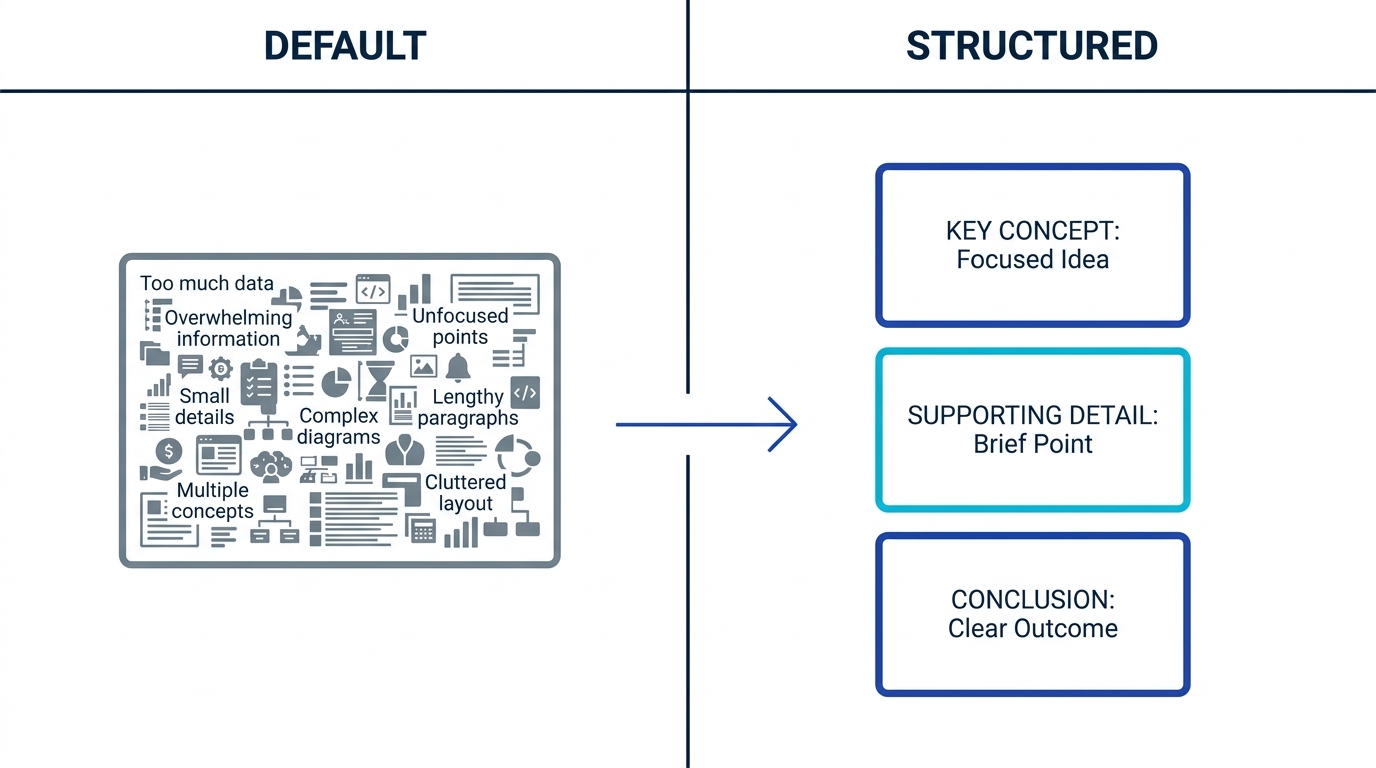
Notice that none of this requires a fancier model. It is the same ChatGPT, given clearer instructions. The structured version costs you one extra paragraph and saves you the reformatting, the bad recall practice, and the silent loss of the cards.
How to make flashcards with ChatGPT, step by step
From raw notes to a scheduled review, the whole thing is six steps, and only the last two are the ones that decide whether you remember any of it.
- Gather the source: paste your lecture notes, a textbook section, or an article into ChatGPT. For a lecture-slide PDF, upload the file directly and ask ChatGPT to extract the text and then make cards from it; with longer documents, work a few sections at a time, because ChatGPT's context window and file handling get unreliable past a point and it may quietly skip pages. Scanned images and dense diagrams are weak spots, so confirm it captured the slide before you trust the cards.
- Run the structured prompt: use the template above so the cards come back atomic, recall-focused, and in a table.
- Edit ruthlessly: delete cards for things you already know cold, split any card that still bundles two facts, shorten long answers, and spot-check any specific date, name, or number against the source. This 90-second pass roughly doubles the value of the set.
- Get an exportable format: ask ChatGPT to "output the final cards as tab-separated values with Front and Back columns" so you can import them anywhere (see the Anki walk-through below for why tabs beat commas).
- Move them into a spaced-repetition tool: import the file into your study app, or skip the export entirely by connecting ChatGPT to your deck (covered below).
- Review on schedule: study the cards the same day, then let the algorithm decide every later review date for you.
Steps one through four are pure ChatGPT. Steps five and six are where memory is actually made, and they are the steps most people skip. Cepeda et al. (2008) showed that spacing reviews across days outperforms massing them into one session, because a recall attempt made after a delay costs real effort while a back-to-back repeat costs almost none. The schedule is not an add-on; it is the entire point.
Exporting ChatGPT flashcards to Anki without the usual pain
The most common free path is ChatGPT plus Anki, the long-running open-source flashcard app. It works. The import is where people give up, and it is nearly always the same handful of settings.
- Ask for tab-separated, not comma-separated, output. Your answers will contain commas ("Paris, the capital"), and a comma inside a field breaks a CSV unless every field is wrapped in quotes. Tell ChatGPT: "output as tab-separated values, Front then Back, one card per line." Tabs almost never appear inside an answer, so they are the safer delimiter.
- Save the file as plain text. Paste the output into a plain-text editor and save it with a .txt extension using UTF-8 encoding. Anki imports .txt fine, and this sidesteps the common trap where a spreadsheet or browser saves the file as the wrong type or re-introduces commas.
- Match the import dialog to your file. In Anki, choose File then Import and select your file. Set Field separator to Tab, map Field 1 to Front and Field 2 to Back, decide how to handle duplicates, and leave Allow HTML in fields off unless your cards intentionally contain formatting tags.
- Turn on FSRS if you want modern scheduling. Anki defaults to the older SM-2 algorithm. FSRS is built in on recent versions but must be enabled in the deck options, which is one more step to remember.
This path is genuinely workable, and for people who enjoy configuring their tools it is a good fit. The friction is real but solvable: the delimiter, the file type, and the field mapping are the three things that trip up first-timers, and the steps above remove all three.
ChatGPT, Anki, Quizlet, and AI flashcard generators compared
Once your cards exist, you have to put them somewhere. An AI flashcard generator is a tool that automatically creates and schedules study cards from your source material using spaced repetition, which is the main thing that separates it from a manual app. Here is how the common destinations trade off setup effort against how much the tool does for you.
| Approach | Card creation | Scheduling | Setup effort | Best for |
|---|---|---|---|---|
| ChatGPT only | Excellent drafts | None (you forget) | Zero | Quick drafting, not retention |
| ChatGPT then Anki | You export and import a file | SM-2 by default, FSRS optional | Medium (import, decks, add-ons) | Power users who tinker |
| Quizlet | Mostly manual sets, some AI extras | Basic, weaker than SM-2 or FSRS | Low | Shared sets and quick games |
| AI flashcard generator | Auto from PDFs, video, audio, web | FSRS, per-card and per-user | Low (no manual import) | Learners who want it to just work |
The scheduling column is where the trade-off bites hardest, and Quizlet is the surprise in it. It is the tool most US students reach for first, and it is genuinely good for sharing sets and for quick game-style review. But unlike Anki's SM-2 or FSRS, it does not adapt review timing to your recall history in the same rigorous way, so the cards you already know keep coming back and long-term retention suffers.
A dedicated AI flashcard generator closes the loop differently. Memly, the tool we make, auto-generates flashcards from PDFs, images, lecture videos, audio, and web pages, then schedules every card with FSRS. FSRS (Free Spaced Repetition Scheduler) is a modern spaced-repetition algorithm that sets each card's next review date based on your recall history, adapting to each card and each learner rather than applying one fixed curve (see how FSRS schedules each card). For the deeper trade-offs between these tools, see how Memly and Anki compare for MCP-based flashcard workflows.
The retention gap: the destination matters more than the draft
It is tempting to obsess over prompt wording, but the bigger lever is what happens after the cards exist. The same set of cards produces sharply different outcomes depending on whether they are reviewed and how. The figures below are illustrative estimates drawn from the forgetting-curve literature, not precise measurements, but the ranking and the gaps are what matter.
| Study pattern | Roughly retained after 1 month | Why |
|---|---|---|
| Generate, never review | Around 20% (estimate) | Forgetting curve runs unchecked |
| Review once, then stop | Around 40% (estimate) | One pass slows decay only briefly |
| Spaced repetition (FSRS) | Around 80% (estimate) | Each card resurfaces before you forget it |
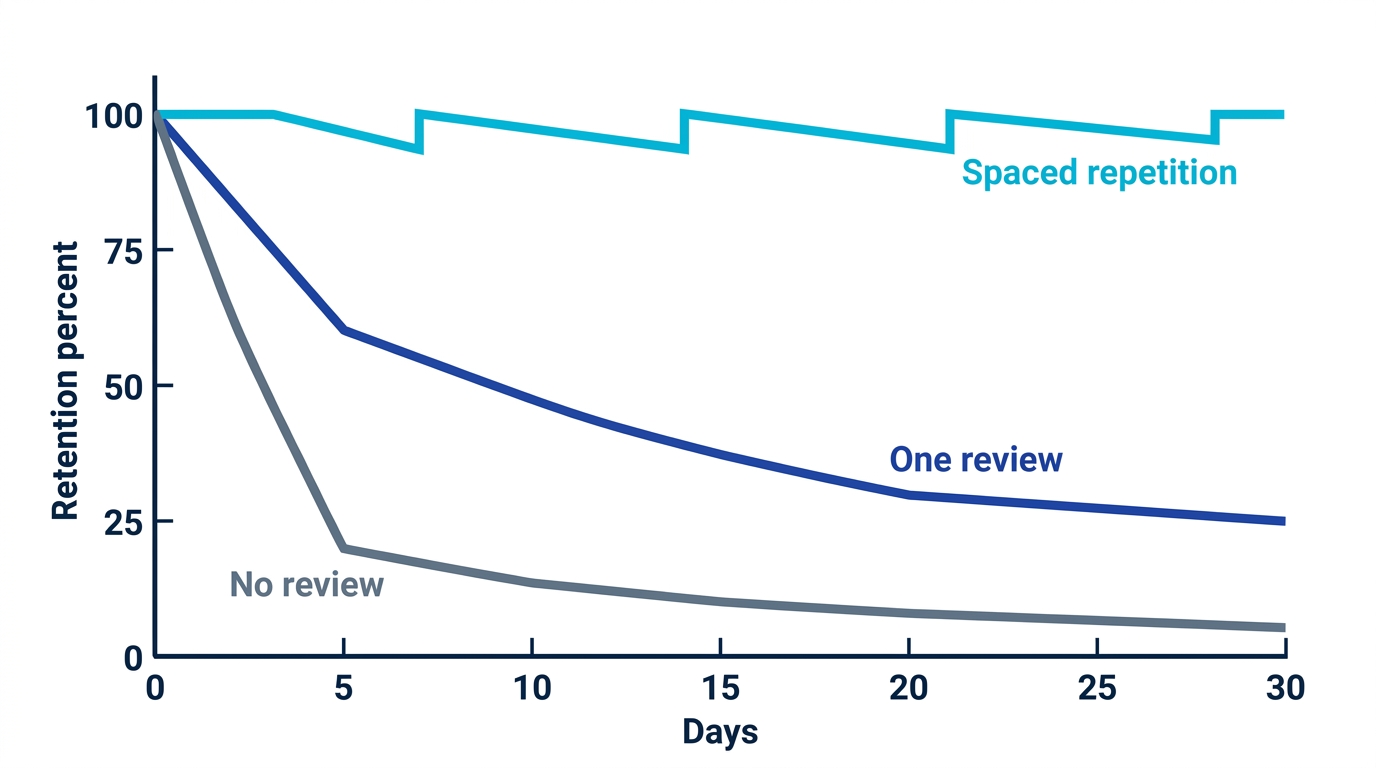
The advantage of spacing is one of the most replicated findings in cognitive psychology, from Ebbinghaus through Cepeda et al. (2008) to modern FSRS scheduling. This matches what we see in Memly: cards reviewed on the FSRS schedule resurface before they are forgotten, while one-and-done cards decay like any other unreviewed material, which is exactly what the peer-reviewed literature predicts. A mediocre card on a spaced schedule beats a beautiful card you never see again.
Stop losing cards: connect ChatGPT straight to your deck
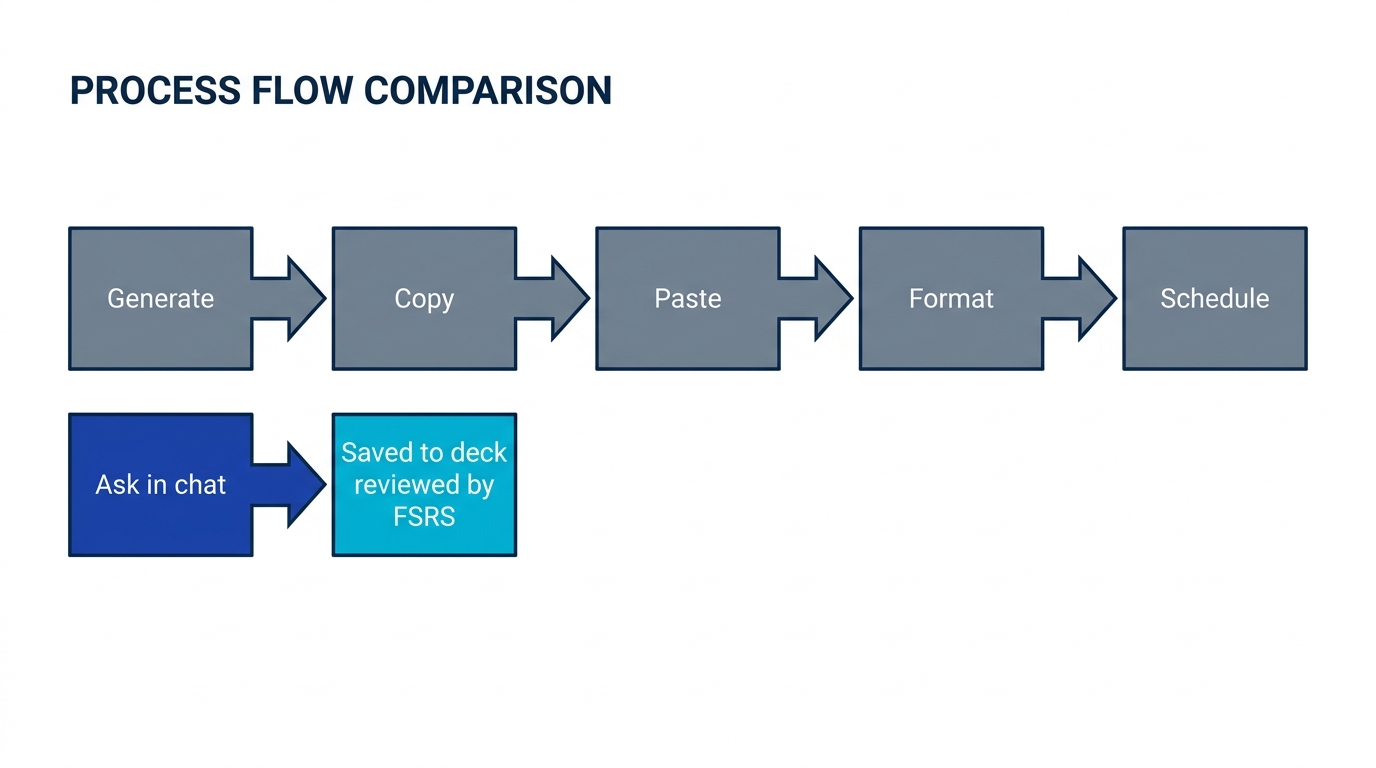
The export-import dance is the weakest link. Every copy, paste, and reformat is a chance to give up. The cleanest fix is to remove the handoff entirely so the cards ChatGPT creates land in your study deck directly.
That is what an MCP connection does. MCP (Model Context Protocol) is an open standard that lets an AI assistant connect to an outside tool, so the assistant can take actions in that tool on your behalf. In this case, it lets ChatGPT or Claude write cards directly into a study deck. Memly runs an official MCP server, so you can connect with a single URL, and the cards the AI generates are saved straight into your Memly deck and scheduled with FSRS, no file in between. You ask in plain language, the cards appear in your deck, and your phone reminds you to review them.
One prerequisite decides whether any of this is available to you. Adding a custom MCP server is a feature of the assistant's connectors, which is generally available on paid ChatGPT and Claude tiers rather than every free plan, so check your assistant's current connector support before you rely on it. On the Memly side, reading and searching a deck works on the free tier, while saving new cards through MCP is a paid Memly feature. If your plan does not support the connector yet, the tab-separated export to Anki above is the fully free fallback. The full walk-through is in how to connect ChatGPT to Memly with MCP.
Common mistakes when making flashcards with ChatGPT
Accepting the first draft
ChatGPT's first pass is a starting point, not a finished deck. The 90-second edit (delete the obvious, split the compound, shorten the long, fact-check the specifics) is where average sets become good ones. Skipping it means studying the model's defaults instead of your priorities.
Trusting numbers and dates without checking
Because ChatGPT generates plausible text rather than retrieving verified facts, it can invent a date, misattribute a quote, or round a figure wrong while sounding completely sure. Any card carrying a specific number, name, or date deserves a five-second glance back at your source before it enters your review rotation, because spaced repetition is just as good at cementing a wrong answer as a right one.
Making too many cards
Asking for 100 cards from one chapter feels thorough and is self-defeating. A focused 20-card set you review for a month beats a 100-card set you never finish. Tell ChatGPT to prioritize the highest-yield facts and cap the count.
Re-reading the chat instead of recalling
Scrolling back through the conversation to "review" is re-reading in disguise, and re-reading is the fluency illusion: it feels like learning while building little durable memory. Always try to answer before you reveal the back of the card.
Treating the chat as storage
A chat thread has no schedule and no record of your errors. The moment you decide to keep cards, move them into a tool built for review. If you are weighing the broader options, the AI-assisted memorization guide lays out the full landscape, including where Anki and modern alternatives fit.
Frequently asked questions
Can ChatGPT make flashcards?
Yes. ChatGPT can turn notes, articles, or textbook sections into question-and-answer flashcards in seconds, and it does this well when you give it clear rules: one idea per card, recall-style questions, and a fixed output format such as a two-column table or CSV. The weakness is not creation but retention, because cards left in a chat are rarely reviewed.
How do I export ChatGPT flashcards to Anki?
Ask ChatGPT to output the cards as tab-separated values with Front and Back columns (tabs avoid the broken-CSV problem caused by commas inside answers), save the text as a UTF-8 .txt file, then use Anki's File then Import to load it. In the import dialog, set Field separator to Tab, map Field 1 to Front and Field 2 to Back, and leave Allow HTML off unless you need it. Anki defaults to the older SM-2 scheduler, so enabling FSRS requires an extra settings change. An AI flashcard generator that schedules with FSRS automatically avoids the import step altogether.
What is the best prompt for making flashcards with ChatGPT?
Use a prompt that sets card-design rules, locks the format, and names the source: ask for one idea per card, recall-based questions, short answers, preserved exact terms, an instruction not to invent facts, and output as a Front/Back table. This structure produces atomic, study-ready cards instead of the wordy, recognition-style cards ChatGPT returns by default.
Does ChatGPT make mistakes in flashcards?
Yes. ChatGPT can hallucinate, meaning it can state a wrong date, name, or figure with full confidence because it predicts likely text rather than retrieving verified facts. Add a "do not invent facts" rule to your prompt and spot-check any card with a specific number, date, or proper noun against your source before you study it, since a memorized error is harder to unlearn than a fact never learned.
Why do I keep losing the flashcards ChatGPT makes?
Because a chat thread is not a study tool. It has no review schedule and no way to resurface cards, so they scroll out of view and are forgotten, and the forgetting curve erases most of the material within a week. The fix is to move the cards into a spaced-repetition app, or to connect ChatGPT to a deck via MCP so the cards are saved as they are created.
Is an AI flashcard generator better than ChatGPT for studying?
For raw drafting, ChatGPT is excellent. For actually remembering the material, a dedicated AI flashcard generator is stronger because it schedules every card with spaced repetition and reviews them across devices, instead of leaving them in a chat. Tools like Memly also generate cards from PDFs, video, and audio, which ChatGPT cannot import into a review schedule on its own.
Conclusion: make them once, remember them for good
Most people who read this will change nothing. They will keep asking ChatGPT for flashcards, admire the output, close the tab, and lose it. The cards from your last study session are probably in a chat thread right now, and you will not notice until the exam, when the one fact you needed turns out to be the one that scrolled away weeks ago.
So you have two options. One is to keep generating cards you will never see again. The other is to spend the same 15 minutes producing atomic, recall-focused cards and then putting them somewhere that schedules the reviews for you, so the work compounds instead of evaporating. The first path feels productive; only the second one builds memory.
The minimal first action: open ChatGPT, paste the structured prompt from this article into your next study session, and send the cards to a deck that reviews them with FSRS instead of leaving them in the chat. You can create a Memly account for free, no credit card needed, connect it to ChatGPT, and try it once today.
