


Within 24 hours of a lecture, your brain quietly discards about 70% of it. Hermann Ebbinghaus measured that forgetting curve back in 1885, and it has not softened since. The Anki deck you keep meaning to build protects exactly 0% of that. So if you are hunting for the best Anki alternative, start here: every day you stick with manual card-making, you are losing memory you already paid for with study time.
If you have ever closed your laptop at midnight with a 50-page lecture PDF unread and an empty Anki deck, you already know the real cost is not Anki's $25 iOS app. It is the exam points that evaporate while you are formatting a card template.
Anki is brilliant. It is also a tool from 2006 that asks 2026 learners to type every question and answer by hand, wrestle with HTML templates, and decode a scheduling system designed before machine learning existed. That gap is exactly why "best anki alternative" has become one of the most-searched study queries this year. This guide compares the five strongest options, with data, so you can find an app that does the boring 60% for you and lets you spend today on actual recall.
Why Anki-Literate Learners Are Looking for an Alternative in 2026
Anki is a free, open-source spaced-repetition flashcard program first released in 2006. It uses an active-recall workout: you answer a question, rate how well you knew it, and an algorithm decides when to show the card again, so each card resurfaces right before you would forget it. That core method is sound; the friction is everything around it.
Let us be clear: this is not an anti-Anki article. Anki is free on desktop and Android (its apps are AnkiDroid on Android, AnkiMobile on iOS, and AnkiWeb in the browser), fully offline, infinitely customizable, and it powers the single most successful study community on earth, the US medical students grinding the community-maintained AnKing deck. If you already love Anki, keep using it. But the people searching for an anki alternative 2026 are not confused beginners. They are Anki-literate learners who hit a wall, and the wall is almost always one of three things.
- Manual card creation is a tax on consistency. A well-made card takes a couple of minutes to write, so a single 200-card chapter is roughly 6-10 hours of typing before you review anything. Present bias is brutal here: the deck you would build "this weekend" rarely gets built, and the reviewing, the part that actually works, never starts.
- The learning curve is real. A basic card takes under a minute, but the friction is the advanced setup: enabling FSRS, wiring up AnkiConnect for AI generation, and editing note types are each documented multi-step processes. Those hours go to tuning the system rather than to retrieving.
- The default algorithm is decades old. Anki ships with SM-2, the spaced-repetition formula Piotr Wozniak built for SuperMemo in the late 1980s, which treats every learner with the same fixed parameters. FSRS (the Free Spaced Repetition Scheduler), a modern algorithm trained on large public review datasets, is available, but as an opt-in, not the default most people ever touch.
Search any "anki alternative reddit" thread and the same complaints repeat: "I love it but I never make the cards," "the UI scares my study group," "I just want to upload my slides." The modern answer to all three is AI-native generation paired with a transparent, adaptive algorithm. That is the lens we use to compare every app below.
The Best Anki Alternative in 2026: 5 Apps at a Glance
We evaluated each app on AI card generation, scheduling algorithm, input formats, pricing, and who it genuinely serves best, and kept Anki itself in the table as the incumbent, so that staying stays a visible option rather than just the thing you are leaving. For most people the answer lands in the same place: the best Anki alternative is the one that turns your own materials into cards automatically and schedules reviews with an algorithm you can verify. On both counts, that points to Memly.
A disclosure, since you will spot the bias anyway: this is Memly's own blog. We have tried to earn your trust by being specific about where Memly falls short, not just where it wins.
Brainscape, RemNote and Knowt share a single slot because each solves one narrow problem rather than replacing Anki outright, and Amgigorae earns its place as a regional standout rather than a general pick.
| App | AI Generation | Algorithm | Pricing | Best For |
|---|---|---|---|---|
| Memly | Full: PDF, image, video, audio, web | FSRS (modern, per-card) | Free tier; paid plan for heavy AI use | Learners who want AI speed plus proven science |
| Anki (incumbent) | None natively (add-ons only) | SM-2 default; FSRS opt-in | Free on desktop/Android; ~$25 once on iOS | Power users who want maximum control for free |
| Gizmo | Full: PDF, YouTube, PPT, notes | Proprietary (black box) | Subscription (pricing has changed over time; check their site) | Gamified, casual study (at a steep price) |
| Quizlet | Partial: AI tests, text input | Proprietary (not true SRS) | Free tier; growing Quizlet Plus paywall | Group study and shared sets |
| Brainscape | Limited | Confidence-based repetition | Paid for serious use | Self-rated confidence study |
| RemNote | Moderate | SM-2 variant | Free tier; paid for power features | Note-takers who want notes plus SRS |
| Knowt | Moderate | Basic SRS | Free | Cost-sensitive, Quizlet-style study |
| Amgigorae (암기고래) | None; ships 80,000+ preset words | Repetition-based (not FSRS) | Free with in-app purchases | Korean exam prep from preset lists |
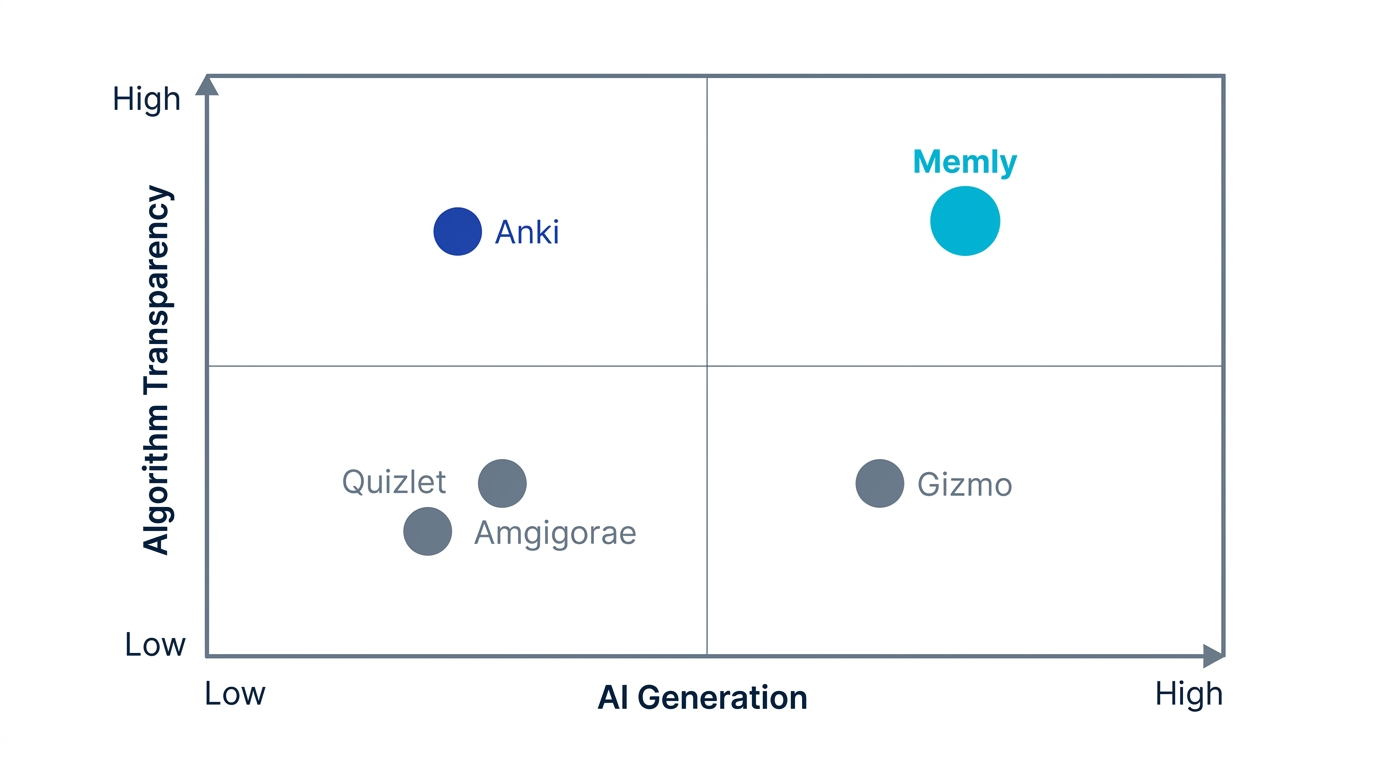
The pattern in that table: the apps that actually solve Anki's manual-card problem are AI-native, and among those, only some pair that speed with an open, transparent algorithm. That one distinction sorts the field better than any feature checklist.
The Before/After of Switching from Manual Anki
Cognitive science is unambiguous about what makes flashcards work, and it has nothing to do with how you make the cards. Dunlosky et al. (2013), in their landmark review of ten study techniques, ranked practice testing (active recall) and distributed practice (spaced repetition) as the two most effective, both far above re-reading and highlighting. Cepeda et al. (2008) showed that spacing reviews across optimal intervals can double long-term retention versus massed study. The cards are just the delivery mechanism. Manual creation adds zero learning benefit that retrieval itself does not already provide; it only adds hours of friction that, per present bias, most people never pay.
The contrast that actually changes your outcome is not a feature difference at all. It is when the reviewing starts. For a single exam chapter, that is where the manual path and the AI-native path part company.
| The behavioral shift | Before: Manual Anki | After: AI-Native Alternative |
|---|---|---|
| When reviewing actually starts | "This weekend": after 6-10 hours of typing, so often never | Today, in 15 minutes, straight from an uploaded file |
| What stands between you and your first review | Templates, add-ons, and sync config to set up | Upload and go, zero configuration |
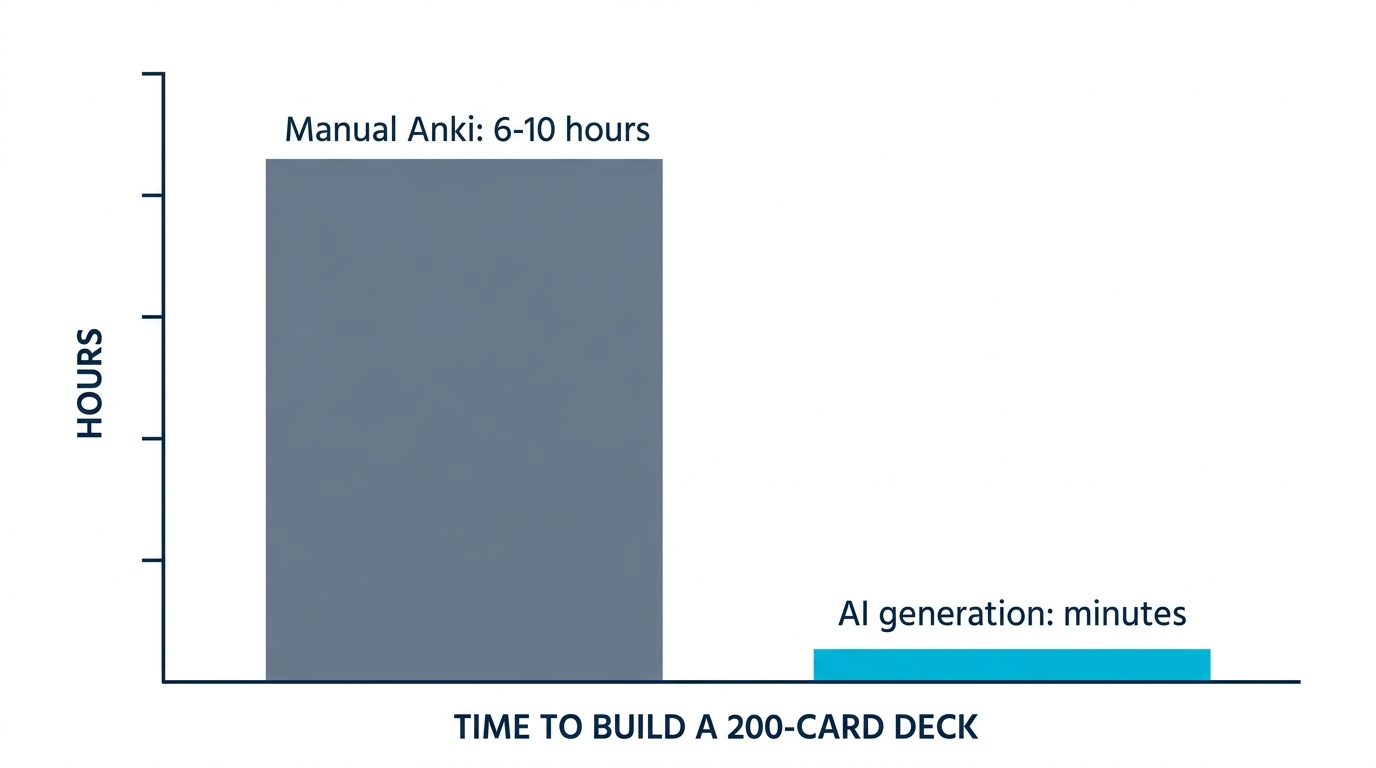
The "After" column is not magic; it is just moving the human effort from transcription (which a model does in seconds) to retrieval (which only you can do).
1. Memly: AI Generation Plus FSRS, Built In From Day One
Memly is the alternative that most directly fixes both of Anki's pain points at once. It is an AI flashcard app that auto-generates cards from PDFs, images, lecture videos, audio, and web pages, turning the 6-to-10-hour deck into a minutes-long upload, and it schedules every review with FSRS, the same modern spaced-repetition algorithm that ships built into Anki but is off by default. The difference is that in Memly, FSRS is the default, tuned per card and per user, with no configuration step you can skip and regret later.
That pairing is the whole point. Gizmo gives you AI speed but a black-box algorithm you cannot inspect. Anki gives you FSRS but only after manual cards and manual setup. Memly is the rare option that does not force the trade-off: AI generation like the newcomers, an open scheduler like the best version of Anki. We cover the head-to-head in detail in Memly vs Anki.
On pricing (and we will be as specific here as we were about Gizmo): Memly is genuinely free to start, with no credit card, on iOS, Android, and web. The free tier includes AI card generation and FSRS scheduling, so you can convert your own materials into a working deck without paying.
The free plan does cap how much you can generate and store; sustained, daily-volume use moves you onto a paid plan at $4/month (Plus) or $8/month (Pro), with discounted annual options at $36 and $72 per year, a fraction of what a sustained Gizmo subscription typically costs (Gizmo's paid pricing has changed over time; check their site for current rates). For the full math on how that compares to Anki's one-time iOS fee and the paid alternatives, see our breakdown of Anki's real cost in 2026. If you are switching specifically because you grind hundreds of new cards a week, check the current free-tier caps and live pricing before you commit, because that is the number that decides whether the free plan is enough for you.
On card quality, the fear every careful Anki user has: AI generation is fast, but it is not infallible. Memly's cards are editable individually and in bulk, and a quick review pass after generation is still the smart move: it is far faster to skim and fix a generated deck than to type one from scratch, but you should expect to correct the occasional awkward or over-broad card rather than trust every one blindly. Speed is the win here; it does not replace your judgment on what makes a good, atomic card.
On offline use, be clear-eyed: Memly is a cloud app. AI generation needs a connection, and review syncs through the cloud, so it does not match Anki's fully-offline desktop experience. If you do most of your studying on planes or underground with no signal, that is a real trade-off to weigh. Anki still wins on pure offline reliability.
For power users, Memly also ships an official MCP server: connect ChatGPT or Claude with a single URL, and the cards the AI generates in conversation save straight into your Memly deck, scheduled with FSRS. It is the zero-setup version of the AnkiConnect-plus-GPT workflow that power users otherwise spend hours assembling. If that sounds like jargon, ignore it: the everyday flow is simply upload a PDF and get a deck.
On effectiveness, Memly's internal, self-reported survey of users (n=648) found that those who switched to its FSRS-scheduled, AI-generated workflow reported roughly 20% higher recall at 30 days than with their previous study app. Treat that as directional rather than peer-reviewed: it is a self-selected user sample, not a controlled trial. It is, however, consistent with the well-established finding that removing the friction which stops people from spacing reviews leads to better retention, the broad direction Cepeda et al. and Bjork document (though their work speaks to spacing in general, not to any single app's numbers).
- Best for: Anki-literate learners who want the speed of AI generation without giving up algorithm transparency.
- Strengths: Multi-format AI input (including video and audio, which Anki and Gizmo do not handle natively), FSRS by default, official MCP server for Claude and ChatGPT, a real free tier.
- Watch-outs: Cloud-based, so weaker offline than Anki; generated cards still warrant a quick edit; newer ecosystem without Anki's nearly two-decade library of pre-made community decks like AnKing (import options exist, but expect cleanup; see the FAQ on moving decks below).
2. Gizmo: AI-Native and Gamified, but Expensive
Gizmo (launched 2023) is the app most often recommended in "apps like anki" threads when the complaint is manual card-making. It generates flashcards from PDFs, YouTube videos, PowerPoint decks, and pasted notes, and wraps the experience in gamification: lives, streaks, and a polished mobile feel that makes Anki's interface look its age. For a casual learner who wants something fun and AI-first, Gizmo is genuinely appealing.
Two things hold it back as a long-term Anki replacement. The first is the algorithm: Gizmo uses a proprietary scheduler it describes as AI-powered, but it is a black box. Unlike SM-2 (fully documented) or FSRS (open-source and openly benchmarked against large public review datasets), you cannot inspect the parameters, audit the methodology, or verify it against published results. For a casual user that is fine; for a serious student optimizing thousands of reviews, an unverifiable algorithm is a real risk.
The second is price. Gizmo's pricing is steep. It is subscription-based, and its paid pricing has changed over time, so check their site for current rates. Sustained over a year, a Gizmo subscription is a hard sell against Anki's free desktop tier and the free-to-start AI alternatives. The gamification is engaging, but lives and streaks are motivation scaffolding, not a scheduling algorithm. If Gizmo's AI-first approach appeals to you but the price or the black box does not, our Anki vs Gizmo comparison maps out exactly where each one fits.
- Best for: Casual learners who value gamification and do not mind a premium price.
- Strengths: Strong AI generation, modern UX, engaging streak mechanics.
- Watch-outs: Opaque algorithm, steep subscription pricing, smaller shared-deck ecosystem.
3. Quizlet: Massive Library, but Not True Spaced Repetition
Quizlet is the most familiar name on this list, with hundreds of millions of user-made sets and a deep catalog for almost any subject. It has added AI features (AI-generated practice tests and an AI tutor), and its gamified study modes (Match, Learn, Test) are genuinely fun for quick review. If your goal is finding an existing set on a popular topic or studying with classmates, Quizlet is hard to beat on sheer content volume.
But for an Anki-literate learner, Quizlet has one disqualifying gap: it is not a true spaced-repetition system. Its scheduling is proprietary and basic, nowhere near the per-card forgetting-curve modeling that makes Anki (and FSRS) effective for long-term retention. Add to that an increasingly aggressive paywall, where features that used to be free now sit behind Quizlet Plus, and it is better understood as a study-set marketplace than as an Anki replacement. If your real question is retention rather than browsing shared sets, our Memly vs Quizlet comparison shows exactly what you trade away on scheduling, and our Quizlet vs Brainscape comparison covers the same trade-offs against another mainstream option.
- Best for: Group study, browsing pre-made sets, light test prep.
- Strengths: Enormous shared library, social study modes, brand familiarity.
- Watch-outs: Weak spaced repetition, growing paywall, AI input limited to text.
4. Brainscape, RemNote, and Knowt: Strong Niche Picks
Three more alternatives deserve a place on any serious shortlist, each solving a specific kind of problem rather than competing head-on as a general Anki replacement.
Brainscape: Confidence-Based Repetition
Brainscape replaces binary right/wrong grading with a 1-to-5 confidence rating after each card, then prioritizes the cards you feel least sure about. Some learners genuinely prefer this self-directed feel, and Brainscape's marketplace of expert-certified decks is high quality. The trade-offs: it is paid for serious use, its AI generation is limited, and confidence-based repetition is less scientifically validated than FSRS or even SM-2.
RemNote: Notes Plus SRS
RemNote merges note-taking with spaced repetition: you write structured notes and they convert into flashcards automatically, eliminating the separate card-creation step. It is excellent if you already take detailed notes and want a knowledge graph linking your concepts. The scheduler is an SM-2 variant rather than FSRS, and the workflow is overkill if you do not live inside your notes.
Knowt: Free, Quizlet-Style
Knowt is the budget pick: a free, Quizlet-like app with AI features and an interface familiar to anyone leaving Quizlet over its paywall. It is great for cost-sensitive students, though its spaced repetition is basic compared to a dedicated SRS engine.
5. Amgigorae (암기고래): The Korean Standout, with a Caveat
Worth a specific mention because it dominates its market: Amgigorae (암기고래) is the leading Korean memorization app, supporting 8 languages with 80,000+ preset words, voice and audio repetition, and category-based study sets for civil-service exams, language tests, and more. For Korean learners drilling a fixed vocabulary list, it is polished and effective, and the audio-repetition loop is a real strength for on-the-go review.
The caveat matters for the audience of this article. Amgigorae ships preset word lists. It does not generate cards from your own materials, so it cannot turn your lecture PDF or your textbook chapter into a deck the way an AI-native app does. It is also not FSRS-based. So if your frustration with Anki is "I have my own materials and no time to make cards," Amgigorae solves a different problem (curated preset content) than the one you have (your content, automated).
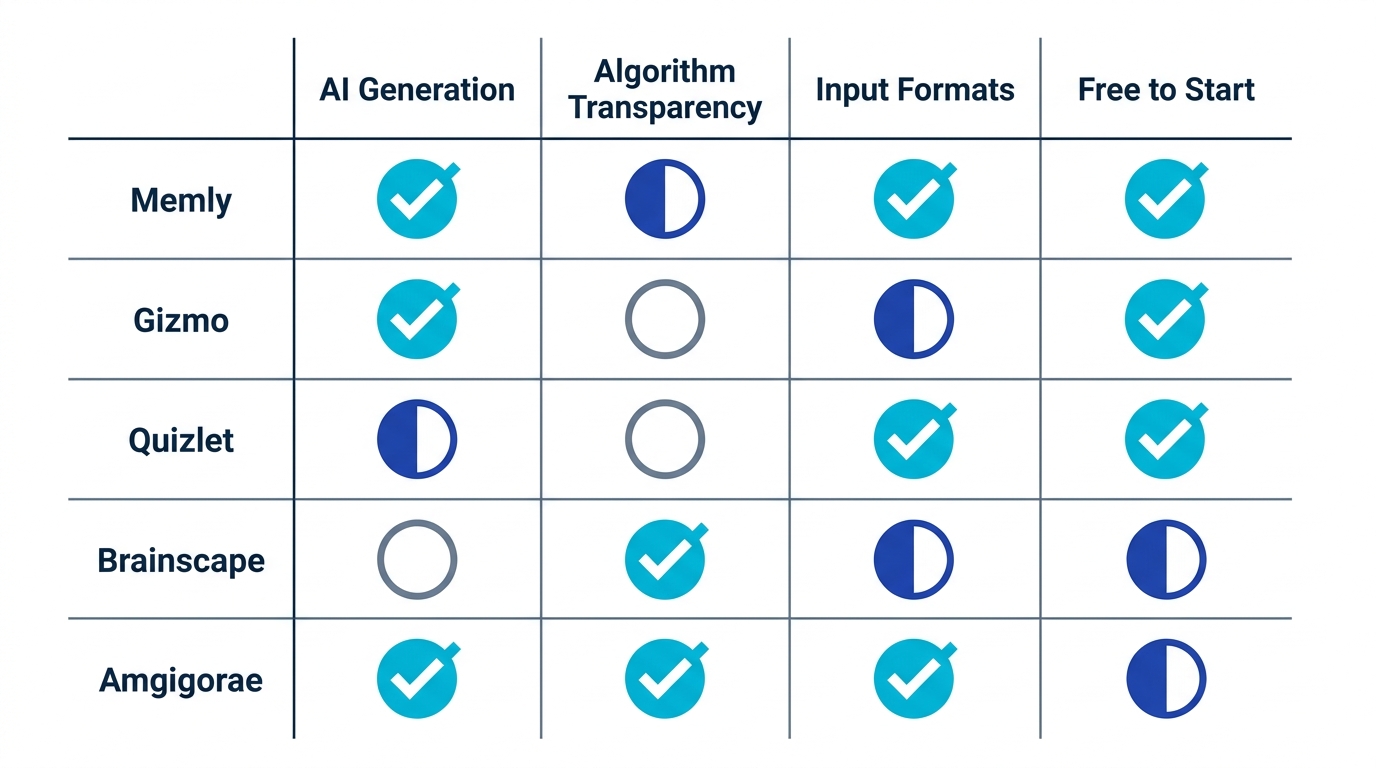
The Two Things That Actually Matter When You Choose
Strip away the UI gloss and the streaks, and only two questions decide whether an Anki alternative will actually improve your results.
Question 1: Does it generate cards from YOUR materials?
The entire reason to leave manual Anki is to delete the 6-to-10-hour transcription tax. An alternative that only offers preset content (Amgigorae) or only imports text you still have to assemble (Quizlet's text input) has not solved your problem. The two that have solved it, Memly and Gizmo, accept your PDFs, slides, recordings, and pages, and hand you a deck in minutes. Memly extends this furthest, handling video and audio that neither Anki nor Gizmo process natively, plus an MCP server that captures cards straight from a Claude or ChatGPT chat.
Question 2: Can you trust the scheduler?
Speed is worthless if the app shows you cards at the wrong time. This is where transparency separates the field. FSRS is open-source and openly benchmarked against large public datasets; you can read exactly how it models your forgetting curve. SM-2 is old but fully documented. Gizmo's and Quizlet's schedulers are proprietary and unverifiable. Bjork's principle of "desirable difficulty" (learning sticks best when each review lands right at the edge of forgetting) is only reliably achievable with an algorithm you can actually evaluate. That is why we weight FSRS-by-default so heavily.
| Decision Driver | What to look for | Which apps pass |
|---|---|---|
| Generates from your own files | PDF, image, video, audio, web upload | Memly (all five), Gizmo (most) |
| Transparent algorithm | Open-source or fully documented | Memly (FSRS), Anki (SM-2/FSRS) |
| Free to start, no card needed | Real free tier, not a trial wall | Memly, Anki, Knowt |
| Zero-setup AI capture | Save AI cards without add-on wiring | Memly (MCP server) |
| Cross-platform from one account | iOS, Android, and web | Memly, Quizlet |
| Works fully offline | Review and create with no connection | Anki (the cloud and AI apps need a connection) |
One row belongs to Anki alone, and it is not a small one. If your studying happens on a commuter train with no signal, every AI-native app on this list is asking you to accept a worse version of something Anki already does perfectly.
Anki Alternatives: Frequently Asked Questions
What is the best Anki alternative in 2026?
For learners who want to stop making cards by hand without giving up a trustworthy algorithm, Memly is the strongest all-around Anki alternative in 2026. It auto-generates flashcards from PDFs, images, video, audio, and web pages, and schedules every review with FSRS by default, the same modern algorithm Anki users add manually. Gizmo is a strong AI-native option if you prefer gamification and accept a premium price, while Anki itself remains best for power users who want maximum customization for free.
Is there a free alternative to Anki?
Yes. Anki itself is free forever on desktop and Android (only the iOS app costs a one-time ~$25), which is a real strength worth respecting. Among AI-powered alternatives, Memly is free to start with no credit card required, and Knowt offers a free Quizlet-style experience. The practical difference is that Memly's free tier includes AI card generation and FSRS scheduling, so you can convert your own materials into a deck without paying upfront. The honest caveat: unlike Anki's unlimited free desktop tier, an AI app's free plan has usage caps: a ceiling on how much you can generate and store before a paid plan kicks in. If you only need a few decks, the free tier is plenty; if you are generating hundreds of cards a week, check the current caps so you know where the paid line falls.
What do Reddit users recommend as an Anki alternative?
Across study subreddits, the recurring theme is not a single app but a single complaint: the time cost of manual card creation. When people ask for an Anki alternative, the most upvoted answers tend to point toward AI-native apps that generate cards automatically. Gizmo is the name that surfaces most often, with newer AI tools like Memly coming up as the category grows, alongside Quizlet for group study and RemNote for note-takers. Rather than chase whichever app is trending in a given thread, the more durable advice is to prioritize two things: an app that turns your own materials into cards, and a transparent scheduling algorithm rather than a proprietary black box.
Which Anki alternative generates flashcards from a PDF or video?
Memly and Gizmo both generate flashcards from uploaded PDFs and YouTube/video content. Memly goes furthest on input formats, also handling images, audio recordings, and web pages, plus an official MCP server that saves cards generated in ChatGPT or Claude directly into your deck. Anki can do this only through community add-ons that require manual setup, and Quizlet's AI generation is largely limited to text input.
Is FSRS better than Anki's default SM-2 algorithm?
FSRS is a modern spaced-repetition scheduler, trained on large public review datasets, that adapts review timing per card and per user, while SM-2 (from the late 1980s) applies fixed parameters to everyone. FSRS is open-source and openly benchmarked, generally requiring fewer reviews to reach the same retention. In Anki, FSRS is available but not the default; apps like Memly use FSRS by default so you get the modern algorithm without any configuration step.
Can I move my Anki decks to another app?
Many modern alternatives support importing Anki decks, though compatibility varies: simple text-based cards transfer cleanly, while complex custom templates with HTML/CSS and media may need cleanup. Before fully switching, export your Anki deck and test the import on a single deck first.
Here are the specifics that matter most for a switcher, because they are deal-breakers if you skip them. Check whether your target app imports Anki's native package files (.apkg / .colpkg) or only a plain CSV export. The two differ enormously in what survives. Cloze deletions and media (images, audio) often need verification, since not every importer preserves them.
The single biggest gotcha is scheduling state: your review history (intervals, ease, and due dates) usually does not transfer. Most apps, Memly included, treat imported cards as new and reschedule them from scratch under their own algorithm. If you are a med student with years of reviews on an 8,000-card AnKing deck, that reset is a genuine cost to weigh honestly: you keep the card content, but the scheduling state starts over. If you are choosing specifically for medical school, we weigh these options for that use case in the best flashcard app for med school. For high-stakes board prep built on a mature community deck, staying on Anki is often the right call; AI-from-your-own-materials shines most when you are building new decks from your own lectures, slides, and notes rather than inheriting a polished library built up over nearly two decades. The upside, when a fresh start is acceptable, is that an FSRS-native app reschedules those imported cards with the modern algorithm automatically.
Your Two Options, Starting Today
If you want the full picture before you decide, our pillar guide to AI-powered Anki alternatives and AI-assisted spaced repetition walks through the research and the tooling in depth. But comparisons can also become their own form of procrastination: there is always one more article to read instead of one card to review.
So the real choice is not "which of these apps is theoretically best." It is binary. Option one: keep typing cards by hand in Anki, keep meaning to set up FSRS this weekend, and keep falling for the it'll-get-built-this-weekend trap where the deck never quite gets built. Option two: let an AI turn the material you already have into a deck in minutes, scheduled by an algorithm you can actually inspect, and start retrieval, the part that works, today. If Anki already fits your life, the honest move is to keep using it. But if you have read this far, that is probably not the option you came looking for.
The fastest way to decide is to find out for yourself rather than take this article's word for it. Take the file that is actually sitting there unread, the 50-page lecture PDF or the photo of your notes, upload it to Memly, run a single ten-minute review session, and judge the cards and the scheduling on your own materials. No card-making, no setup, no credit card.
