


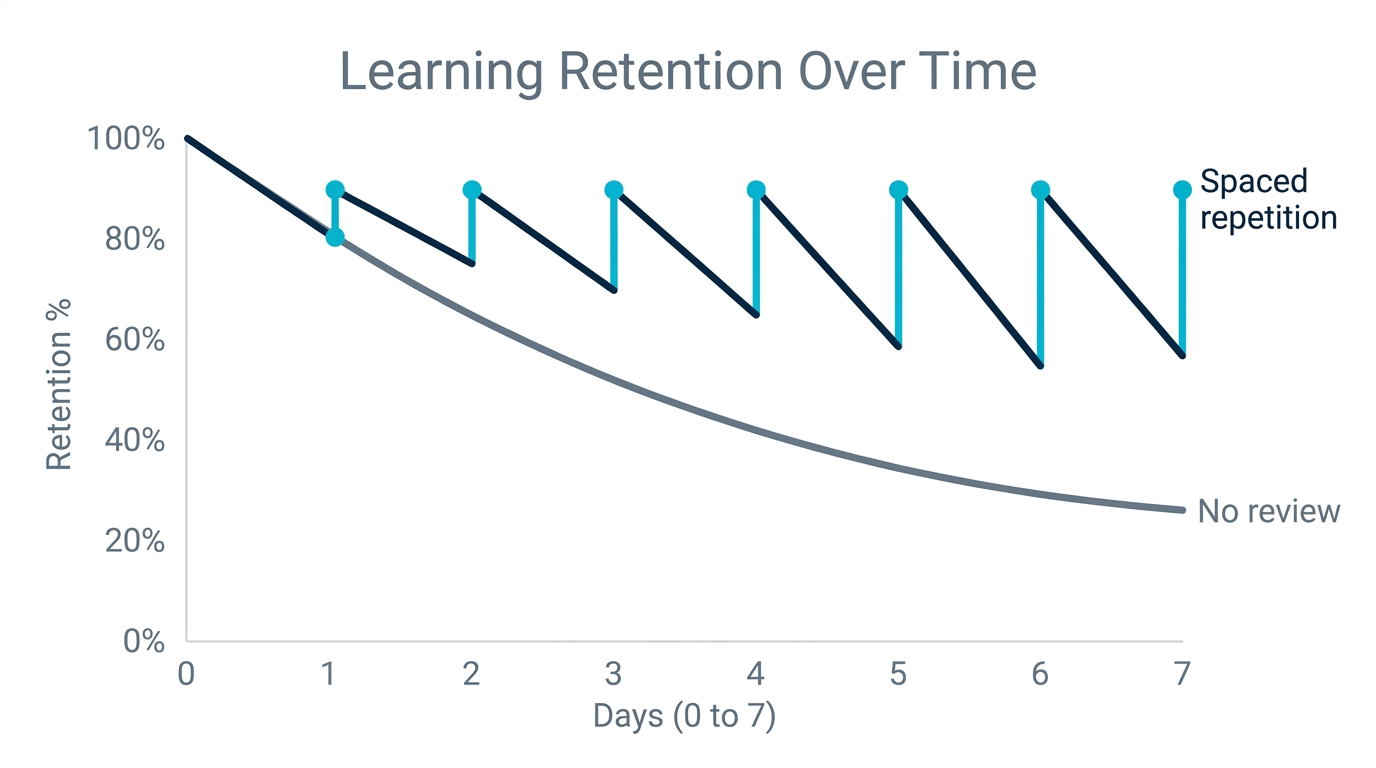
Right now, the lecture you sat through this morning is already evaporating. Ebbinghaus measured it in 1885 and modern replications confirm it: without active review, you lose roughly 70% of new material within 24 hours. Commonly cited estimates put the preclinical fact load somewhere in the tens of thousands of discrete items, and the AnKing master deck, which most US students treat as the canon, runs to roughly 35,000 cards on its own. That is not an abstraction. It is hundreds of hours of attendance, reading, and note-taking quietly draining out of your head while you sleep. Choosing the best flashcard app for med school is a decision about which tool stops that loss with the least wasted time.
Anki and the community-built AnKing deck have been the default answer for US med students for over a decade, and for good reason. But in 2026 a new bottleneck has appeared. The volume of source material (recorded lectures, dense PDFs, Pathoma chapters, Sketchy decks) now grows faster than any human can turn it into cards by hand. This guide is an honest look at the best flashcard app for med school, weighing Anki, AnKing, Gizmo, Quizlet, and AI-native options, so you can decide where your scarce hours actually go.
The Real Cost of Med School Memorization
Medical school is the single most memorization-heavy academic path in existence, and the math is brutal. A typical preclinical student is expected to hold pharmacology, microbiology, anatomy, biochemistry, and pathology in working memory simultaneously, then retrieve any fragment on demand under timed exam conditions. For the method-level tactics that keep the two hardest of these from blurring together, see our guide to memorizing anatomy and pharmacology at scale.
The forgetting curve is the enemy, but cramming is the trap. Cepeda et al. (2008) ran a large-scale spacing experiment and found that distributing reviews over time produced dramatically better long-term retention than massing them the night before. Dunlosky et al. (2013), reviewing ten common study techniques, rated only two as high-utility for nearly all learners: practice testing (retrieval) and distributed practice (spacing). Flashcards with a good spaced-repetition algorithm are the only common tool that delivers both at once. That is why Anki dominates, and why the algorithm and the card-creation pipeline matter more than the logo on the app.
| Study Method | Long-Term Retention | Evidence Base | Sustainability |
|---|---|---|---|
| Re-reading notes | Low | Rated low-utility (Dunlosky 2013) | Feels productive but retains little |
| Highlighting and summarizing | Low to moderate | Rated low-utility (Dunlosky 2013) | Feels productive but retains little |
| Cramming (massed practice) | High short-term, collapses by exam season | Inferior to spacing (Cepeda 2008) | High burnout risk |
| Flashcards plus spaced repetition | High and durable | High-utility on both axes (Dunlosky 2013) | Sustainable over a multi-year program |
For a med student, then, the debate is not flashcards versus other methods. It is which flashcard system loses you the least time. Every hour spent fighting your software, manually retyping a Pathoma slide, or reviewing cards on an inferior schedule is an hour not spent on retrieval that sticks.
Why Anki and AnKing Became the Med School Standard
The incumbent has earned its position. Anki, released in 2006, is free on desktop, Android, and the web, with a one-time roughly $25 iOS app (AnkiMobile). Its open-source architecture, offline-first design, and local data ownership are genuinely hard to beat. For a four-year program, Anki can cost a student literally nothing beyond an optional one-time iOS purchase.
On top of Anki sits AnKing, a community-maintained master deck of roughly 35,000 cards mapped to First Aid, Pathoma, Sketchy, Boards and Beyond, and Physeo. AnKing represents tens of thousands of hours of crowdsourced curation, complete with tags that let you unsuspend cards as your lectures cover them. Many students now layer AnkiHub on top for paid, continuously updated sync of those cards, and pair it with the Image Occlusion Enhanced add-on for anatomy, histology, and radiology. For pure board-prep coverage, nothing else has this density of vetted, exam-aligned content. AnKing is not just a deck; it is an ecosystem, and for the canon it is unmatched. The honest question is what you bolt onto it for the material it cannot cover.
Where the Anki/AnKing Workflow Strains in 2026
The cracks show up in two places. First, the algorithm. Anki's historical default is SM-2, designed by Piotr Wozniak in 1987. It uses a fixed ease-factor model that does not adapt to your personal forgetting curve. Anki has since built in the Free Spaced Repetition Scheduler (FSRS) as a toggle in deck options, and FSRS is a major step forward. The catch is adoption: most students still run default settings, and many AnKing veterans never flip the switch, leaving thousands of reviews scheduled on intervals that are demonstrably suboptimal. Our pillar guide on AI-powered spaced repetition and Anki enhancement walks through why that single setting matters so much.
Second, card creation. AnKing covers the canon, but it cannot cover your specific lecturer's slides, your school's custom OMM material, or that one obscure NBME topic that always shows up. Most AnKing users do not rebuild the canon by hand; they unsuspend pre-made cards, which takes seconds. The real manual workload is the supplemental, gap-filling cards for your own lectures, and that is where the hours actually disappear. Most students report two to three minutes per well-made card with a cloze on the exact tested term, so even a modest 40 gap cards a week is one to two hours of pure typing on top of everything else. That is the gap AI card generation was built to close, and it is the reason the conversation about an AI-assisted Anki workflow exists at all.
The Best Flashcard App for Med School: Six Options Compared
We evaluated each option on the dimensions that actually move board scores: algorithm quality, AI card generation, input formats, med-specific features like image occlusion, platform coverage, and cost. None of the six wins on all six.
| App | Algorithm | AI Card Generation | Best For Med Students | Pricing Model |
|---|---|---|---|---|
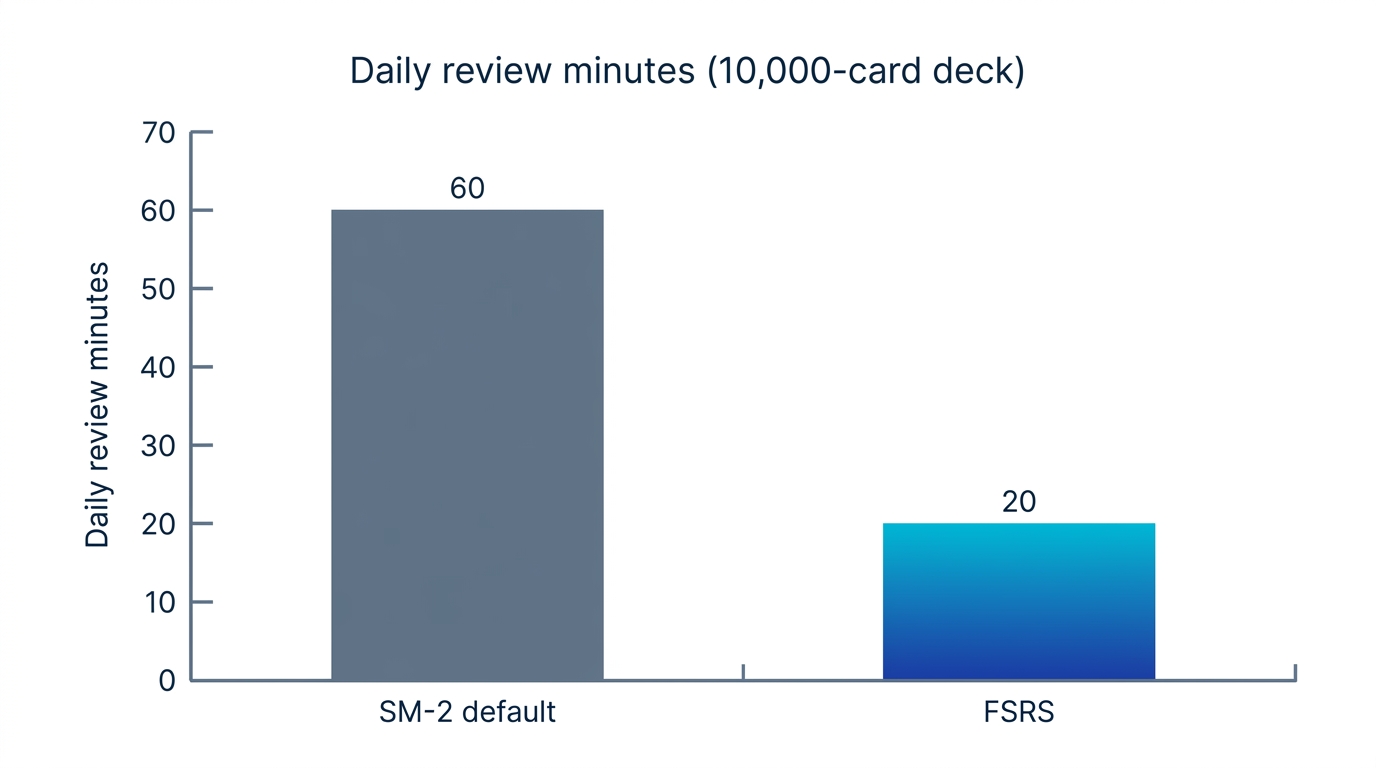
| Anki + AnKing | SM-2 default (FSRS available) | Plugin-based only (AnkiConnect + GPT) | Board-aligned coverage that is already written | Free desktop; ~$25 one-time iOS |
| Memly | FSRS (modern, per-card and per-user) | Native: PDF, image, video, audio, web | Turning your own lectures into cards fast | Free tier (no card); paid plan for higher generation limits |
| Gizmo | Proprietary (undisclosed) | Native: PDF, YouTube, PPT, notes | Gamified motivation, quick generation | Subscription billed as a weekly-equivalent of an annual plan |
| Quizlet | Basic (not true SRS) | AI practice tests, text input | Group study, shared user-made sets | Free tier; Plus subscription |
| Brainscape | Confidence-based repetition | Limited | Self-assessment learners | Paid Pro |
| RemNote / Knowt | SM-2 variant / basic | Notes-to-cards / Quizlet-like | Note-takers; free Quizlet alternative | Free tier; paid upgrades |
1. Anki plus AnKing: The Coverage Champion
The reason to choose Anki plus AnKing is content you cannot get anywhere else: a curated deck mapped to every major board resource, vetted against UWorld question patterns, and synced through AnkiHub so it updates with the canon. The gotcha is twofold. The setup and HTML/CSS customization carry a real learning curve, and the algorithm ships on the older SM-2 default, so many students unknowingly forfeit the efficiency FSRS offers until they find the toggle. Who should be cautious here: a time-pressed student who needs cards from this week's specific lecture, because building those by hand is exactly the labor AnKing was never designed to do. One context note that reshapes the stakes: Step 1 has been pass/fail since 2022, but Step 2 CK and the NBME shelf exams during clerkships are still scored, so durable retention through the Dedicated study period still drives the outcomes that matter for residency.
2. Memly: AI Generation Meets Modern FSRS
Memly is an AI flashcard app built around the workflow gap AnKing cannot fill: turning your source material into cards in seconds. It auto-generates flashcards from PDFs, images, lecture videos, audio recordings, and web pages, then schedules every card with FSRS, a modern spaced-repetition algorithm that adapts per-card and per-user, in contrast to Anki's older SM-2 default. It runs on iOS, Android, and the web, and it is free to start with no credit card required.
The fear every med student has about AI cards is fair: auto-generated cards are notorious for being vague, single-fact, or just paraphrasing a slide bullet instead of testing the exact buzzword the NBME loves. So it is worth being concrete about what a generation actually produces. Feed Memly a renal-pathology slide on nephritic versus nephrotic syndrome and you do not get one mushy "what is nephrotic syndrome?" card. You get atomic, recall-style cards, for example:
- Cloze: "Nephrotic syndrome is defined by proteinuria greater than {{c1::3.5 g/day}}, hypoalbuminemia, edema, and {{c1::hyperlipidemia}}."
- Q/A front: "Which syndrome presents with RBC casts and hypertension, nephritic or nephrotic?" Back: "Nephritic."
- Q/A front: "Minimal change disease shows what classic finding on electron microscopy?" Back: "Effacement of podocyte foot processes."
That is the same atomic, cloze-on-the-tested-term style an AnKing card uses, which is exactly the point. Every generated card stays editable before it enters your review queue. The honest workflow is generate, then prune: delete the soft cards, tighten the cloze onto the term you will actually be tested on, and only then start reviewing. The AI removes the typing, not your judgment about what is high-yield. Treat the draft deck as a first pass to QA, not a finished product to trust blindly.
On medical images, be clear-eyed about the distinction. Memly generates cards from images, which means it reads a photographed slide or diagram and writes text cards about it (OCR and ingestion). That is not the same as image occlusion, where parts of a diagram are masked so you actively recall the hidden structure. For occlusion-heavy anatomy, histology, and radiology, Anki with the Image Occlusion Enhanced add-on remains the better tool, and the honest blended workflow keeps it there: Anki and AnKing carry occlusion and the canon, while Memly handles your text and lecture gaps. Confirm occlusion support before you assume any AI app replaces that part of your stack.
The second standout feature is Memly's official MCP server. You connect ChatGPT or Claude with a single URL, and any cards the AI generates during a study conversation are saved straight into your Memly deck and scheduled with FSRS, collapsing the old "ask an LLM, copy the answer, build a card by hand" loop into one step. Two prerequisites are worth stating plainly so it does not look frictionless when it is not: you need a ChatGPT or Claude account that supports MCP connectors, and the one-time setup is roughly two minutes to paste the URL. MCP-saved cards land in the same editable queue as any other generation, so the same generate-then-prune QA applies.
On price, to keep this apples-to-apples with the competitors above: Memly's free tier includes AI card generation and FSRS scheduling so you can build and review a real deck without paying, with generation volume capped on the free plan; a paid plan lifts those limits for heavy daily use. On interoperability, the question that makes or breaks a blended workflow: today Memly and Anki are separate review queues rather than a single merged pile, so the practical pattern is to keep AnKing's daily reviews in Anki and run Memly only for the gap cards it generates, rather than expecting one unified queue. If running two review apps is a dealbreaker for you, that is a real cost to weigh, and the consistency that actually drives results is easier to protect when each app owns a clearly separate job.
On effectiveness, Memly reports materially higher long-term retention in its own internal study (n=648): learners retained substantially more over the study window than they had with their prior method. Two honest caveats: this is a self-reported, unaudited internal figure rather than peer-reviewed research, and it measures improvement relative to each learner's previous workflow, not an absolute guarantee. It points in the same direction as the independent literature from Cepeda and Bjork, but treat it as the vendor's own claim, weighed alongside the peer-reviewed work cited throughout this guide.
3. Gizmo: Fast and Gamified, but Pricey and Opaque
Gizmo, launched in 2023, is AI-native and generates cards from PDFs, YouTube, PowerPoint, and notes, wrapped in a gamified shell of lives and streaks that some students find motivating. The two real concerns for med school use are cost and transparency. Its pricing is displayed as a weekly figure but billed as the weekly-equivalent of an annual subscription, so the number you actually commit to is a yearly total, with a reduced student rate available; either way it compounds into real money over a multi-year program. Verify the current annual total in the app before subscribing rather than reading the headline weekly figure as a literal weekly charge. And its algorithm is proprietary and undisclosed, so you cannot verify how its scheduling compares to SM-2 or FSRS, which is uncomfortable when thousands of high-stakes reviews depend on it.
4. Quizlet: Great for Groups, Weak for Spaced Repetition
Quizlet's hundreds of millions of user-made sets and gamified modes make it excellent for collaborative study and quick term drills. But it is not a true spaced-repetition system, and its free tier has grown increasingly paywalled. For the durable, high-volume retention med school demands, Quizlet is a supplement, not a backbone.
5. Brainscape, RemNote, Knowt, and Niche Tools
None of these four is a backbone for board prep. Each is worth knowing for one specific reason:
- Brainscape: confidence-based repetition (rate yourself 1 to 5) with curated certification decks, but limited AI generation and an algorithm less validated than FSRS. Fine for self-assessment learners, weak for high-volume board prep.
- RemNote: SRS baked into a note-taking flow, so it suits students who want cards to fall out of the notes they are already writing. The gotcha is that the scheduler is a basic SM-2 variant, not FSRS.
- Knowt: a free, Quizlet-like option for budget-conscious students who mostly want term drills, not a durable review backbone.
- AMBOSS Anki add-on: not a standalone app, but worth knowing if you live in Anki. It links AnKing cards to AMBOSS articles, which is the kind of ecosystem fit a US Step 1 and Step 2 student actually weighs alongside UWorld and Boards and Beyond.
The Algorithm Question: SM-2 vs FSRS for High-Volume Decks
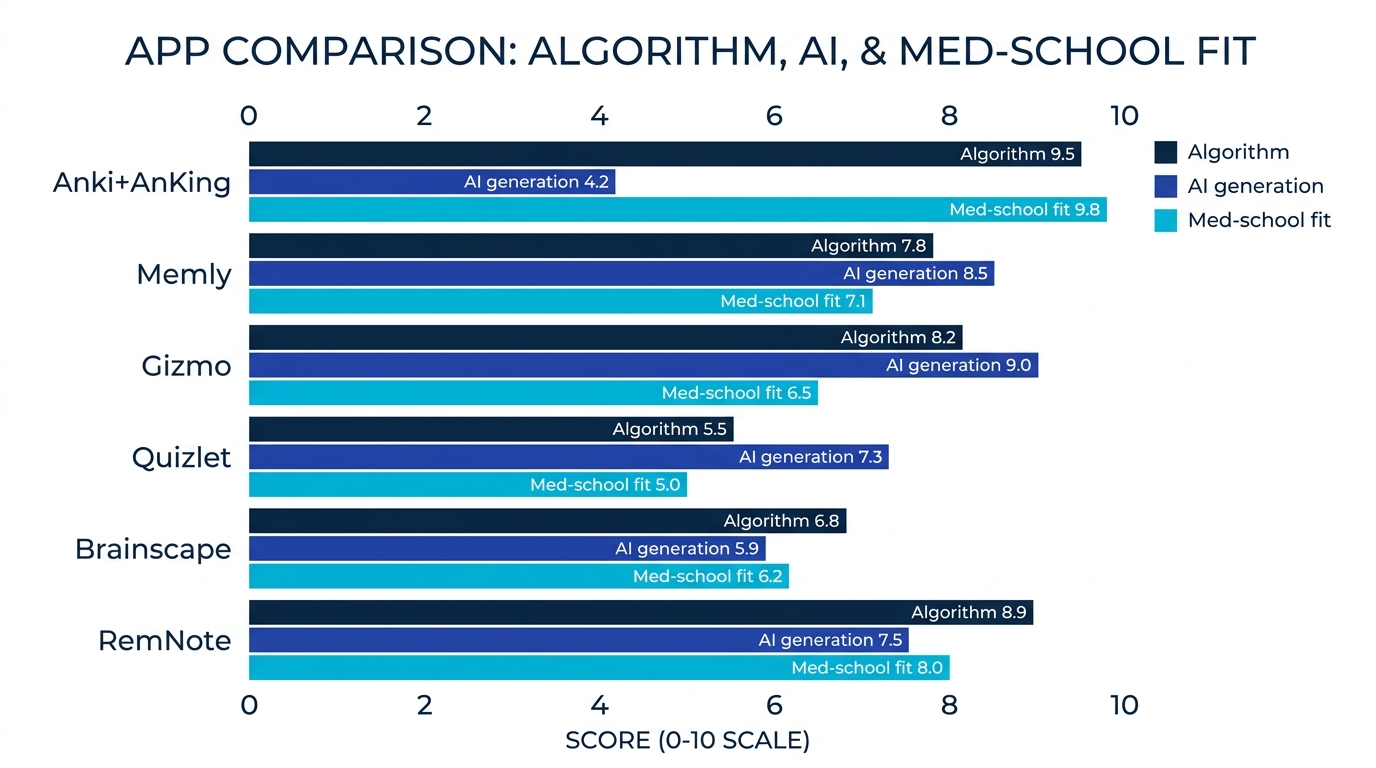
For a med student, the scheduling algorithm is not a footnote. Open-source FSRS benchmarks (the Open Spaced Repetition project, 2023) report that FSRS typically needs 20 to 30% fewer reviews than SM-2 to hit the same retention target. On a large active deck that compounds: trim a quarter off a two-hour daily review load and you reclaim hours every single week, time that goes back into retrieval that sticks instead of redundant reps. The exact saving depends on your deck and settings, so treat any single before-and-after figure as illustrative rather than a promise.
SM-2 treats every learner with the same fixed ease-factor logic. It works, but it cannot model that you lock in pharmacology fast while biochemistry keeps slipping, or that your personal forgetting curve differs from the average. FSRS, by contrast, is built on the same desirable-difficulty principle Bjork articulated. It schedules each card around a target recall probability (commonly about 90%), keeping reviews difficult enough to strengthen memory but not so late that the card is lost. It estimates a probability of recall for each card and personalizes intervals from your own review history.
| Dimension | SM-2 (Anki default, 1987) | FSRS (modern scheduler) |
|---|---|---|
| Personalization | Uniform ease-factor for all cards | Per-card and per-user forgetting model |
| New-card handling | Fixed initial interval | Estimates difficulty from early responses |
| Review volume for same retention | Higher (more daily reviews) | About 20 to 30% fewer reviews for the same target |
| Adaptation to your data | Slow, manual tuning | Continuous, automatic |
| Availability | Default scheduler in Anki | Built-in toggle in Anki (off by default); native and on by default in Memly |
The practical takeaway: if you stay on Anki, turn FSRS on. It is built into deck options and is one of the highest-leverage changes a med student can make in fifteen minutes. If you are starting fresh and want a modern algorithm without configuration, an FSRS-native app like Memly gives you the same scheduling philosophy out of the box. For a deeper technical walkthrough, see our AI flashcard guide.
Before and After: A Realistic Med Student Workflow
Theory is easy to nod along to. The honest test is what your Tuesday actually looks like. Below is the same student, a second-year covering a renal pathology block, with a manual Anki-only workflow versus an AI-assisted one. Present bias is real: the cards you do not make today are the ones you will be cramming in panic next month.
| Step in the Block | Before: Manual Anki/AnKing | After: AI-Assisted (Memly or Anki + AI) |
|---|---|---|
| After a 90-min lecture | Watch recording again, retype slides into cards (2-3 hrs) | Upload the recording or PDF, get a draft deck in minutes |
| Covering the canon | Unsuspend matching AnKing tags (good, but manual mapping) | Keep AnKing for canon, generate cards only for the gaps |
| Asking an AI for clarification | Copy the answer, leave the tab, build a card later (often never) | Cards from the chat save straight into the deck via MCP |
| Daily review | SM-2 default schedule, more reviews than necessary | FSRS schedule, fewer reviews for the same retention |
| Managing the two queues | One app, but every gap card is manual | Two queues, not merged: AnKing reviews in Anki, gap cards in Memly |
| Net effect over the block | Hours lost to card-making, time-pressed before exam | More retrieval, less typing, earlier exam readiness |
The marginal hour is better spent generating cards for what AnKing misses than retyping what it already has. The blended workflow, where AnKing carries the canon and an AI app handles your specific materials, follows directly from the trade-off above: use the vetted deck for the shared high-yield material, and reserve your card-making effort for the lecture-specific gaps it was never built to cover. The one caveat to go in clear-eyed is the queue split: because the two apps do not merge into a single review pile, you protect consistency by giving each a separate, well-defined job rather than half-reviewing both. Our breakdown of Anki vs Gizmo digs further into the manual-versus-AI trade-off.
What to Actually Look For in a Med School Flashcard App
If you strip away the marketing, five criteria predict whether an app will survive contact with a real board-prep schedule. Evaluate any candidate against these before you migrate a single deck.
- Algorithm you can trust: FSRS or an equivalent, peer-examined adaptive scheduler beats a fixed SM-2 schedule and beats any undisclosed proprietary black box you cannot verify.
- Real source-material ingestion: Med content arrives as recorded lectures, dense PDFs, and slide decks mapped to UWorld, Boards and Beyond, and your Dedicated study plan. An app that only accepts typed text forces you back into the manual trap.
- Med-specific card types: Image occlusion for anatomy, histology, and radiology is non-negotiable for visual disciplines, and in Anki that means the Image Occlusion Enhanced add-on specifically. Cloze deletion, the dominant med card type for mechanisms and pathways, matters just as much, so confirm any candidate handles clean single-term clozes.
- Reliable sync and a content path: Cross-device sync has to be dependable, because AnkiWeb sync hiccups are a real pain point worth beating. Also be honest about content: AnKing (kept current via AnkiHub) gives you a vetted, shared high-yield library, whereas an AI app like Memly is for generating your content rather than handing you a community med deck, so know which job you are buying it for.
- True mobile and offline use: The majority of review happens in clinic hallways, on commutes, and in three-minute gaps. If reviews stall without signal or feel clumsy on a phone, consistency dies, and consistency is the entire game.
For a broader, non-med-specific view of how these apps stack up, our guide to the best AI flashcard app for students covers the full landscape with the same evaluation lens.
Frequently Asked Questions
What is the best flashcard app for med school in 2026?
There is no single winner for everyone. For board-aligned content that is already written and vetted, Anki with the AnKing deck remains the standard. For turning your own lectures, PDFs, and recordings into cards quickly with a modern FSRS algorithm, an AI-native app like Memly is the strongest option. The logical answer for most is to blend the two: AnKing for the canon, an AI app for everything it does not cover.
Is there a good Anki alternative for med school that uses AI?
Yes. Memly is an AI flashcard app that auto-generates cards from PDFs, images, lecture videos, audio, and web pages, then schedules reviews with FSRS, a modern algorithm that adapts per-card and per-user. It runs on iOS, Android, and web and is free to start with no credit card. Gizmo is another AI-native option but uses an undisclosed algorithm and is sold as a subscription whose weekly price is the weekly-equivalent of an annual plan, so confirm the yearly total before subscribing.
Should I switch from AnKing to an AI flashcard app?
Usually not a full switch. Keep AnKing for the canon and add an AI app for the gaps: your specific lecturers, custom curriculum, and obscure NBME topics. The catch to plan around is that the two apps keep separate review queues, so assign each a clear job rather than splitting your attention across both.
What spaced repetition algorithm is best for high-volume med decks?
FSRS (Free Spaced Repetition Scheduler) generally outperforms Anki's older SM-2 default for large decks because it models your personal forgetting curve and schedules each card individually, typically requiring fewer daily reviews for the same retention target. If you stay on Anki, enabling FSRS is a quick, high-leverage change. FSRS-native apps like Memly apply it automatically with no configuration.
Can AI flashcard apps handle medical images and anatomy diagrams?
Partly, and the distinction matters. Memly generates text cards from images, video, and audio, meaning it reads a slide or diagram and writes questions about it. That is ingestion, not image occlusion, where parts of a diagram are masked so you actively recall the hidden structure. For occlusion-heavy anatomy, histology, and radiology, Anki with the Image Occlusion Enhanced add-on is still the right tool, so the honest plan is Anki for occlusion plus an AI app for text and lecture gaps.
Can I import my AnKing or Anki deck into Memly, or export to .apkg?
Treat Memly and Anki as separate review queues rather than one merged pile. The realistic blended pattern is to keep AnKing and its daily reviews in Anki and use Memly to generate the gap cards Anki does not cover, instead of trying to consolidate everything into a single app. If a single unified queue is a hard requirement for you, that is a genuine trade-off to weigh before committing to the blended workflow.
How does Memly's MCP server help med students study faster?
Memly offers an official MCP server you connect to ChatGPT or Claude with a single URL. When you ask the AI to explain a mechanism or quiz you on a topic, the flashcards it generates save directly into your Memly deck and are scheduled with FSRS, removing the friction of copying answers out of a chat and rebuilding them by hand. The prerequisites to know up front: you need a ChatGPT or Claude account that supports MCP connectors, and a roughly two-minute one-time setup to paste the URL. Cards saved this way land in the same editable queue as any other generation, so apply the same quick quality check before reviewing.
The Bottom Line: Two Paths, One First Step
Picking the best flashcard app for med school comes down to two honest paths. Path one: keep retyping slides into Anki by hand on a default SM-2 schedule, and accept that card-making will keep eating the hours you need for retrieval. Path two: let an adaptive algorithm and an AI built for your source material carry the mechanical work, so your effort goes into recall that actually sticks. AnKing belongs in both paths; the difference is whether you also close the gap it cannot cover.
You do not have to migrate four years of decks today, and the open loop of an unfixed workflow tends to nag until you do something small about it. If you want the full science of how AI and spaced repetition combine to beat the forgetting curve before you start, our pillar guide on AI-powered spaced repetition and Anki enhancement is the deeper read. The minimal first action is smaller than that: take this morning's lecture, the one already evaporating, generate your first deck free in 15 minutes, prune the soft cards, and review the result. If it saves you an hour, you will know which path is yours.
