


The short answer to the anki cost 2026 question: Anki is free on Windows, macOS, Linux, Android, and the web; on iPhone and iPad it is a one-time purchase of about $24.99 (not a subscription). That is the number you came for. If you have heard that "Anki is free" and then hit a paywall on the App Store, you are not imagining it -- the iOS app is the single paid piece of an otherwise free ecosystem.
Price, though, is only half of what a study tool costs you. The notes you studied last week are already evaporating: in Hermann Ebbinghaus's original 1885 experiments, roughly half of newly learned nonsense syllables were forgotten within a day and about 70-75% within a week without review. Real study material with meaning decays more slowly, but the shape of the curve is the same. So once you know the sticker price, the more useful question is whether the tool you pick will actually stop that bleed -- and how much time, not just money, it will quietly cost you to keep it running.
The sticker price is the easy half. The half that actually costs you is everything after it: why the AnkiMobile figure keeps getting misquoted, whether an iPhone can run Anki free at all, and the point where a free AI-native tool costs less than either paying or not paying.
Is Anki Free? The Short Answer for 2026
Yes and no. Anki is genuinely free on most platforms, and that is a big part of why it has dominated spaced repetition for over fifteen years. But there is one important exception that catches almost every new iPhone user off guard.
- Free on Windows, macOS, and Linux (the desktop app, AnkiDesktop).
- Free on Android (the community-built AnkiDroid app).
- Free on the web for syncing and reviewing (AnkiWeb).
- Paid on iOS and iPadOS -- AnkiMobile is a one-time purchase of about $24.99 USD.
That last line is the whole story. If you study on a Windows or Mac laptop, or on an Android phone, Anki costs you nothing -- ever. If your daily driver is an iPhone or iPad, the official Anki app is a paid download. There is no free, fully-featured first-party Anki app on iOS, and that single fact is why "how much does Anki cost" is one of the most searched questions about the app.
Beyond that one-time iOS purchase, Anki has no ongoing software cost at all. AnkiWeb sync is free with any account, and the entire community add-on ecosystem is free too. No server fee, no storage subscription, no recurring charge of any kind. Against the subscription rivals, where the meter never stops running, that is a genuine difference and not a marketing one.
AnkiMobile Price: How Much Does Anki Cost on iPhone?
The AnkiMobile price is frequently misquoted online -- you will see figures ranging from $25 to $30 depending on the year, the region, and currency conversion. Here is the accurate picture for 2026.
| Platform | App name | Cost | Billing model |
|---|---|---|---|
| Windows / macOS / Linux | Anki (desktop) | Free | None |
| Android | AnkiDroid | Free | None (open source) |
| Web | AnkiWeb | Free | Account-based sync |
| iOS / iPadOS | AnkiMobile | ~$24.99 USD | One-time purchase |
The key thing to understand about the AnkiMobile price is that it is a one-time purchase, not a subscription. You pay the App Store price tier of $24.99 once, and you own the app on your Apple ID forever, including future updates. There are no recurring fees, no in-app purchases for core features, and no annual renewal. The money goes directly to funding development of the entire free Anki ecosystem -- which is why many long-time users happily pay it.
Local pricing varies because Apple sets fixed price tiers per region and currency. In the UK it lands around 24.99 GBP and in the eurozone around 24.99 EUR. In Japan the tier sits near 4,000 JPY as of June 2026, shifting with Apple's exchange-rate-driven tier adjustments rather than staying at a fixed yen figure. There is no student discount and no free trial on iOS -- you either pay the one-time fee or you do not get the official app.
Anki Cost 2026: The Real Total Over Time
A one-time $24.99 sounds trivial, and on pure price it is. But "cost" is more than a sticker. To understand the anki cost 2026 picture honestly, you have to account for the time you invest, because for most learners that is the larger, hidden expense.
| Cost type | Anki (desktop / Android only) | Anki (including iPhone) |
|---|---|---|
| Software, one-time | $0 | $24.99 |
| Recurring software fee | $0 | $0 (no subscription) |
| Effective cost per month (over a 4-year horizon) | $0 | ~$0.52 |
| Hidden cost | Your hours building and maintaining cards | Your hours, plus the $24.99 iOS fee |
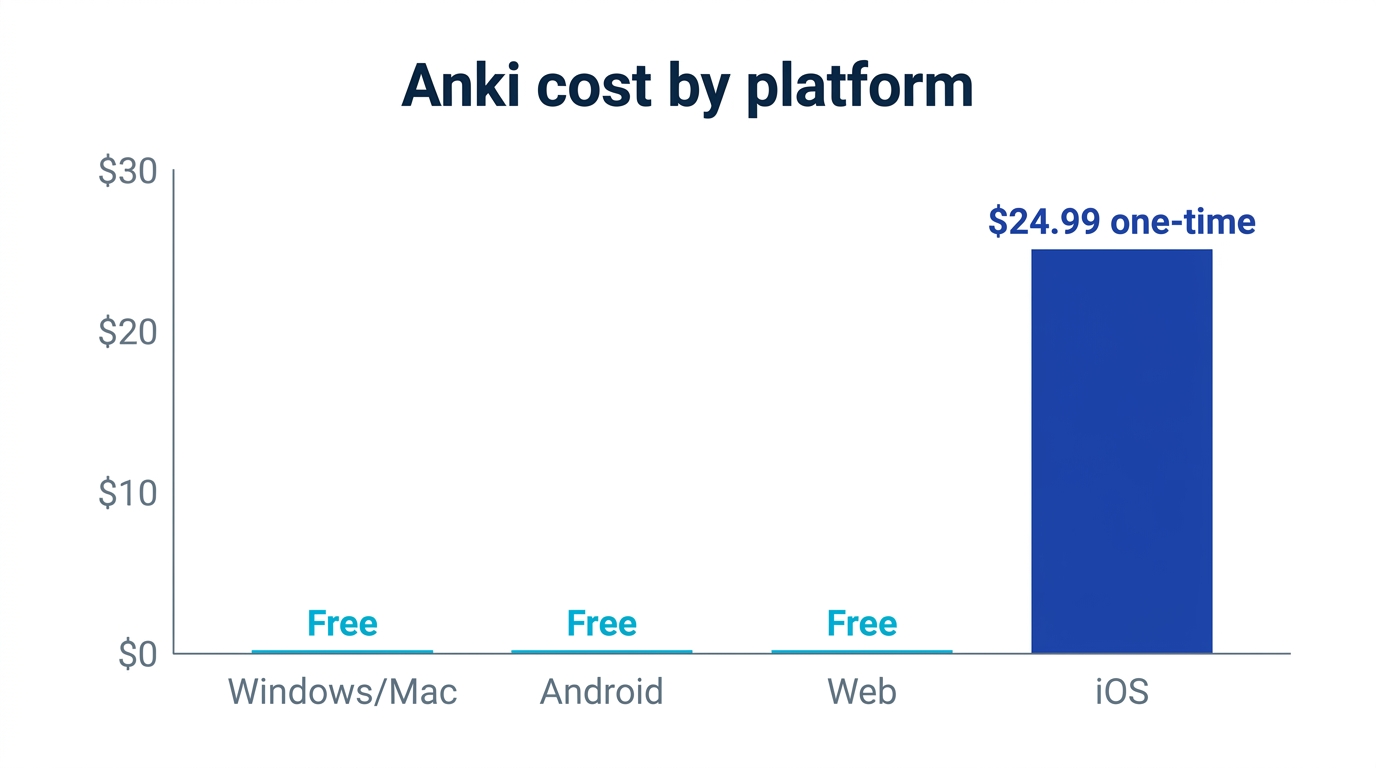
On dollars alone, Anki is close to unbeatable. The honest headline is the raw figure: free on most platforms, $24.99 once on iOS. The ~$0.52-a-month line is illustrative -- it only holds if you spread that one-time fee over a typical four-year study horizon, so treat it as a way to feel the scale, not a billed amount. The real catch lives in the last row. Anki gives you a free, powerful engine, but you supply all the fuel: every card is typed by hand, every deck option is yours to configure, and the learning curve is steep enough that many beginners abandon it in the first week. The price you pay for Anki is rarely money. It is time and friction.
Common Questions About Paying for AnkiMobile
Because the AnkiMobile fee is the one piece of Anki that is not free, a predictable set of worries comes up before people buy. Most of them have a plain factual answer.
Is there a free trial or a cheaper version on iOS?
No. There is no free trial of AnkiMobile and no "lite" tier on the App Store. The closest free option on Apple devices is reviewing through AnkiWeb in your browser, which is covered honestly in its own section below. If you want the native iPhone app, the $24.99 one-time purchase is the only door.
Can I use Anki free on iPhone through the browser?
Partly, and it matters enough to be the deciding factor for many cost-conscious readers. AnkiWeb runs in Safari or Chrome on iOS and lets you review your synced decks without paying. But it is a browser review page, not the app, and the limitations are real:
- No real offline use. AnkiWeb needs a connection. Lose signal on a train or plane and your reviews stop, where the native app works entirely offline.
- No native gestures or speed. There is no swipe-to-grade, no quick tap-to-flip tuned for touch; you are clicking web buttons, which is noticeably slower over a long review session.
- No card creation or add-ons. AnkiWeb is built for reviewing existing cards, not for building decks or running add-ons on your phone.
- Sync friction. You still need a desktop or Android device somewhere in your setup to build and manage decks, then sync them up.
Is it viable for daily study? For light, occasional review on Wi-Fi, yes. For someone whose only device is an iPhone and who reviews on the go, it is workable but gets frustrating fast, which is exactly why the $24.99 app exists. Free third-party "Anki-compatible" iOS clients have come and gone, but they tend to be unofficial, can break on format changes, and are not recommended for anything you depend on -- the official AnkiMobile or a free AI-native alternative are the dependable iPhone paths.
Do I pay again on every device, and what about Family Sharing or refunds?
You pay once per Apple ID, and that purchase covers your iPhone and iPad with every future update included. AnkiMobile supports Family Sharing, so members of your Apple Family group can install it without buying again. Because there is no trial, the only way to "test" it is to buy and, if it is not for you, request an App Store refund through Apple's standard process within the usual window -- approval is at Apple's discretion, not Anki's.
Is AnkiWeb sync free forever, or are there storage limits?
AnkiWeb sync is free with any Anki account, with no recurring fee. There is a generous practical cap on the size of media (images and audio) you can sync, which the vast majority of text-based decks never approach; only unusually large media-heavy collections tend to bump into it. For ordinary studying, treat sync as free and unlimited.
Why is the Android app free but iOS costs money?
AnkiDroid on Android is a separate, community-built open-source project, while AnkiMobile on iOS is developed and maintained by Anki's original author, Damien Elmes. The iOS fee funds development of the entire free Anki ecosystem -- the desktop app, AnkiWeb syncing, and the file format that every version shares. In other words, iPhone users are effectively subsidizing the free experience everyone else enjoys.
Does the price differ by country?
Slightly, as covered above -- it tracks Apple's regional tiers (about 24.99 in USD, GBP, and EUR; near 4,000 JPY in Japan). There is never a student discount, a coupon, or a seasonal sale. Budget for the local equivalent of about twenty-five US dollars and you will not be surprised at checkout.
The Algorithm You Are Actually Paying For: SM-2 in 2026
When you pay for any flashcard app, you are paying for one thing: the scheduling algorithm that decides when to show you each card. Get the timing right and you barely review at all. Get it wrong and you waste hours reviewing cards you already know -- or worse, you forget the ones that mattered.
Anki's default algorithm is SM-2, designed by Piotr Wozniak in 1987 -- the algorithm that originated in his SuperMemo software, the product that effectively invented modern spaced repetition. SM-2 is simple, proven, and has served millions of learners. But it is also nearly four decades old and uses fixed parameters that do not adapt to you as an individual. Robert Bjork's research on "desirable difficulties" and the spaced-practice work of Nicholas Cepeda and colleagues both point to the same conclusion: review timing should bend to the person and the material, not follow a one-size-fits-all curve. SM-2 cannot do that on its own.
The spacing research is worth dwelling on, because it puts a number on the cost of bad timing. Cepeda and colleagues (their 2006 meta-analysis in Psychological Bulletin synthesized hundreds of spacing comparisons, and their 2008 Psychological Science experiment tracked retention across more than a thousand participants) found that the optimal gap before a review grows with how long you need to remember something -- and that reviewing too early wastes effort while reviewing too late lets the memory collapse first. SM-2 approximates this with a fixed multiplier, but it cannot tell that your "capital of Australia" card is easy for you and your "atomic mass of molybdenum" card is hard. It schedules both on roughly the same curve, so you over-review the easy cards and under-review the hard ones. Multiply that inefficiency across a 2,000-card deck and the wasted minutes add up to hours every week.
This is where the newer FSRS (Free Spaced Repetition Scheduler) algorithm comes in. It uses machine learning to personalize intervals, and community benchmarks and the FSRS project's own evaluations report roughly 20-30% fewer daily reviews at the same retention. FSRS models each card's individual difficulty, stability, and retrievability, then schedules the next review for the moment just before you would forget -- exactly the "desirable difficulty" Bjork argues makes recall durable. FSRS has been built into recent Anki versions since v23.10 (2023), so it is no longer just an add-on -- but you still have to know it exists, switch it on in the deck options, run the optimizer on your review history, and re-run it periodically. That is another item on the setup checklist the free price tag never mentions.
Before and After: What Changes When the Tool Does the Work
The best scheduler in the world is worthless if you never open the app. A perfectly tuned FSRS curve and a free SM-2 default are equally useless to a deck you stopped building on day three. So the deepest cost of any study app is not the download fee. It is the gap between "I installed it" and "I actually study with it every day." John Dunlosky and colleagues, in their landmark 2013 review in Psychological Science in the Public Interest, rated practice testing and spaced repetition as the two most effective study techniques they assessed. The problem is never the technique. It is getting yourself to use it consistently when the setup is heavy.
| Stage | Before (manual setup) | After (AI-native, automated) |
|---|---|---|
| Turning notes into cards | Type each card by hand, 1-2 hours per chapter | Upload a PDF or photo, cards generated in minutes |
| Getting started on iPhone | Pay $24.99, then learn deck options | Open the app, start free, no card needed |
| Review scheduling | SM-2 by default; enable FSRS manually | FSRS built in, personalized per card |
| Where you can study | Desktop free, iPhone paid, sync to configure | iOS, Android, and web in one account |
| First useful study session | Often day two or three | Within 15 minutes, today |
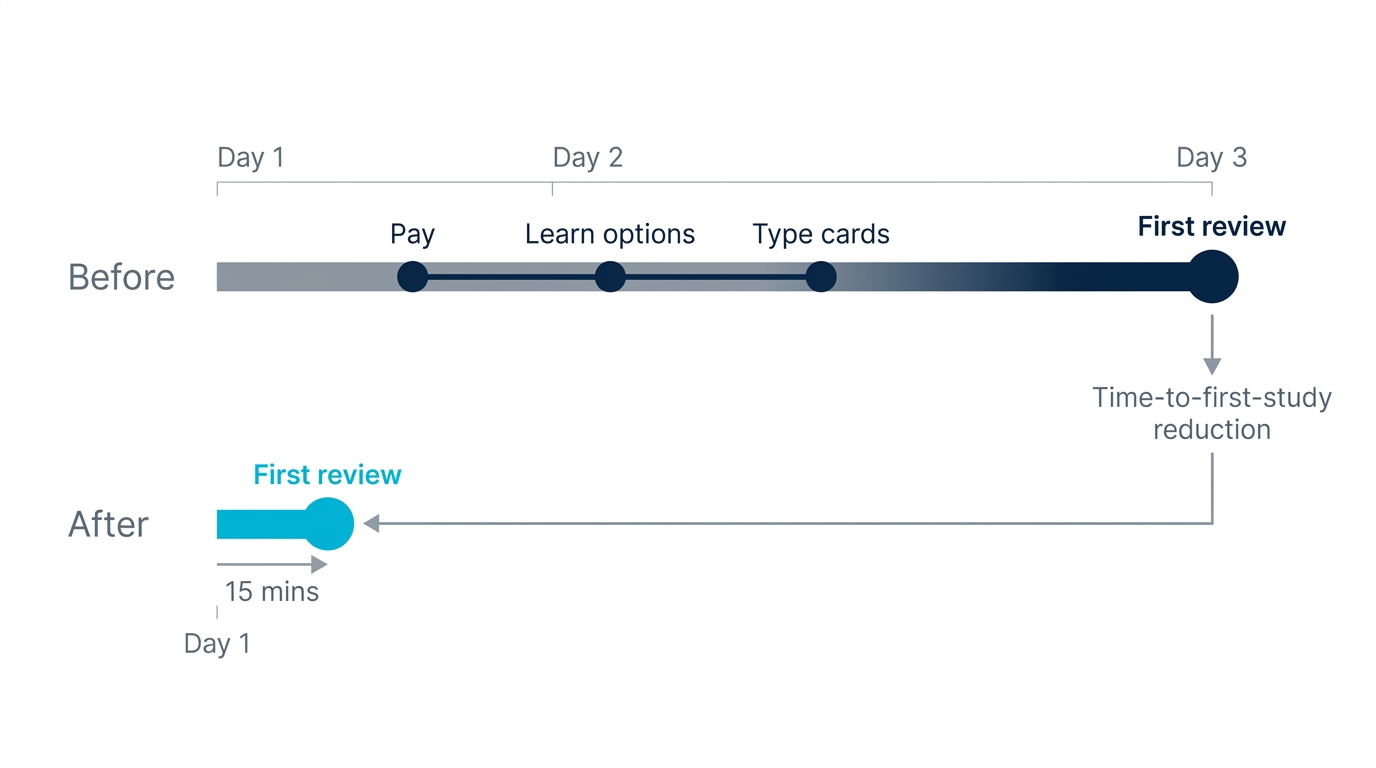
Notice the last row. Present bias -- our tendency to overweight what is easy right now -- is the single biggest reason good study tools sit unused. If a tool lets you go from raw material to a real review session in fifteen minutes today, you actually do it. If it asks you to pay first, then watch tutorials, then build a deck by hand before you learn anything, "later" usually becomes "never."
This is the real economics of studying, and it is why the cheapest tool on paper is not always the cheapest tool in practice. Imagine two students with the same exam in three weeks. The first buys AnkiMobile for $24.99, spends the first two evenings learning deck options and typing 150 cards by hand, and starts reviewing on day three. The second opens a free AI app, photographs the same chapter, and is reviewing auto-generated cards twenty minutes later on day one. By the time the first student finishes building, the second has already completed three spaced review cycles. Same material, same money sensitivity -- but one of them converted intention into reviews while the intention was still fresh. The forgetting curve does not wait for your setup to finish.
Anki vs the Paid AI Alternatives: Where the Money Goes
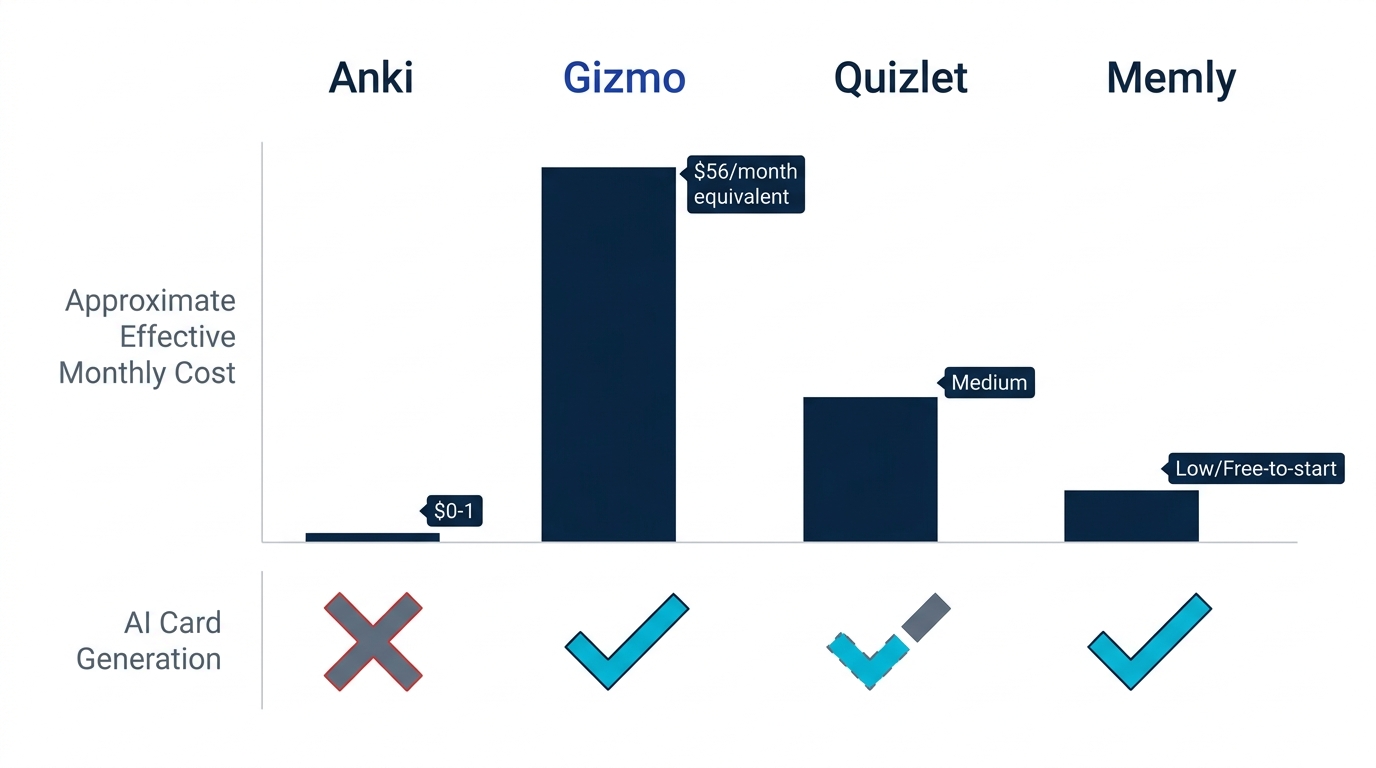
Anki's one-time iPhone fee starts to look like a bargain the moment you compare it to the subscription-priced AI flashcard apps that have appeared since 2023. Here is how the cost models stack up (competitor pricing as of June 2026, per each app's published plans -- verify current figures before you buy, since these apps change pricing often).
| App | Pricing model (as of June 2026) | AI card generation | Algorithm |
|---|---|---|---|
| Anki | Free; $24.99 one-time on iOS | No (manual; add-ons exist) | SM-2 default, FSRS available |
| Gizmo | Subscription; paid pricing has changed over time -- check their site for current rates | Yes (PDF, YouTube, PPT, notes) | Proprietary, undisclosed |
| Quizlet | Free tier; Plus around $35.99/year, increasingly paywalled | Limited | Not true spaced repetition |
| Brainscape | Subscription, roughly $19.99/month or ~$95.88/year | Limited | Confidence-based repetition |
| RemNote | Free tier; Pro subscription around $8/month billed annually | Yes (notes and PDFs) | Spaced repetition (SM-2 style) |
| Memly | Free to start, no card needed | Yes (PDF, images, video, audio, web) | FSRS, per-card and per-user |
Look closely at Gizmo. Its paid pricing has changed over time and is often framed as a short trial that rolls into a longer paid plan, so check their site for current rates and read the billing terms closely before subscribing. Even read charitably, a sustained Gizmo subscription overtakes AnkiMobile's one-time price within its first months -- and AnkiMobile is yours forever. Quizlet, meanwhile, has steadily moved core study modes behind a paywall and was never built on true spaced repetition -- it is a study-set library with games attached, not a memory engine. RemNote bundles spaced repetition into a note-taking workspace, which is appealing if you want one tool for both, though its scheduling sits closer to SM-2 than to FSRS.
The pattern is clear: you are choosing between Anki's "free engine, you build the cards" model and the AI apps' "we build the cards, you pay a subscription" model. The interesting question is whether you can get AI card generation without a steep weekly subscription. For a fuller breakdown, see our Anki vs Gizmo comparison and our roundup of the best Anki alternatives in 2026.
The Free AI Alternative: When You Should Not Pay for Either
Neither model is the only one on offer. A third sits between Anki's manual free engine and the paid AI subscriptions: a tool that automates card creation, runs a modern algorithm, and lets you start without paying.
Memly is an AI flashcard app built for exactly this gap. Instead of typing cards or paying weekly, you upload your raw material -- PDFs, photos of textbook pages, lecture videos, audio recordings, or web pages -- and Memly auto-generates flashcards from them. The review scheduling uses FSRS, the same modern algorithm now built into recent Anki versions, applied per card and per user rather than Anki's older default SM-2. The honest difference is not that one app has FSRS and the other does not -- both can run it. It is that Anki asks you to find, enable, and re-optimize it yourself, while Memly has it on by default. Memly runs on iOS, Android, and web from a single account, and it is free to start with no credit card.
Where that changes the arithmetic:
- No iPhone paywall to get started. Unlike AnkiMobile, there is no upfront purchase just to open the app on an iPhone. You start free and study the same day.
- AI does the card-building that Anki leaves to you. The single biggest hidden cost of Anki -- the hours spent typing cards -- largely disappears when the app generates them from your own files.
- Modern algorithm, no manual tuning. FSRS is built in and personalized automatically, so you do not have to know it exists or configure it to benefit from it.
- An official MCP server. You can connect ChatGPT or Claude to Memly with a single URL, and cards the AI generates in your conversation are saved straight into your Memly deck and reviewed with FSRS -- no exporting, no local server. Our Memly vs Anki comparison goes deeper on this workflow.
- Backed by Memly's own data. In Memly's internal study (n=648) -- self-reported vendor data, weighted accordingly against the peer-reviewed work cited above -- learners who reviewed on Memly's FSRS schedule retained meaningfully more after one month than those who did not review on schedule. The point is simple: scheduled review is what flattens the forgetting curve, and a tool that schedules it for you is more likely to get used.
This is not a claim that Memly beats Anki on every axis. Anki's local data ownership, its enormous community decks like AnKing for medical school, and its near-zero monetary cost on desktop are real, durable advantages. If you already have a large Anki library and enjoy building cards by hand, paying $24.99 once for AnkiMobile is a sensible, frugal choice. The point is narrower: if the reason you are reading this is that the iPhone paywall surprised you, there is a free, AI-native path that skips both the paywall and the manual card-building.
The Verdict: Who Should Pay, and Who Should Not
Anki is worth it if you value control, permanence, and cost above convenience. Two profiles, and most people know within a sentence which one is theirs:
- Choose Anki if you study mostly on desktop or Android (where it is free), you are comfortable building cards by hand, and you want data you fully own with a community nearly two decades old behind it. Paying $24.99 once for the iPhone app is a fair price for what you get.
- Choose a free AI alternative if your time is the scarce resource, you study on an iPhone and do not want a paywall on day one, and you want cards generated from your own materials with a modern algorithm doing the scheduling for you.
One thing worth remembering as you decide: knowing the price is the easy part. The cost that actually adds up is not $24.99 -- it is everything you re-learn because the material slipped down the same forgetting curve Ebbinghaus measured back in the 1880s while your system sat half-built. Whatever you choose, the value only arrives once you are actually reviewing.
So here is a clean next step, sized to fifteen minutes:
- The zero-cost, zero-setup move (recommended first): open Memly, upload a single PDF or photo, and let it generate your first deck for free -- no payment details, no manual card-building. If the iPhone paywall is what brought you here, this is the lowest-friction way to be reviewing today.
- The permanence-and-control move: if you want data you fully own and you like building cards by hand, buy AnkiMobile for $24.99 and commit to your first ten cards tonight.
Either one turns intention into reviews, which is the only thing that beats the forgetting curve.
For the complete picture of how AI is reshaping spaced repetition -- the science, the tools, and how to build a system that actually sticks -- read our pillar guide on how AI supercharges Anki-style spaced repetition.
