


![Quizlet vs Brainscape: Which Flashcard App Is Better in 2026? [Honest Comparison]](/_next/image?url=%2Fblog%2Fen%2Fquizlet-vs-brainscape.png%3Fv%3D4&w=1920&q=75&dpl=dpl_9SRSZDZ5yMfoV7dxZ4vp67Tnt8qN)
Quizlet vs Brainscape is one of the most common flashcard app debates in 2026. Both apps have loyal followings, but they take fundamentally different approaches to learning. Quizlet leans into gamification, community-created content, and classroom collaboration, while Brainscape bets on cognitive science with its Confidence-Based Repetition system. If you're trying to decide which one deserves space on your phone, the answer turns on four things: pricing, algorithm, content library, and which learner each app was actually built for.
We've spent weeks testing both platforms across multiple use cases -- exam prep, language learning, professional certifications, and casual study. Neither one came out of it looking like the obvious winner, and a third category kept intruding on the comparison: AI-powered flashcard tools. For a broader look at how AI is transforming memorization, see What Is AI-Powered Memorization? A Complete Guide.
Quizlet vs Brainscape: Quick Summary
The core difference comes down to three things.
- Quizlet is a community-driven learning platform that excels in gamification, team collaboration, and access to millions of user-created study sets
- Brainscape is a science-focused flashcard app built around Confidence-Based Repetition (CBR), designed for serious individual learners and professional training
- Quizlet offers more ways to study; Brainscape offers a more disciplined, algorithm-driven review process
| Category | Quizlet | Brainscape |
|---|---|---|
| Core Philosophy | Learn through variety and community | Learn through cognitive science |
| Best For | Students, classrooms, casual learners | Self-directed learners, professionals |
| Starting Price | Free / Plus $9.99 or $44.99 (US App Store, billing period not shown) | Free / Pro from ~$7.99/mo (annual) |
Looking for Quizlet alternatives beyond Brainscape? See our comparison of six options.
Detailed Feature Comparison
Neither app wins in every category -- your priorities will determine which trade-offs matter most.
| Feature | Quizlet | Brainscape |
|---|---|---|
| AI Features | Q-Chat AI tutor, AI-generated study paths (Plus+) | Minimal AI; relies on CBR algorithm |
| Learning Algorithm | Proprietary gamified spaced repetition | Confidence-Based Repetition (CBR) with 1-5 self-rating |
| Pricing | Free / Plus $9.99 or $44.99 (US App Store, checked Oct 5, 2026; billing period not shown) | Free / Pro $19.99/mo (from ~$7.99/mo billed annually) |
| Team/Classroom | Quizlet Live, class sets, teacher dashboard | Enterprise/team plans, certified content partnerships |
| Game Modes | Match, Live, Learn, Test | None -- study-only interface |
| Card Formats | Text, images, audio, diagrams | Text, images (front and back) |
| Offline Access | Plus plan and above | Pro plan |
| Mobile Experience | Full-featured iOS and Android apps | Clean iOS and Android apps, slightly dated UI |
| Analytics | Basic progress tracking, streak counters | Confidence meters, mastery percentages per deck |
| Community/Library | 800M+ public study sets | Curated expert-made decks (smaller but higher quality) |
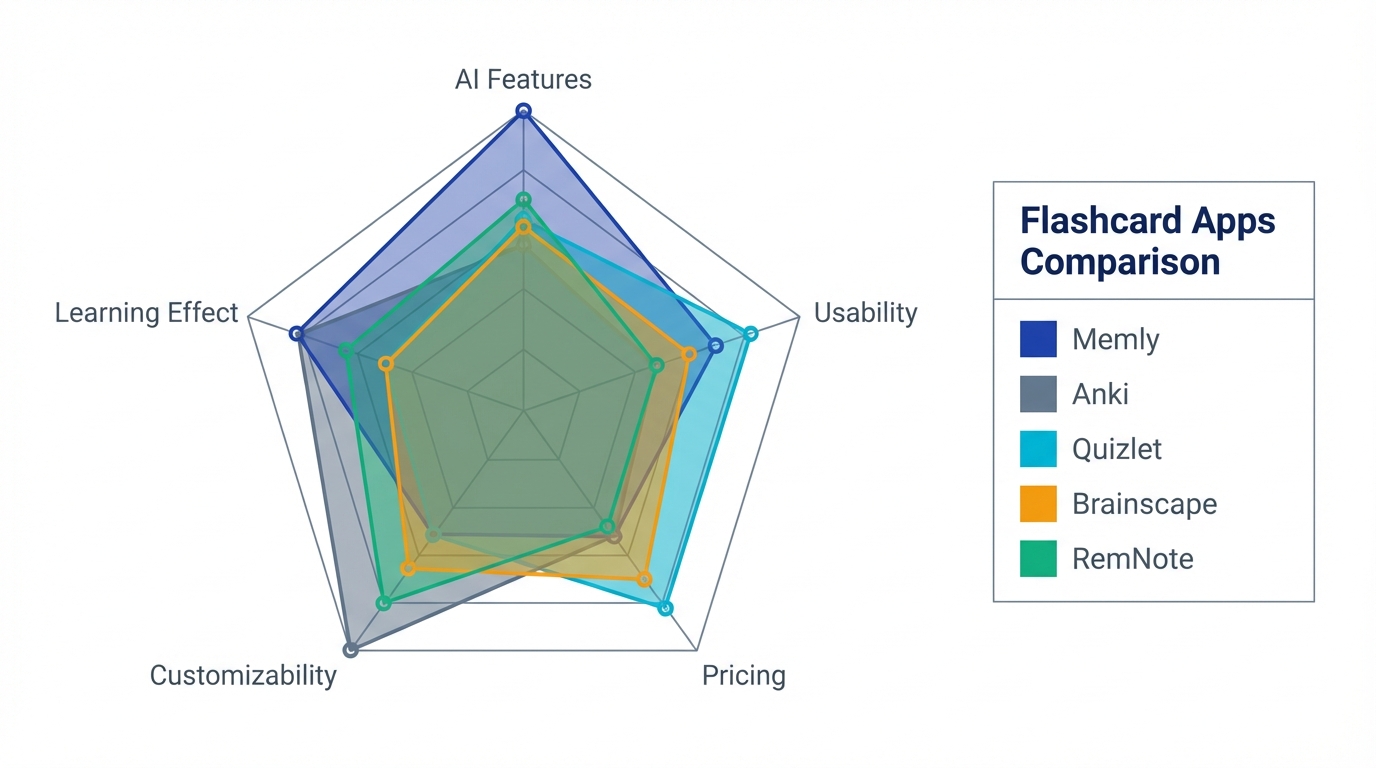
Quizlet covers more surface area in usability and community features, while Brainscape concentrates its strengths in learning effectiveness and structured review.
Algorithm Comparison: Gamified Review vs Confidence-Based Repetition
The algorithm powering your flashcard app matters more than most people realize. It determines when you see each card, how often you review difficult material, and ultimately how much you retain over weeks and months. Quizlet and Brainscape take notably different approaches.
Quizlet: Proprietary Gamified Approach
Quizlet's algorithm blends spaced repetition with gamification elements. When you use Learn mode, the system tracks which cards you get right or wrong and adjusts frequency accordingly. Cards you struggle with appear more often, while mastered cards fade into the background.
The strength of this approach is accessibility. You don't need to understand how the algorithm works -- just keep playing, and the system adapts. The study modes (Match, Learn, Test) provide varied ways to engage with the same material, which helps combat study fatigue. However, the algorithm lacks transparency. You can't see exactly why a card is scheduled when it is, and there's no way to fine-tune the review intervals.
Quizlet's algorithm also doesn't deeply personalize to individual memory patterns. Two users who get the same card wrong will generally see similar review schedules, regardless of their broader learning history.
Brainscape: Confidence-Based Repetition (CBR)
Brainscape's core innovation is its CBR system. After seeing the answer to each card, you rate your confidence on a scale of 1 to 5:
- 1 -- "Not at all" (no recognition)
- 2 -- "Barely" (vaguely familiar)
- 3 -- "Kind of" (partially remembered)
- 4 -- "Almost perfectly" (minor hesitation)
- 5 -- "Perfectly" (instant recall)
Cards rated 1 or 2 reappear frequently within the same session. Cards rated 4 or 5 are spaced out over longer intervals. This system puts the learner in control of the pacing while still following spaced repetition principles.
The advantage is honesty enforcement. Rating each card forces a judgment about your own knowledge, so passive flipping becomes harder to sustain. The disadvantage is that self-assessment can be unreliable: research shows people often overestimate their knowledge, which pushes cards they have not yet mastered into longer intervals.
Which Algorithm Is Better?
Neither is objectively superior -- they optimize for different things. Quizlet optimizes for engagement and ease of use. Brainscape optimizes for deliberate, self-aware review. If you find yourself mindlessly tapping through flashcards, Brainscape's forced self-rating may help. If you struggle with motivation, Quizlet's game modes may keep you coming back.
It's worth noting that both algorithms are less sophisticated than modern open-source alternatives like FSRS (Free Spaced Repetition Scheduler), which uses machine learning to build individualized memory models. For a deep dive into how these newer algorithms work, see our Complete Guide to AI Flashcard Apps.
Pricing Breakdown
Both Quizlet and Brainscape follow a freemium model, but their paid tiers differ in scope and value.
Quizlet Pricing
| Plan | Monthly | Annual (per month) | Annual Total | Key Features |
|---|---|---|---|---|
| Free | $0 | $0 | $0 | Basic flashcards, ads, limited study modes |
| Plus | $9.99 or $44.99 on the US App Store (checked October 5, 2026; the store does not show the billing period) | Ad-free, offline, AI features, custom images | ||
Brainscape Pricing
| Plan | Monthly | Annual (per month) | Annual Total | Key Features |
|---|---|---|---|---|
| Free | $0 | $0 | $0 | Create and study your own cards, limited access to shared decks |
| Pro | $19.99 | Lower on annual billing | Check their site for current rates | Full library access, offline, unlimited bookmarks, advanced stats |
Pricing Analysis
Quizlet's free tier is more generous for casual users -- you get access to millions of community study sets and basic study modes. Brainscape's free tier is functional but limited, especially if you want to browse expert-made decks.
At the paid level, Quizlet Plus ($9.99 or $44.99 on the US App Store, billing period not shown) offers more features per dollar than Brainscape Pro ($19.99/month, or roughly $7.99/month billed annually), including AI tools and varied study modes. However, Brainscape Pro unlocks its full curated library of expert-made content, which can be valuable if you're studying for specific certifications (bar exam, medical boards, real estate licensing).
On the US App Store, Quizlet Plus is also listed at $44.99 (the store does not say for which billing period), while Brainscape Pro is discounted from its monthly rate but still typically costs more per year (check their site for current rates). Whether Brainscape's expert content justifies the premium depends entirely on whether those curated decks align with what you're studying.
Who Should Choose Quizlet?
Quizlet is the right choice if you identify with any of the following:
- You learn in groups or classrooms: Quizlet Live turns review sessions into competitive team games. Teachers can create class sets, track student progress, and assign study activities. No other flashcard app matches Quizlet's classroom integration
- You thrive on gamification: Match races, Quizlet Live, and streak counters keep you motivated. If you find traditional flashcard review boring, Quizlet's variety helps maintain consistency
- You want access to existing content: With a vast library of user-created study sets, chances are someone has already created cards for your topic. This is especially valuable for standardized courses and popular textbooks
- You're a visual learner: Quizlet supports images, diagrams, and audio on cards. The Diagram study mode lets you label images interactively
- You study casually or across many subjects: Quizlet's breadth makes it easy to jump between topics without committing to a single structured deck
If you need a tiebreaker among those, use the classroom line. Nothing else on the market replaces Quizlet Live.
Who Should Choose Brainscape?
Brainscape is the better fit if you match these profiles:
- You prefer structured, science-based review: CBR forces you to honestly assess your knowledge on every card. There are no games or shortcuts -- just focused repetition guided by cognitive science principles
- You're studying for professional certifications: Brainscape partners with subject-matter experts to create curated decks for the bar exam, MCAT, USMLE, CPA, real estate licensing, and more. These aren't crowd-sourced -- they're professionally authored
- You're an enterprise or corporate learner: Brainscape's enterprise plans include admin dashboards, content management, and progress tracking across teams. Companies use it for onboarding, compliance training, and sales enablement
- You value simplicity over features: Brainscape's interface is intentionally stripped down. No games, no distractions -- just cards and confidence ratings. If you find Quizlet's many modes overwhelming, Brainscape's focus may appeal to you
- You want to create deeply structured decks: Brainscape organizes content into classes, subjects, and decks with clear hierarchies. For complex topics that require systematic coverage, this structure helps ensure nothing is missed
The tiebreaker here is the certification library. If your exam is on Brainscape's expert list, that content is most of the argument on its own. If it isn't, the remaining reasons get noticeably thinner.
Card Creation: A Practical Comparison
One area where both Quizlet and Brainscape show their age is card creation. Both apps still rely primarily on manual input -- you type the front, type the back, and repeat. Quizlet does offer AI-assisted generation from text on its paid plans, but the process still requires significant manual oversight and editing.
Brainscape has even less automation. You can import from CSV files or copy decks from other users, but there's no AI generation pipeline. For learners with large volumes of study material (textbooks, lecture notes, research papers), manual card creation remains the biggest time sink in both apps.
| Creation Method | Quizlet | Brainscape |
|---|---|---|
| Manual typing | Supported | Supported |
| Import from CSV/spreadsheet | Supported | Supported |
| AI text-to-card | Available (Plus+) | Not available |
| PDF/document upload | Not available | Not available |
| Image/photo to card | Not available | Not available |
| Video/audio to card | Not available | Not available |
| Average time per 50 cards | 45-60 minutes | 60-90 minutes |

Creation time is the bottleneck. At 1-2 minutes per card, a 200-card deck takes 3-6 hours to build, and that is time spent organizing rather than learning. For a comparison of apps that address this bottleneck with AI, see our Best AI Flashcard Apps for Students guide.
A Third Option Worth Considering: AI-Powered Flashcard Apps
If neither Quizlet nor Brainscape fully meets your needs, the AI flashcard app category offers a compelling third path. A new generation of apps is emerging that combines the best elements of both approaches -- community features and engaging interfaces like Quizlet, with serious spaced repetition algorithms like Brainscape -- while adding a layer that neither offers: AI-powered card generation from any source material.
Apps like Memly represent this new wave. Instead of choosing between gamification and algorithm rigor, these tools use AI to auto-generate flashcards from PDFs, images, YouTube lecture videos, and audio recordings. The underlying algorithm (in Memly's case, FSRS 6.0) goes beyond both Quizlet's proprietary system and Brainscape's CBR by modeling each card's memory state from its answer history.
The key advantages of this approach:
- Dramatically faster card creation: Upload a 50-page PDF and get a study-ready deck in minutes instead of hours
- Adaptive algorithms: FSRS 6.0 uses a 21-parameter memory model to schedule each card from its answer history, delivering more precise review scheduling than either Quizlet or Brainscape
- Multi-format support: Generate cards from text, images, YouTube videos, and audio -- not just typed input
- Lower cost: Some AI flashcard apps, including Memly, start at $4/month, undercutting both Quizlet Plus and Brainscape Pro
The trade-off is real. AI flashcard apps typically lack Quizlet's massive community library and classroom features, and they don't offer Brainscape's curated expert content. But if your primary frustration with Quizlet or Brainscape is the time it takes to create cards or the limitations of their algorithms, it's worth exploring this third option. For a detailed comparison of how these newer tools stack up, see our Memly vs Quizlet deep dive and our 2026 Flashcard App Comparison.
If making cards is the part that stalls you, test it on one chapter of your own notes: try Memly free. No credit card required; the free plan includes an initial AI allowance that does not refill monthly.
Already have sets in Quizlet? The free Quizlet converter turns pasted terms and definitions into a CSV with front and back columns (or an Anki-ready TSV). That CSV goes straight into Memly's CSV import, which is free on a free Memly account and does not use the AI allowance.
Quizlet vs Brainscape: Frequently Asked Questions
Is Quizlet or Brainscape better for medical students?
Both have strong use cases in medicine. Brainscape offers professionally authored USMLE and anatomy decks created by medical educators, which provides a ready-made study resource. Quizlet has a larger volume of user-created medical flashcards, but quality varies. For medical students who want curated, verified content, Brainscape has an edge. For those who prefer to create their own cards or collaborate with classmates, Quizlet is more flexible.
What is the best flashcard app for college?
It depends on where your cards come from: Quizlet fits courses where classmates share sets, Brainscape fits self-directed review with expert-made decks, and if most of your material is your own lecture slides and readings, see our picks of AI flashcard apps for students.
Can I use Quizlet and Brainscape together?
Yes, and some learners do exactly this. A common approach is using Quizlet for classroom activities and group study sessions, while using Brainscape for focused solo review of high-priority material. The main downside is managing two separate apps and potentially paying for two subscriptions.
Does Brainscape have anything like Quizlet Live?
No. Brainscape does not offer a real-time multiplayer game mode. Its enterprise plans include team progress dashboards, but there's no competitive group activity comparable to Quizlet Live. If live classroom engagement is essential to your teaching or study group, Quizlet is the clear winner here.
Which has a better free plan -- Quizlet or Brainscape?
Quizlet's free plan is more feature-rich. You can access millions of study sets, use basic study modes, and create unlimited cards (with ads). Brainscape's free plan lets you create your own cards and access a limited selection of shared decks, but the curated expert content is locked behind the Pro paywall. For budget-conscious learners, Quizlet's free tier provides more value.
Is Brainscape's algorithm scientifically proven?
Brainscape's CBR system is based on established cognitive science principles -- spaced repetition, active recall, and metacognitive self-assessment (judging how well you actually know something). The company cites research supporting these underlying concepts. However, the specific implementation of CBR has not been independently validated in peer-reviewed studies comparing it directly to other algorithms. The self-rating component introduces a variable (user honesty and accuracy) that can affect results.
Can I import my Quizlet decks into Brainscape?
Not directly. Quizlet allows exporting study sets as text files, but Brainscape's import feature expects a specific CSV format. You'll need to export from Quizlet, reformat the data (or use a spreadsheet to rearrange columns), and then import into Brainscape. It's doable but requires manual effort.
Which app is better for language learning -- Quizlet or Brainscape?
Quizlet has a larger library of language learning sets and supports audio pronunciation on cards, which is valuable for language study. Brainscape offers curated language decks for several major languages. For vocabulary drilling with audio, Quizlet is generally preferred. For systematic grammar review with structured decks, Brainscape's organized hierarchy can be helpful.
Are there better alternatives to both Quizlet and Brainscape in 2026?
The flashcard app landscape has expanded significantly. AI-powered apps like Memly offer auto-generation from multiple source formats and more advanced algorithms (FSRS 6.0). Anki remains the gold standard for customization power users. The "best" app depends on your priorities -- community content, algorithm precision, AI features, or price. For a feature-by-feature look at the current options, see our AI Flashcard App Guide.
Conclusion: Quizlet vs Brainscape -- The Honest Verdict
After thorough testing, the Quizlet vs Brainscape decision comes down to a fundamental question: how do you prefer to learn?
Choose Quizlet if you value variety, community, and engagement. Its game modes combat study fatigue, its massive library saves creation time, and its classroom features are unmatched. The trade-off is a less rigorous algorithm and AI features locked behind expensive tiers.
Choose Brainscape if you value discipline, structure, and science-backed review. Its CBR system forces honest self-assessment, its expert decks provide professional-quality content, and its focused interface eliminates distractions. The trade-off is a smaller community library, no game modes, and limited AI capabilities.
And if your biggest frustration with either app is the time spent creating cards or the limitations of their algorithms, consider exploring the growing category of AI-powered flashcard tools. The gap between traditional flashcard apps and AI-native alternatives is widening rapidly, and 2026 may be the year it becomes hard to ignore.
Whatever you choose, the most important factor is consistency. Both apps have a free plan, so pick the one that sounded more like you and give it two honest weeks. The app still on your phone when those two weeks are up is the one that was right for you.
Sources and Dates Checked
Prices were checked on October 5, 2026: Quizlet Plus on its US App Store listing, and Brainscape Pro on Brainscape's pricing page and its US App Store listing.
